Layered Architecture
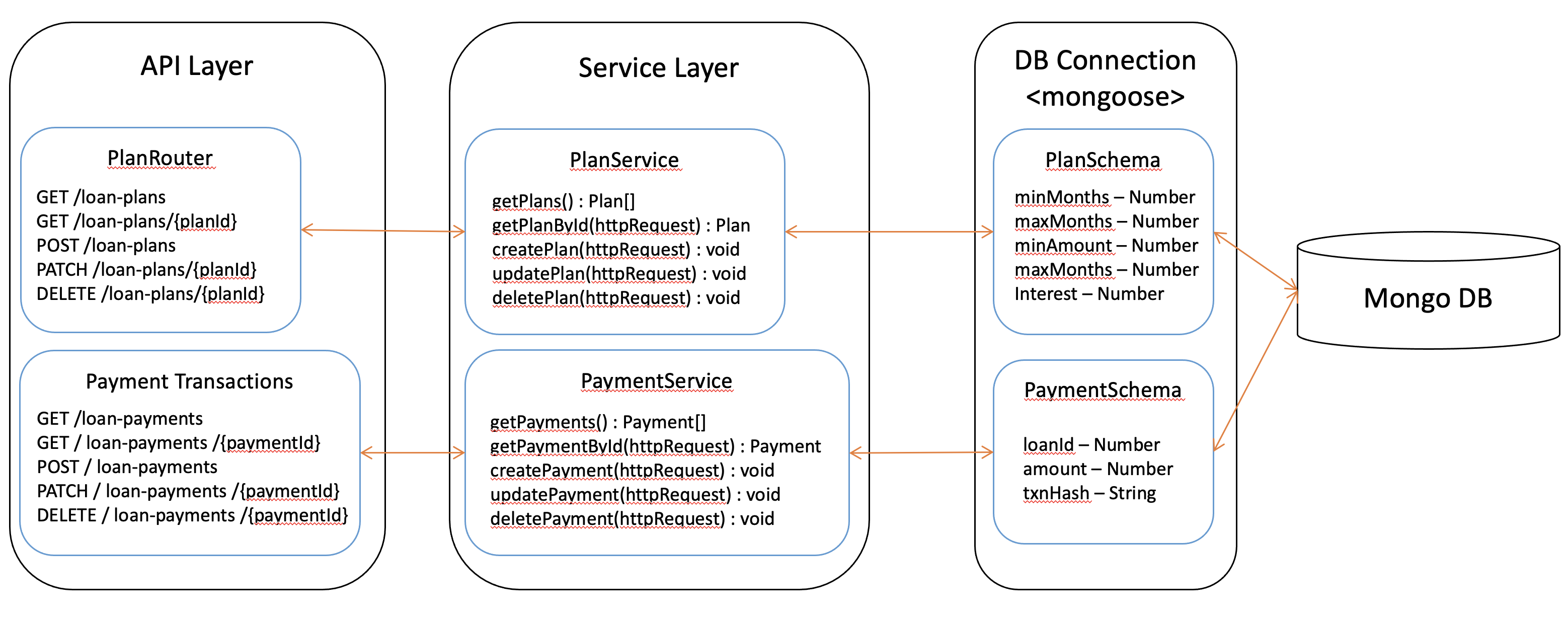
The Bank Web Server follows a layered architecture. It consists of three layers.
API Layer - APIs for the Bank Web Server.
Service Layer - Implemet server side logic.
Data Layer - Implement database logic.
In the commonly used Model-View-Controller (MVC) context, the Service Layer is the Controller, the Data Layer is the Model. This diagram shows the layered architecture of the Bank Web Server.
API Layer
The Bank Web Server serves two routes (incoming requests): /loan-plans and /loan-payments.
As mentioned in the index.js section, requests coming to these routes directed to
the routes/plans and routes/payments scripts.
Both routes work in the same manner. We use the Plan route as an example to illustrate how it is handled.
The routes/plans script first import required dependencies:
const Express = require('express') // Define Express web framework
const router = Express.Router() // Import router module from Express.
const planService = require('../services/planService'); // Import plan service script.
The plans router serves 4 HTTP request methods GET, POST, PATCH, and DELETE.
Get All Loan Plans
This function return all loan plans from the bank, stored in MongoDB.
When a user sends a GET request to the /loan-plans url in Bank Web Server via the web app, the function is invoked and calls planService.getPlans(), returns loan plans to the user.
router.get('/', async (req, res) => {
    try {
        const plans = await planService.getPlans();
        res.json(plans);
    }
    catch (err) {
        res.json({
            message: err
        })
    }
})
This request has no parameter in the url and no json objects in the request body.
Get Loan Plan By Loan Plan Id
This function return a loan plan corresponding to the given plan id.
It passes the GET request to the planService.getPlanById() function and returns the loan plan.
router.get('/:planId', async (req, res) => {
    try{
        const plan = await planService.getPlanById(req);
        res.json(plan);
    }
    catch(err){
        res.json({
            message: err
        })
    }
})
This request has the Loan Plan Id as a parameter in the url, but no json object in the request body.
Save Loan Plan
When a user sends a POST request to the /loan-plans via the web app, this function passes the request to planService.createPlan() which returns the saved loan plan.
router.post('/', async (req, res) => {
    try {
        const savedPlan = await planService.createPlan(req);
        res.json(savedPlan);
    }
    catch (err) {
        res.json({
            message: err
        })
    }
})
This request has no parameter in the url but has a json object in the request body.
Update Loan Plan
When a user sends a PATCH request to the /loan-plans via the web app, the function updates the existing Loan Plan corresponding to Loan Plan Id stored in MongoDB. It calls the planService.updatePlan() function, which returns the
updated Loan Plan.
router.patch('/:planId', async (req, res) => {
    try {
        const updatedPlan = await planService.updatePlan(req)
        res.json(updatedPlan);
    }
    catch (err) {
        res.json({
            message: err
        })
    }
})
This request has the Loan Plan Id as a parameter in the url and the Loan Plan json object in the request body.
Delete Loan Plan
When user sends a DELETE request to the /loan-plans url it will delete the Loan Plan specified by the Loan Plan Id
in the request url. It will call the planService.deletePlan() function with the request
and returns the deleted Loan Plan.
router.delete('/:planId', async (req, res) => {
    console.log(req.params.planId);
    try {
        const plan = await planService.deletePlan(req);
        if(plan.deletedCount==0){
            res.status(404).send('Loan Plan not found');
        }
        res.json(plan);
    }
    catch (err) {
        res.json({
            message: err
        })
    }
})
This request has the Loan Plan Id as a parameter in the url, but no json object in the request body.
With Bank Web Server up and running, we can navigate to localhost:9091/api-docs to see the
full Swagger API documentation for all APIs served by Bank Web Server. This is not an essential feature but nice to have; it facilitates communication and understanding among sofware developers.
Service Layer
We use the Service Layer to implement business logic in the server. Requests generated by the web app are sent to the respective service layer methods to be handled. To illustrate, we discuss the Loan Plans Service Layer in this section.
First, we import the data model defined in the models/Plans script.
It defines the Mongoose Schema to interact with MongoDB.
const Plan = require('../models/Plans')
Then we define the planService as follows:
const planService = {
    getPlans: async () => {
        const plans = await Plan.find()
        return plans;
    },
    getPlanById: async (req) => {
        const plans = await Plan.findById(req.params.planId);
        return plans;
    },
    createPlan: async (req) => {
        const plan = new Plan({
            minMonths: req.body.minMonths,
            maxMonths: req.body.maxMonths,
            minAmount: req.body.minAmount,
            maxAmount: req.body.maxAmount,
            interest: req.body.interest,
        })
        const savedPlan = await plan.save();
        return savedPlan;
    },
    updatePlan: async (req) => {
        const updatedPlan = await Plan.updateOne({ _id: req.params.planId },
            {
                $set: {
                    minMonths: req.body.minMonths,
                    maxMonths: req.body.maxMonths,
                    minAmount: req.body.minAmount,
                    maxAmount: req.body.maxAmount,
                    interest: req.body.interest
                }
            });
        return updatedPlan;
    },
    deletePlan: async (req) => {
        const deletedPlan = await Plan.deleteOne({ _id: req.params.planId });
        return deletedPlan;
    },
}
The planService function uses the Mongoose Schema Queries to interact with the MongoDB.
You can learn more about these queries in the Mongoose Queries page
getPlans()
Find and return all Loan Plans from the MongoDB using the Plan schema.
It uses the find Mongoose Query to get all loan plans from the MongoDB.
getPlanById()
This function gets the Loan Plan Id from the request url, finds and returns the Loan Plan using the Plan schema.
It uses the findById Mongoose Query to get the Loan Plan by Id from the MongoDB.
createPlan()
Create new Loan Plan in the MongoDB. It creates a new Plan object using a json object received from the request body.
Then it uses the save Mongoos Query to save the new Loan Plan in the MongoDB.
updatePlan()
Update the existing Loan Plan specified by the Loan Plan Id. This function gets the Loan Plan Id from the request url and updated fields from the request body. It uses the ``updateOne``Mongoose Query to update the object in the MongoDB.
deletePlan()
Delete the Loan Plan in MongoDB using the deleteOne Mongoose Query.
The Loan Plan Id is sent as a request url parameter.
Data Layer
The Data Layer corresponds to the schema and tables in MongoDB.
This node server uses Mongoose to interact with the MongoDB.
It defines the schemas in the models directory.
The Plans Schema is defined as follows.
const mongoose = require('mongoose')

const PlanSchema = mongoose.Schema({
    minMonths: {
        type: Number,
        required: true
    },
    maxMonths: {
        type: Number,
        required: true
    },
    minAmount: {
        type: Number,
        required: true
    },
    maxAmount: {
        type: Number,
        required: true
    },
    interest: {
        type: Number,
        required: true
    },
})

module.exports = mongoose.model('Plans', PlanSchema)
We use the auto generated _id field for the Loan Plans.
Other than that, the Loan Plan has 5 fields.
minMonths- Minimum duration of a Loan.maxMonth- Maximum duration of a Loan.minAmount- Minimum tokens amount of the Loan.maxAmount- Maximum tokens amount of the Loan.interest- Interest rate of a Loan.
Each field is defined with its type and required status.
These Schemas are used in the planService to query the MongoDB.