Create Loan Plan Event Flow
When select the Bank as the user role in the top right corner in Microfinance - Bank UI it will displays the
BankMenu in left panel.
The second menu item of the BankMenu is Loan Plans.
Bank user can click on this menu item and navigate to Create Loan Plan page and create a new Loan Plan.
User can see the current Loan Plans in the table at the bottom of this page.
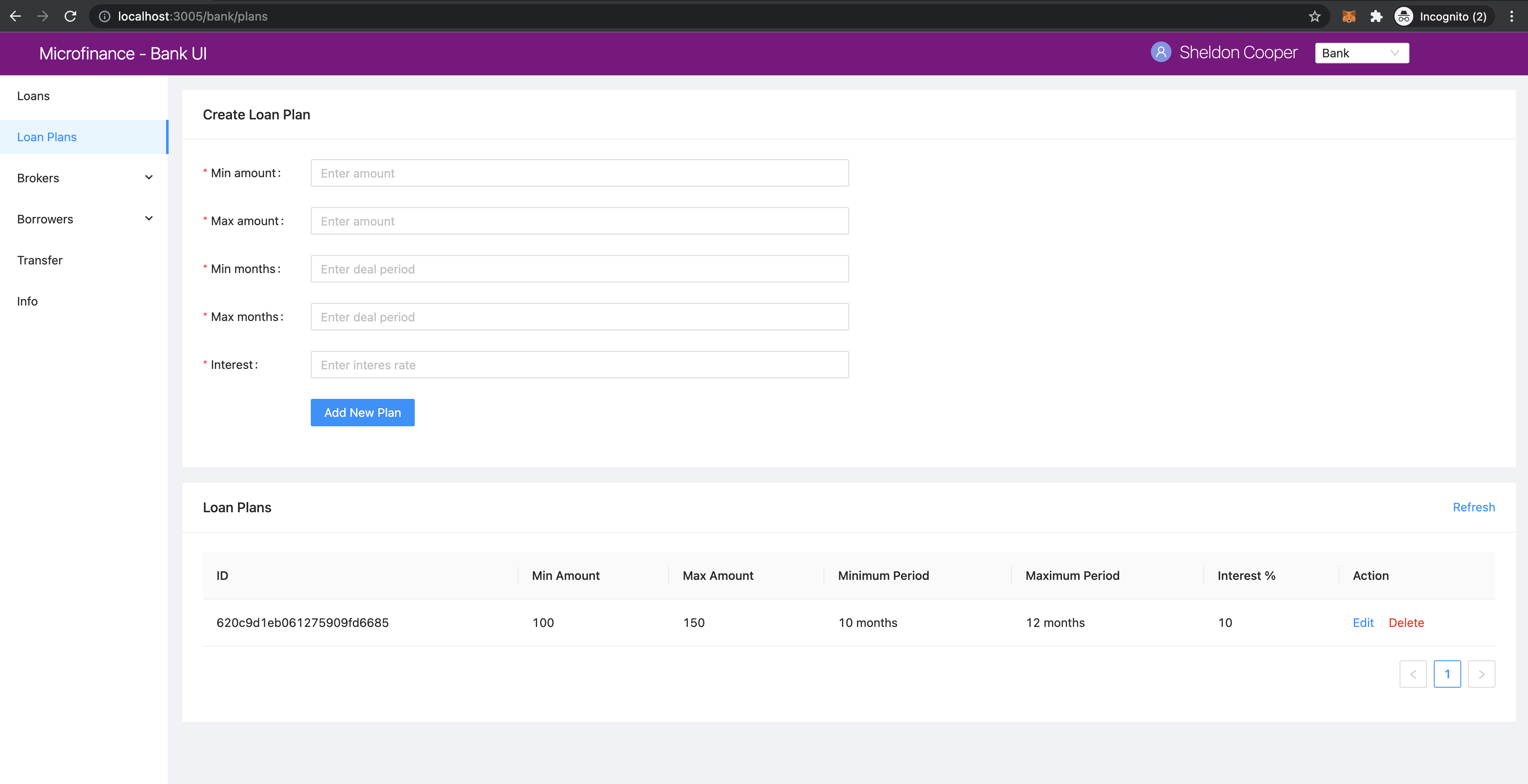
As you can see in the address bar, it displays the address localhost:3005/bank/plans and
UI loads the page in /pages/bank/plans.js.
We illustrate the flow of events from React web app (UI) to
bank-web-app/pages/bank/plans.js to bank-web-app/components/plan/CreatePlanForm.js
and postApi method of bank-web-app/util/fetchApi.js.
plan.js
The script of the plans.js.
import React, { useState } from 'react';
import { Row, Col } from 'antd';
import PlansTable from '../../components/plan/PlansTable';
import CreatePlanForm from '../../components/plan/CreatePlanForm';

function BankPlans() {
    const [togglePlan, setTogglePlan] = useState(true);
    return (
        <Row gutter={[16, 16]}>
            <Col span={24}>
                <CreatePlanForm setTogglePlan={setTogglePlan} togglePlan={togglePlan} />
            </Col>
            <Col span={24}>
                <PlansTable togglePlan={togglePlan} />
            </Col>
        </Row>
    );
}

export default BankPlans;
In this plans.js script, it first imports the dependencies.
Then it defines the BankPlans() function.
In this React Component it load the <CreatePlanForm /> and <PlansTable /> React Components.
<Row> and <Col> Ant design components help to arrange These React component in the browser.
As you can see in above screenshot first it diplays the Create Loan Plan form and later Loan Plans table.
The CreatePlanForm imported from the ../../components/plan/CreatePlanForm
and PlansTable imported from the ../../components/plan/PlansTable.
The paths are specified in relative manner which is path to each script from the current directory.
Above BankPlans() functional component defines the togglePlan state as follows.
const [togglePlan, setTogglePlan] = useState(true);
This state helps to update the Loan Plan table when user submits the new Loan Plan.
This state is used to trigger the fetchPlans function in PlansTable component.
setTogglePlan is the state update method of the togglePlan state.
BankPlans component passes its togglePlan state and setter method to the CreatePlanForm as
props like this.
<CreatePlanForm setTogglePlan={setTogglePlan} togglePlan={togglePlan} />
togglePlan state is passed as props to the PlansTable as follows.
<PlansTable togglePlan={togglePlan} />
Next we discuss about important code snippets of the CreatePlanForm.js script.
CreatePlanForm.js
In the top of the CreatePlanForm.js it imports following dependencies.
import React from 'react';
import PropTypes from 'prop-types';
import { Card, Form, InputNumber, Button, message } from 'antd';
import { postApi } from '../../util/fetchApi';
PropTypesdependency is used for check the props types pass to the component.postApidependecy is used for send post requests to the Bank Web Server.
CreatePlanForm.js returns the following html form.
return (
  <Card title="Create Loan Plan" style={{ margin: '0px' }}>
    <Form
      ...
      onFinish={addPlan}
    >
      <Form.Item label="Min amount" name="minAmount" rules={[{ required: true, message: 'Please enter minimum amount!' }]}>
        <InputNumber
          min="0"
          style={{ width: '100%' }}
          placeholder="Enter amount"
        />
      </Form.Item>
      <Form.Item label="Max amount" name="maxAmount" rules={[{ required: true, message: 'Please enter max amount!' }]}>
        <InputNumber
          min="0"
          style={{ width: '100%' }}
          placeholder="Enter amount"
        />
      </Form.Item>
      <Form.Item label="Min months" name="minMonths" rules={[{ required: true, message: 'Please enter min months!' }]}>
        <InputNumber
          min="0"
          style={{ width: '100%' }}
          placeholder="Enter deal period"
        />
      </Form.Item>
      <Form.Item label="Max months" name="maxMonths" rules={[{ required: true, message: 'Please enter max months!' }]}>
        <InputNumber
          min="0"
          style={{ width: '100%' }}
          placeholder="Enter deal period"
        />
      </Form.Item>
      <Form.Item label="Interest" name="interest" rules={[{ required: true, message: 'Please enter interest!' }]}>
        <InputNumber
          min="0"
          style={{ width: '100%' }}
          placeholder="Enter interes rate"
        />
      </Form.Item>
      <Form.Item wrapperCol={{
        lg: { span: 14, offset: 4 },
        xl: { span: 14, offset: 3 },
        xxl: { span: 14, offset: 2 } }}
      >
        {/* Form submit button */}
        <Button type="primary" htmlType="submit">Add New Plan</Button>
      </Form.Item>
    </Form>
  </Card>
);
This also has the same functionalities as mentioned in the LoanForm.js Loan Request Form
onFinish={addPlan} property in the Form component will submit the form field values in to the addPlan function.
All Form.Item components have name attribute which will be used to access the form field submitted value.
All Form.Item components have InputNumber fields. All inputs are numbers for this form.
Finally the <Button> for user to submit the Loan Plan Form.
We define the CreatePlanForm functional component as follows.
function CreatePlanForm({ togglePlan, setTogglePlan })
This CreatePlanForm gets 2 props togglePlan, setTogglePlan when initialize the component which we discuss above.
Then we define the addPlan function as follows.
const addPlan = async (values) => {
  try {
    const body = {
      minAmount: values.minAmount,
      maxAmount: values.maxAmount,
      minMonths: values.minMonths,
      maxMonths: values.maxMonths,
      interest: values.interest,
    };

    const requestOptions = {
      body: JSON.stringify(body),
    };

    await postApi({
      url: 'loan-plans',
      options: requestOptions,
    });
    message.success('Loan Plan added successfully');
    setTogglePlan(!togglePlan); // Update state.s
  } catch (err) {
    message.error('Error while adding the Loan Plan');
    console.log(err);
  }
};
addPlan function will be triggered when user submit the Loan Plan Form.
It will get the values object which contains the submitted form field values of the Loan Plan Form.
In addPlan fnction first it defined the body object as follows.
const body = {
  minAmount: values.minAmount,
  maxAmount: values.maxAmount,
  minMonths: values.minMonths,
  maxMonths: values.maxMonths,
  interest: values.interest,
};
This body object contains the LoanPLan object which will be subimitted to the Bank Web Server.
Each form field values are mapped to the key values of the LoanPlan object.
Then addPlan method submits the LoanPlan to the Bank Web Server using postApi method
which is defined in the util/fetchApi.js script.
await postApi({
  url: 'loan-plans',
  params: body,
});
As we discussed in Bank Web Server it defines an api end point call /loan-plans to handle
Loan Plan related data. We use POST method to save new Loan Plan in the MongoDB.
Because of that we use the postApi method to pass data to the MongoDB through Bank Web Server and
we specify the api end point as url: 'loan-plans'.
Then we pass the request body content as options to the postApi method.
postApi is asynchronous function and we use await before we call the method.
After successfully save LoanPlan in the MongoDB addPlan method will display the success message
on the top of the Microfinance - Bank UI.
message.success('Loan Plan added successfully');
Then it will change the togglePlan plan state using setTogglePlan method as follows.
setTogglePlan(!togglePlan);
This will trigger the fetchPlans function in PlanForm compnent as we mentioned above.
In later part of the CreatePlanForm.js it check the propTypes as follows.
CreatePlanForm.propTypes = {
  togglePlan: PropTypes.bool.isRequired,
  setTogglePlan: PropTypes.func.isRequired,
};
This will check whether togglePlan is a boolean value and setTogglePlan is a function.
Both these are required to render this CreatePlanForm component.
Complete CreatePlanForm.js script.
import React from 'react';
import PropTypes from 'prop-types';
import { Card, Form, InputNumber, Button, message } from 'antd';
import { postApi } from '../../util/fetchApi';

function CreatePlanForm({ togglePlan, setTogglePlan }) {
  const addPlan = async (values) => {
    try {
      const body = {
        minAmount: values.minAmount,
        maxAmount: values.maxAmount,
        minMonths: values.minMonths,
        maxMonths: values.maxMonths,
        interest: values.interest,
      };

      await postApi({
        url: 'loan-plans',
        params: body,
      });

      message.success('Loan Plan added successfully');
      setTogglePlan(!togglePlan);
    } catch (err) {
      message.error('Error while adding the Loan Plan');
      console.log(err);
    }
  };

  return (
    <Card title="Create Loan Plan" style={{ margin: '0px' }}>
      <Form
        labelCol={{ lg: 4, xl: 3, xxl: 2, }}
        wrapperCol={{ lg: 14, xl: 12, xxl: 10, }}
        layout="horizontal"
        size="default"
        labelAlign="left"
        onFinish={addPlan}
      >
        {/* field values captured using name property when user submit the form */}
        <Form.Item label="Min amount" name="minAmount" rules={[{ required: true, message: 'Please enter minimum amount!' }]}>
          <InputNumber
            min="0"
            style={{ width: '100%' }}
            placeholder="Enter amount"
          />
        </Form.Item>
        <Form.Item label="Max amount" name="maxAmount" rules={[{ required: true, message: 'Please enter max amount!' }]}>
          <InputNumber
            min="0"
            style={{ width: '100%' }}
            placeholder="Enter amount"
          />
        </Form.Item>
        <Form.Item label="Min months" name="minMonths" rules={[{ required: true, message: 'Please enter min months!' }]}>
          <InputNumber
            min="0"
            style={{ width: '100%' }}
            placeholder="Enter deal period"
          />
        </Form.Item>
        <Form.Item label="Max months" name="maxMonths" rules={[{ required: true, message: 'Please enter max months!' }]}>
          <InputNumber
            min="0"
            style={{ width: '100%' }}
            placeholder="Enter deal period"
          />
        </Form.Item>
        <Form.Item label="Interest" name="interest" rules={[{ required: true, message: 'Please enter interest!' }]}>
          <InputNumber
            min="0"
            style={{ width: '100%' }}
            placeholder="Enter interes rate"
          />
        </Form.Item>
        <Form.Item wrapperCol={{
          lg: { span: 14, offset: 4 },
          xl: { span: 14, offset: 3 },
          xxl: { span: 14, offset: 2 } }}
        >
          {/* Form submit button */}
          <Button type="primary" htmlType="submit">Add New Plan</Button>
        </Form.Item>
      </Form>
    </Card>
  );
}

CreatePlanForm.propTypes = {
  togglePlan: PropTypes.bool.isRequired,
  setTogglePlan: PropTypes.func.isRequired,
};

export default CreatePlanForm;
postApi Method of fetchApi.js
fetchApi.js imports following merge dependecy to merge objects within the functions.
import merge from 'lodash/merge';
The following line will get the Bank Web Server url from the config file.
const { API_URL } = process.env;
This will get the API_URL value defined in the bank-web-app/next.config.js file.
module.exports = {
  ...
  env: {
    API_URL: 'http://localhost:9091/',
  },
}
We define the postApi method in fetchApi.js as follows.
const postApi = async ({ url, options, params } = mandatory(), cb = f => f)
postApi is a asynchronous function.
It takes 2 parameters.
First parameter is a object and it contains the keys {url, options, params}.
mandatory is the default value for this object.
If any component call this method without this object it will execute the mandatory() function.
const mandatory = () => {
  return Promise.reject(new Error('Fetch API Missing parameter!'));
};
The mandatory function will return a Promise that rejects the function call.
This will display an Error message Fetch API Missing parameter! in th UI.
The second parameter is cb stands for callback function.
When any component submits a callback function to this postApi function it will call this callback function
at the end of the transaction.
The default value for the cb is f => f is a simple arrow funcion which is equal to (f) => { return f }.
in postApi function, first it defines the defaultOptions object.
const defaultOptions = {
  method: 'POST',
  headers: {
    'Accept': 'application/json',
    'Content-Type': 'application/json',
  },
};
This object has the HTTP Request methos and the headers for the HTTP Request.
Then it will merge the defaultOptions object and the options object.
We can override these HTTP Request parameters by passing the options object.
const opts = merge(defaultOptions, options);
Then it creates the api url using the url value passed in to the postApi function.
let uri = API_URL + url;
Then adds the body to the HTTP Request from the params object.
First it params object will convert in to a json object as follows.
if (params && Object.keys(params).length > 0) {
  opts.body = JSON.stringify(params);
}
Then it calls the api using JavaScript fetch api and wait for the response from the Bank Web Server.
const response = await fetch(uri, opts);
const data = await response.json();
To return results to the caller component it will use the callback function.
Then return the results as follows.
Any component can get results by passing a callback function or using await method.
cb(null, data);
return data;
if error occured while this transaction it will call the callback function with error and
returns a Promise.reject with the error.
cb(err);
return Promise.reject(err);
In callback functions, first parameter contains the error and secon parametr contains the data.
Complete postApi function.
const postApi = async ({ url, options, params } = mandatory(), cb = f => f) => {
  try {
    const defaultOptions = {
      method: 'POST',
      headers: {
        'Accept': 'application/json',
        'Content-Type': 'application/json',
      },
    };

    const opts = merge(defaultOptions, options);

    const uri = API_URL + url;

    if (params && Object.keys(params).length > 0) {
      opts.body = JSON.stringify(params);
    }

    console.log(process.env.NODE_ENV);
    if (process.env.NODE_ENV !== 'production') {
      console.log('Post API: url, options, params', uri, options, params);
    }

    const response = await fetch(uri, opts);
    const data = await response.json();

    cb(null, data);
    return data;
  } catch (err) {
    if (process.env.NODE_ENV !== 'production') {
      console.error('Call API Error: ', err);
    }
    cb(err);
    return Promise.reject(err);
  }
};