Token Transfer Event Flow
Token Transfer component is displayed for Broker, Borrower and Bank users.
Bank view
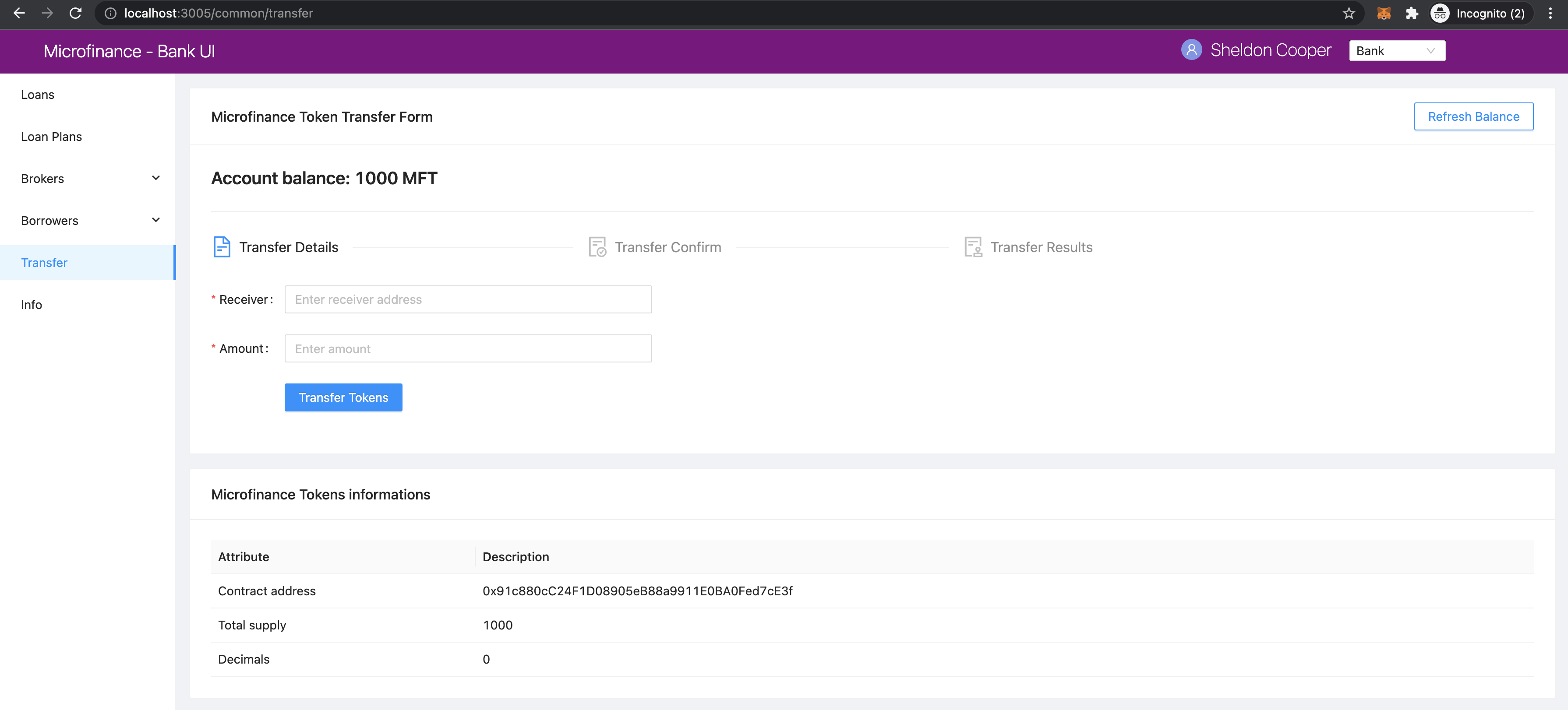
Broker view
In these screenshots, browser address bar contains the localhost:3005/common/transfer value.
Both Transfer menu item loads the bank-web-app/pages/common/transfer.js script.
import React from 'react';
import { Row, Col } from 'antd';
import TransferController from '../../components/transfer/TransferController';
import TokenInfo from '../../components/info/TokenInfo';

function Transfer() {
  return (
    <Row gutter={[16, 16]}>
      <Col span={24}>
        <TransferController />
      </Col>
      <Col span={24}>
        <TokenInfo />
      </Col>
    </Row>
  );
}

export default Transfer;
Transfer component displays the TransferController component from bank-web-app/components/transfer/TransferController.js first
and TokenInfo component in the later part.
Borrower view
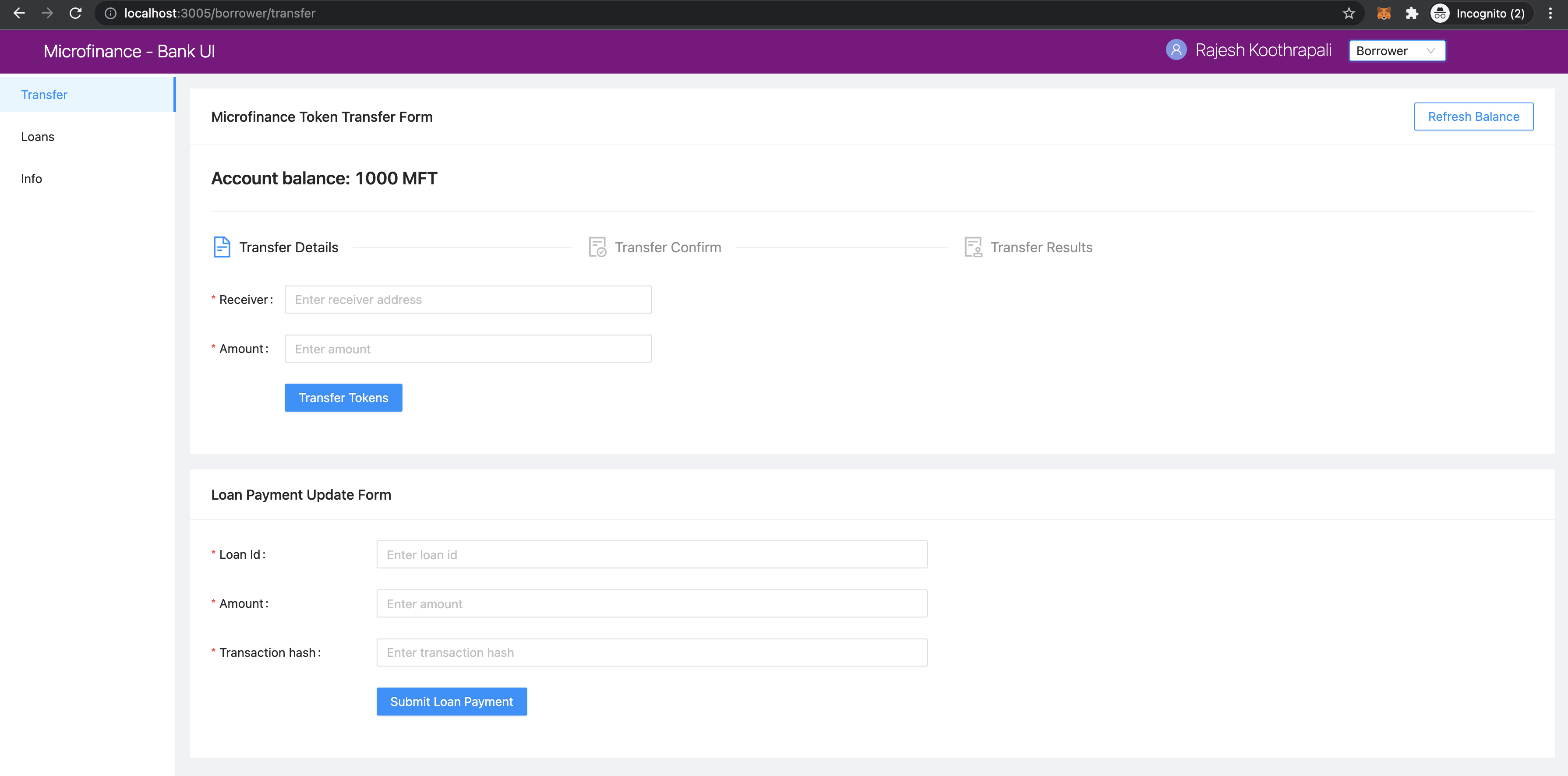
In Borrower view, browser address bar contains the localhost:3005/borrower/transfer value.
This Transfer menu item loads the bank-web-app/pages/borrower/transfer.js script.
import React from 'react';
import { Row, Col } from 'antd';
import TransferController from '../../components/transfer/TransferController';
import LoanPaymentForm from '../../components/payment/LoanPaymentForm';

function Transfer() {
  return (
    <Row gutter={[16, 16]}>
      <Col span={24}>
        <TransferController />
      </Col>
      <Col span={24}>
        <LoanPaymentForm />
      </Col>
    </Row>
  );
}

export default Transfer;
In this Transfer component it also loads the TransferController from bank-web-app/components/transfer/TransferController.js.
But later part it loads the LoanPaymentForm from bank-web-app/components/transfer/LoanPaymentForm.js.
TransferController.js
TransferController resides in the bank-web-app/components/transfer/ directory.
in TransferController component first imports its dependecies.
import React, { useEffect, useState, useContext } from 'react';
import { Typography, Card, Divider, message, Steps, Col, Row } from 'antd';
import { FileTextOutlined, FileDoneOutlined, AuditOutlined } from '@ant-design/icons';
import TransferForm from './TransferForm';
import TransactionConfirm from './TransactionConfirm';
import TransactionSuccess from './TransactionSuccess';
import TransactionFail from './TransactionFail';
import SmartContractContext from '../../stores/smartContractContext';
In addition to common dependencies like React, Ant Design and Context it imports following components.
TransferForm- Collects receiver’s wallet address and token amunt details.TransactionConfirm- Displays user input data and gets the user confirmation.TransactionSuccess- Transaction success messageTransactionFail- Transaction fail message.
TransferController has following states.
const [balance, setBalance] = useState('0');
const [symbol, setSymbol] = useState('');
const [address, setAddress] = useState('');
const [amount, setAmount] = useState('');
const [transactionHash, setTransactionHash] = useState('');
const [isTransactionSuccessful, setIsTransactionSuccessful] = useState(false);
const [current, setCurrent] = useState(0);
balance- Microfinance token balance of the selected Wallet account in MetaMask.symbol- Microfinance token symbol state.address- Token receiver’s address.amount- Transfering token amount.transactionHash- Blockchain transaction hash.isTransactionSuccessful- transaction success state.current- Current step of the token transfering process.
TransferController gets the MicroTokenContract object from the SmartContractContext.
const { MicroTokenContract } = useContext(SmartContractContext);
Get MetaMask Selected Account balance
getBalance function fetch the MetaMask selected account MicroToken balance.
const getBalance = async () => {
  try {
    const accounts = await window.ethereum.request({ method: 'eth_requestAccounts' });
    const response = await MicroTokenContract.methods.balanceOf(accounts[0]).call();
    setBalance(response);
  } catch (err) {
    console.log(err);
    message.error('Error occured while reading balance');
  }
};
In getBalance function fisrt it gets the selected account from the MetaMask.
Then token account balance from MictoToken smart contract using balanceOf method and passes MetaMask selected account address.
It uses the MicroTokenContract object from SmartContractContext.
When successful it set the response value as the balance state.
MictoToken smart contract’s balanceOf method described in
balanceOf section.
Get ERC20 Token Symbol
symbol method helps to load the Microfinance token symbol from the MicroToken smart contract.
- const getSymbol = async () => {
- try {
const response = await MicroTokenContract.methods.symbol().call(); setSymbol(response);
- } catch (err) {
message.error(‘Error occured while reading symbol’);
}
};
There is no symbol method defined in the MicroToken.sol smart contract.
But symbol attribute is defined as a public attribute.
Getter methods were generated for all the public attributes in smart contract in the compile time and
methods names are equal to attribute name.
We can use those methods to get the attribute values from smart contracts.
So we use symbol() method to get the Microfinance Token symbol from the MicroToken smart contract.
Response value is set as the symbol state value in the TransferController component.
Load Initial Data
Above 2 functions are executed when TransferController mount in the Microfinance - Bank UI.
It uses useEffect hook to achieve this.
useEffect(() => {
  getBalance();
  getSymbol();
}, []);
This useEffect hook is triggered only when TransferController mount in the Microfinance - Bank UI.
It is controlled by second parameter, [] empty array in the useEffect hook.
If we add component’s states in this array useEffect triggered every time when those states change.
Acount Balance and Token Symbol displayed in the Microfinance - Bank UI as follows.
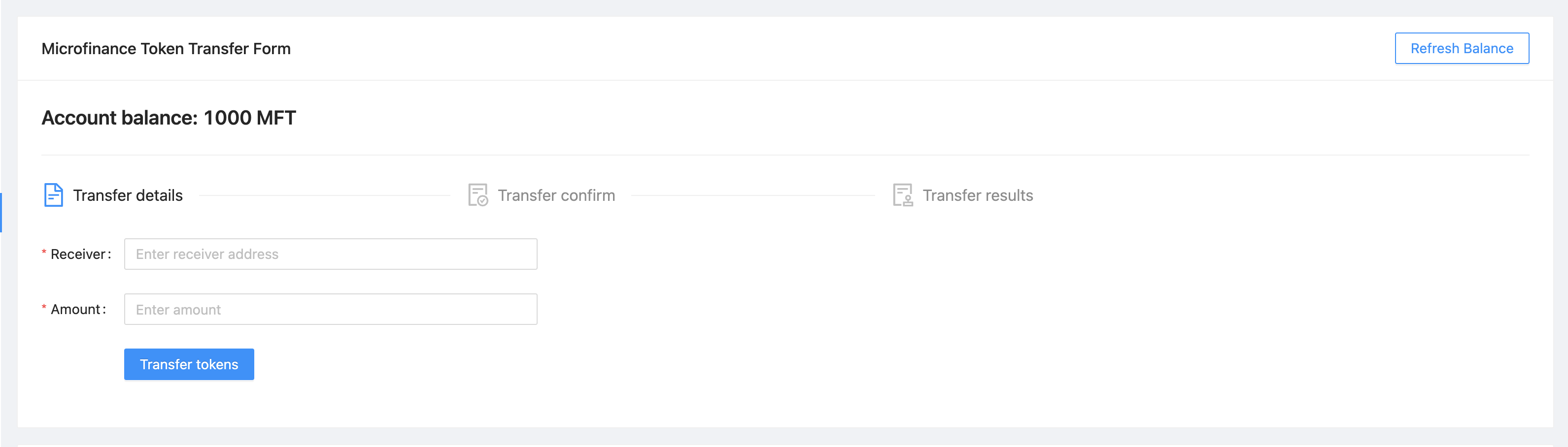
In the return section of the TransferController first it defines a Ant Design Card component as follows.
<Card
  title="Microfinance Token Transfer Form"
  extra={<Button type="primary" ghost onClick={getBalance}>Refresh Balance</Button>}
>
  {/* This will show the balance state value in the web page */}
  <Title level={4}>Account balance: {balance} {symbol}</Title>
  <Divider />
  ....
</Card>
In this coponent Microfinance Token Transfer Form is set as the Card title.
Refresh Balance button triggers the getBalance function to reload the account balance on click event.
In the Card body it displays the Account Balance usign balance state and symbol state.
This updates when getBalance and getSymbol functions update the states.
Token Transaction Steps
In Token Transaction event it has 3 steps.
Transfer Details
Transfer Confirm
Trasfer Results
These steps were defined in the steps array in the TransferController component.
const steps = [
  {
    title: 'Transfer Details',
    icon: <FileTextOutlined />,
  },
  {
    title: 'Transfer Confirm',
    icon: <FileDoneOutlined />,
  },
  {
    title: 'Transfer Results',
    icon: <AuditOutlined />,
  },
];
These steps are displayed below the Account Balance in the UI.
In the return section of the TransferController steps ara mapped to Step Ant Design component as follows:
<Row>
  <Col lg={24} xl={18} xxl={16} style={{ marginBottom: 25 }}>
    <Steps current={current}>
      {steps.map(item => (
        <Step key={item.title} title={item.title} icon={item.icon} />
      ))}
    </Steps>
  </Col>
</Row>
TransferController uses Step Ant Design component to render these steps in the UI.
current state is used to keep the track of current token transaction step.
These Ant Design Steps are updates according to the current state value.
Component rendered in the later part of the Card depends on this current state value as well.
Following diagram shows the components loaded in each stage of token transfering process.
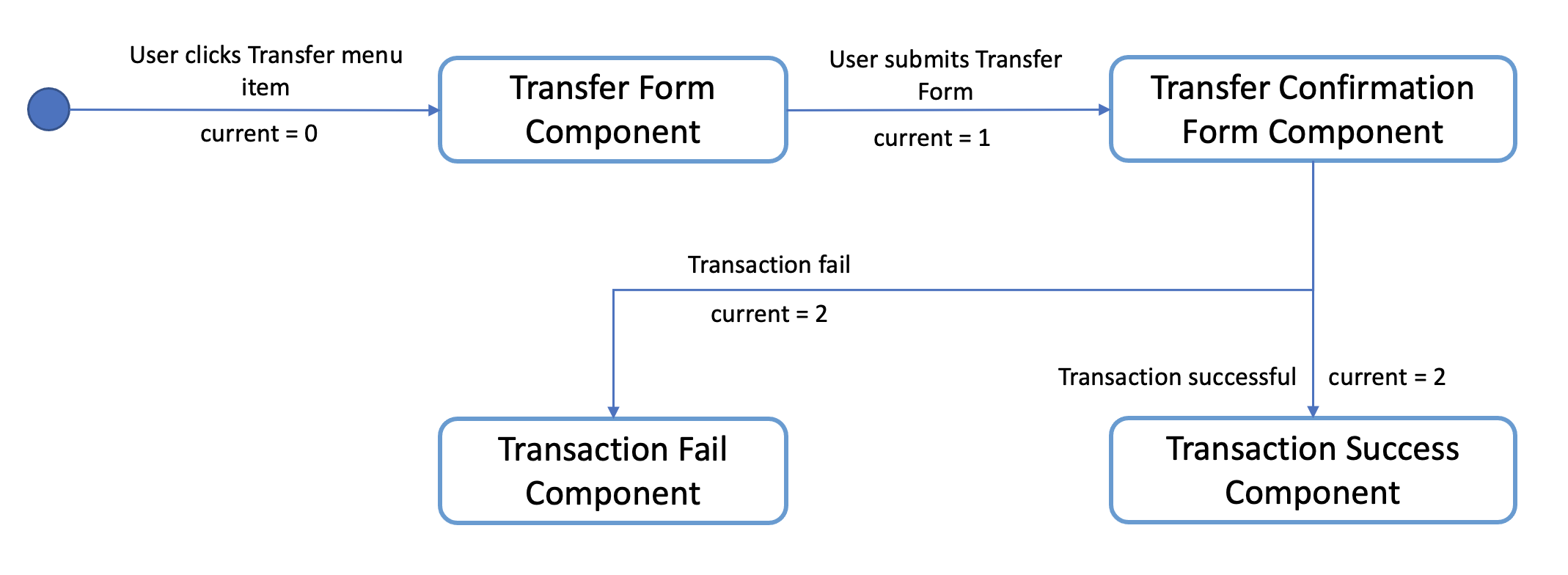
There are 3 stages in the Token Transfer process and 4 components displayed according to the states of the transaction.
{
  current === 0 &&
  <Row>
    <Col lg={24} xl={18} xxl={16}>
      <TransferForm
        setAddress={setAddress}
        setAmount={setAmount}
      />
    </Col>
  </Row>
}
{
  current === 1 &&
  <Row>
    <Col lg={24} xl={18} xxl={16}>
      <TransactionConfirm
        address={address}
        amount={amount}
        confirmTokenTransfer={confirmTokenTransfer}
        prev={prev}
      />
    </Col>
  </Row>
}
{
  current === 2 && isTransactionSuccessful &&
  <Row>
    <Col lg={24} xl={18} xxl={16}>
      <TransactionSuccess
        amount={amount}
        address={address}
        transactionHash={transactionHash}
        backToHome={backToHome}
      />
    </Col>
  </Row>
}
{
  current === 2 && !isTransactionSuccessful &&
  <Row>
    <Col lg={24} xl={18} xxl={16}>
      <TransactionFail
        backToHome={backToHome}
      />
    </Col>
  </Row>
}
This conditional rendering part defined in the return section of the TransferController component.
TransferController passes props to each component in each step.
In the Transfer Result step, it renders the components depending on the isTransactionSuccessful state as well.
Complete Transfer Controller Component
Complete TransferController component:
import React, { useEffect, useState, useContext } from 'react';
import { Typography, Card, Divider, message, Steps, Col, Row, Button } from 'antd';
import { FileTextOutlined, FileDoneOutlined, AuditOutlined } from '@ant-design/icons';
import TransferForm from './TransferForm';
import TransactionConfirm from './TransactionConfirm';
import TransactionSuccess from './TransactionSuccess';
import TransactionFail from './TransactionFail';
import SmartContractContext from '../../stores/smartContractContext';

const { Title } = Typography;
const { Step } = Steps;

function TransferController() {
  const [balance, setBalance] = useState('0');
  const [symbol, setSymbol] = useState('');
  const [address, setAddress] = useState('');
  const [amount, setAmount] = useState('');
  const [transactionHash, setTransactionHash] = useState('');
  const [isTransactionSuccessful, setIsTransactionSuccessful] = useState(false);

  const { MicroTokenContract } = useContext(SmartContractContext);

  const [current, setCurrent] = useState(0);

  const getBalance = async () => {
    try {
      const accounts = await window.ethereum.request({ method: 'eth_requestAccounts' });
      const response = await MicroTokenContract.methods.balanceOf(accounts[0]).call();

      setBalance(response);
    } catch (err) {
      console.log(err);
      message.error('Error occured while reading balance');
    }
  };

  const getSymbol = async () => {
    try {
      const response = await MicroTokenContract.methods.symbol().call();
      setSymbol(response);
    } catch (err) {
      message.error('Error occured while reading symbol');
    }
  };

  const loadConfirmPage = () => {
    setCurrent(current + 1);
  };

  const setInitialStates = () => {
    setAddress('');
    setAmount('');
    setIsTransactionSuccessful(false);
    setTransactionHash('');
    setCurrent(0);
  };

  const prev = () => {
    setCurrent(current - 1);
    setInitialStates();
  };

  const backToHome = () => {
    setInitialStates();
  };

  const confirmTokenTransfer = async () => {
    try {
      const accounts = await window.ethereum.request({ method: 'eth_requestAccounts' });
      const response = await MicroTokenContract.methods.transfer(address, amount).send({
        from: accounts[0] });
      setTransactionHash(response.transactionHash);
      setIsTransactionSuccessful(true);
      setCurrent(current + 1);
      getBalance();
      message.success('Token transferred successfully');
    } catch (err) {
      console.log(err);
      message.error('Error occured while transferring tokens');
      setCurrent(current + 1);
      setIsTransactionSuccessful(false);
    }
  };

  useEffect(() => {
    getBalance();
    getSymbol();
  }, []);

  useEffect(() => {
    if (amount !== '') {
      loadConfirmPage();
    }
  }, [amount]);

  const steps = [
    {
      title: 'Transfer Details',
      icon: <FileTextOutlined />,
    },
    {
      title: 'Transfer Confirm',
      icon: <FileDoneOutlined />,
    },
    {
      title: 'Transfer Results',
      icon: <AuditOutlined />,
    },
  ];

  return (
    <Card
      title="Microfinance Token Transfer Form"
      extra={<Button type="primary" ghost onClick={getBalance}>Refresh Balance</Button>}
    >
      <Title level={4}>Account balance: {balance} {symbol}</Title>
      <Divider />

      <Row>
        <Col lg={24} xl={18} xxl={16} style={{ marginBottom: 25 }}>
          <Steps current={current}>
            {steps.map(item => (
              <Step key={item.title} title={item.title} icon={item.icon} />
            ))}
          </Steps>
        </Col>
      </Row>
      {
        current === 0 &&
        <Row>
          <Col lg={24} xl={18} xxl={16}>
            <TransferForm
              setAddress={setAddress}
              setAmount={setAmount}
            />
          </Col>
        </Row>
      }
      {
        current === 1 &&
        <Row>
          <Col lg={24} xl={18} xxl={16}>
            <TransactionConfirm
              address={address}
              amount={amount}
              confirmTokenTransfer={confirmTokenTransfer}
              prev={prev}
            />
          </Col>
        </Row>
      }
      {
        current === 2 && isTransactionSuccessful &&
        <Row>
          <Col lg={24} xl={18} xxl={16}>
            <TransactionSuccess
              amount={amount}
              address={address}
              transactionHash={transactionHash}
              backToHome={backToHome}
            />
          </Col>
        </Row>
      }
      {
        current === 2 && !isTransactionSuccessful &&
        <Row>
          <Col lg={24} xl={18} xxl={16}>
            <TransactionFail
              backToHome={backToHome}
            />
          </Col>
        </Row>
      }
    </Card>

  );
}

export default TransferController;
Transfer Form Component
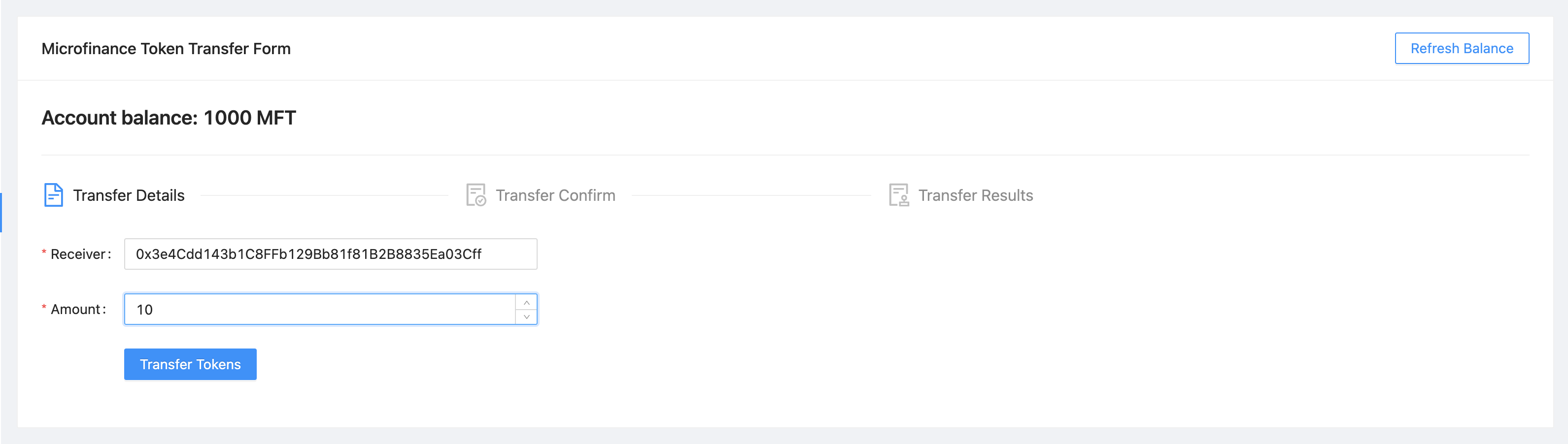
TransferForm component is rendered in the first step of the Token Transfer process.
TransferController passes setter functions of address and amount states as setAddress and setAmount props.
TransferForm defined in the bank-web-app/components/transfer/TransferForm.js file.
After imports its dependencies TransferForm component destructure its props as follows.
import React from 'react';
import { Form, Input, Button, InputNumber } from 'antd';

function TransferForm({ setAddress, setAmount }) {
  ....
}
These props are used to update address and amount states in the TransferController component from
TransferForm component.
In the return section of the TransferForm component it uses a Ant Design Form component to collect
transfer details from user.
Form component of the TransferForm component:
return (
  <Form
    ....
    onFinish={onFinish}
  >
    <Form.Item label="Receiver" name="address" rules={[{ required: true, message: 'Please input receiver address!' }]}>
      <Input
        placeholder="Enter receiver address"
      />
    </Form.Item>
    <Form.Item label="Amount" name="amount" rules={[{ required: true, message: 'Please input token amount!' }]}>
      <InputNumber
        min="0" style={{ width: '100%' }} placeholder="Enter amount"
      />
    </Form.Item>
    <Form.Item wrapperCol={{ .... }}
    >
      <Button type="primary" htmlType="submit">Transfer Tokens</Button>
    </Form.Item>
  </Form>
);
Form component has 2 input fields. Enter Receiver’s wallet address and the token amount to be transferred.
When user clicks the Transfer Tokens button it triggers the onFinish function and form field values passed as a object.
const onFinish = async (values) => {
  setAddress(values.address);
  setAmount(values.amount);
};
onFinish function gets the values object which contains the form field values.
These form field value can be accessed using their names (address and amount).
address and amount states of the TransferController will be updated by these values using setAddress and
setAmount props by onFinish function.
There is a useEffect hook defined in the TransferController component.
useEffect(() => {
  if (amount !== '') {
    loadConfirmPage();
  }
}, [amount]);
This useEffect hook is triggered when TransferController is mounted to the UI and amount state changes.
loadConfirmPage function is triggered from the useEffect hook.
If condition in the above hook stops triggering loadConfirmPage function when TransferController mounts.
When TransferForm updates the amount state, it triggers this useEffect hook and then loadConfirmPage function.
const loadConfirmPage = () => {
  setCurrent(current + 1);
};
loadConfirmPage updates the current state value and TransactionConfirm component is displayed in the UI.
Transfer Form:
Complete Transfer Form Component
Complete TransferForm component:
import React from 'react';
import { Form, Input, Button, InputNumber } from 'antd';

function TransferForm({ setAddress, setAmount }) {
  const onFinish = async (values) => {
    setAddress(values.address);
    setAmount(values.amount);
  };

  return (
    <Form
      labelCol={{ lg: 3, xl: 2, xxl: 2 }}
      wrapperCol={{ lg: 14, xl: 12, xxl: 10 }}
      layout="horizontal"
      size="default"
      labelAlign="left"
      onFinish={onFinish}
    >
      <Form.Item label="Receiver" name="address" rules={[{ required: true, message: 'Please input receiver address!' }]}>
        <Input
          placeholder="Enter receiver address"
        />
      </Form.Item>
      <Form.Item label="Amount" name="amount" rules={[{ required: true, message: 'Please input token amount!' }]}>
        <InputNumber
          min="0"
          style={{ width: '100%' }}
          placeholder="Enter amount"
        />
      </Form.Item>
      <Form.Item wrapperCol={{
        lg: { span: 14, offset: 3 },
        xl: { span: 14, offset: 2 },
        xxl: { span: 14, offset: 2 } }}
      >
        <Button type="primary" htmlType="submit">Transfer Tokens</Button>
      </Form.Item>
    </Form>

  );
}

export default TransferForm;
Transaction Confirm Component
When current state value is 1 TransferController displays TransactionConfirm component.
{
  current === 1 &&
  <Row>
    <Col lg={24} xl={18} xxl={16}>
      <TransactionConfirm
        address={address}
        amount={amount}
        confirmTokenTransfer={confirmTokenTransfer}
        prev={prev}
      />
    </Col>
  </Row>
}
TransferController passes address and amount state values and confirmTokenTransfer and prev functions
as props to TransactionConfirm component.
TransactionConfirm component is defined in the bank-web-app/components/transfer/TransactionConfirm.js file.
In TransactionConfirm.js script, it first imports its dependecies and then destructure props as follows.
import React from 'react';
import { Form, Button, Space } from 'antd';

function TransactionConfirm({ address, amount, confirmTokenTransfer, prev }) {
  ...
}
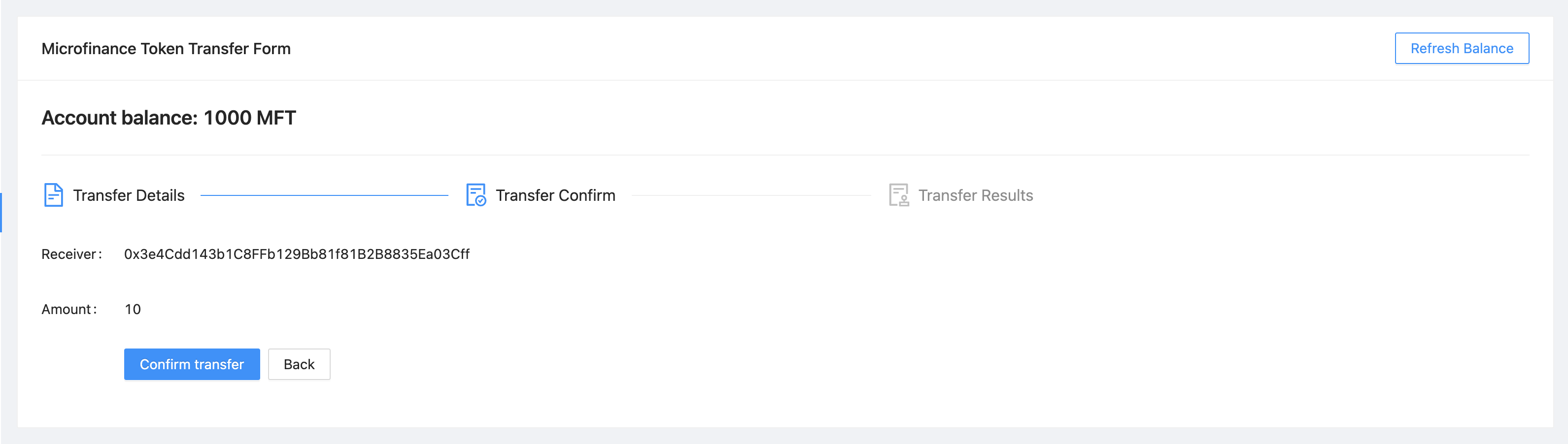
address and amount values are displayed in the Form defined in the TransactionConfirm component.
<Form .... >
  <Form.Item label="Receiver">
    <span> { address } </span>
  </Form.Item>
  <Form.Item label="Amount">
    <span> { amount } </span>
  </Form.Item>
  <Form.Item wrapperCol={{ .... }}
  >
    <Space direction="horizontal">
      <Button type="primary" onClick={() => confirmTokenTransfer()}>Confirm Transfer</Button>
      <Button onClick={() => prev()}>Back</Button>
    </Space>
  </Form.Item>
</Form>
When user clicks the Confirm Transfer button it triggers the confirmTokenTransfer function passed as prop to the
TransactionConfirm component.
Back button triggers prev function.
In TransferController component confirmTokenTransfer function transfer tokens from MetaMask selected account to the
rceiver wallet.
const confirmTokenTransfer = async () => {
  try {
    const accounts = await window.ethereum.request({ method: 'eth_requestAccounts' });
    const response = await MicroTokenContract.methods.transfer(address, amount).send({
      from: accounts[0] });
    setTransactionHash(response.transactionHash);
    setIsTransactionSuccessful(true);
    setCurrent(current + 1);
    getBalance();
    message.success('Token transferred successfully');
  } catch (err) {
    console.log(err);
    message.error('Error occured while transferring tokens');
    setCurrent(current + 1);
    setIsTransactionSuccessful(false);
  }
};
In confirmTokenTransfer function first it gets the MetaMask selected account address.
Then calls the transfer method of the MicroToken smart contract and passes the address and amount state values
as paramaters. This method calls from the MetaMask selected account.
When transaction successful, it returns the transactionHash in the response.
confirmTokenTransfer updates the transactionHash from response.transactionHash.
Then it sets isTransactionSuccessful state to true and updates the current state value.
current value will be updated to 2.
When current state is 2 and isTransactionSuccessful is true, TransferController displays the
TransactionSuccess component.
Finally in try block of the confirmTokenTransfer function it updates the account balance using getBalance function and
displays the success message.
In catch block of the confirmTokenTransfer function it displays the error message.
Then it updates the current state and isTransactionSuccessful state to true.
current value will be updated to 2.
When current state is 2 and isTransactionSuccessful is false, TransferController displays the
TransactionFail component.
When user clicks the Back button in the TransactionConfirm component, it triggers the prev function
in TransferController component.
const prev = () => {
  setCurrent(current - 1);
  setInitialStates();
};
prev function decreses the current state value and value will be 1.
setInitialStates function resets the address and amount states to ''.
const setInitialStates = () => {
  setAddress('');
  setAmount('');
  setIsTransactionSuccessful(false);
  setTransactionHash('');
  setCurrent(0);
};
When current value is 1, TransferController displays the TransactionForm.
It facilitate user re-enter the receiver’s address and token amount to be transferred.
Complete Transfer Confirm Component
Complete TransferConfirm component:
import React from 'react';
import { Form, Button, Space } from 'antd';

function TransactionConfirm({ address, amount, confirmTokenTransfer, prev }) {
  return (
    <Form
      labelCol={{ lg: 3, xl: 2, xxl: 2 }}
      wrapperCol={{ lg: 14, xl: 12, xxl: 10 }}
      layout="horizontal"
      size="default"
      labelAlign="left"
    >
      <Form.Item label="Receiver">
        <span> { address } </span>
      </Form.Item>
      <Form.Item label="Amount">
        <span> { amount } </span>
      </Form.Item>
      <Form.Item wrapperCol={{
        lg: { span: 14, offset: 3 },
        xl: { span: 14, offset: 2 },
        xxl: { span: 14, offset: 2 } }}
      >
        <Space direction="horizontal">
          <Button type="primary" onClick={() => confirmTokenTransfer()}>Confirm Transfer</Button>
          <Button onClick={() => prev()}>Back</Button>
        </Space>
      </Form.Item>
    </Form>

  );
}

export default TransactionConfirm;
Transaction Success Component
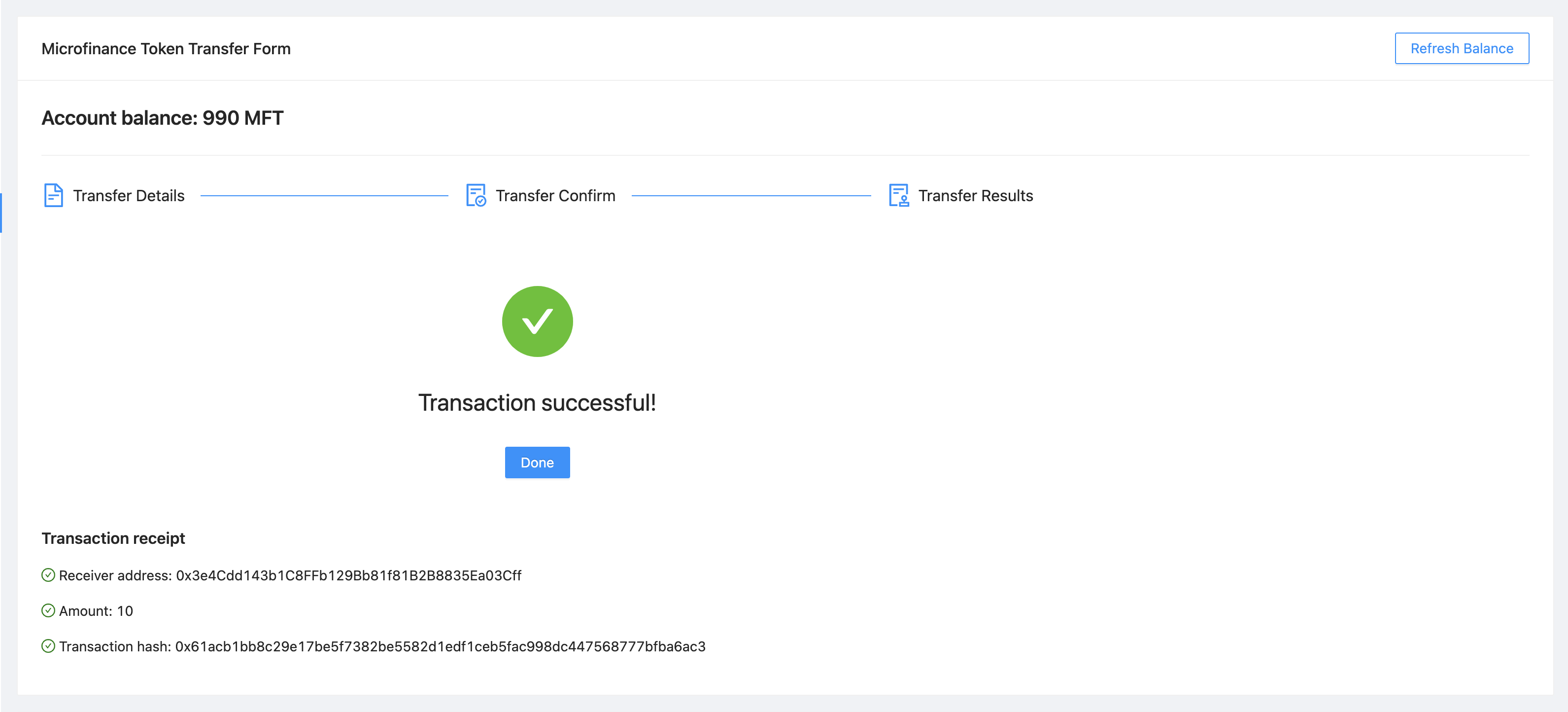
When current state is 2 and isTransactionSuccessful is true, TransferController displays the
TransactionSuccess component.
{
  current === 2 && isTransactionSuccessful &&
  <Row>
    <Col lg={24} xl={18} xxl={16}>
      <TransactionSuccess
        amount={amount}
        address={address}
        transactionHash={transactionHash}
        backToHome={backToHome}
      />
    </Col>
  </Row>
}
TransferController passes amount, address, transactionHash state values and backToHome function
to the TransactionSuccess component as props.
TransactionSuccess component is defined in the bank-web-app/components/transfer/TransactionSuccess.js file.
In this file first it imports its dependecies and then destructure the props as follows.
import React from 'react';
import { Button, Result, Typography } from 'antd';
import { CheckCircleOutlined } from '@ant-design/icons';

function TransactionSuccess({ address, amount, transactionHash, backToHome }) {
  ....
}
In the return section of the TransactionSuccess component it displays the success message using
Ant Design Result component.
<Result
  status="success"
  title="Transaction successful!"
  extra={[
    <Button type="primary" key="home" onClick={(e) => backToHome(e)}>
      Done
    </Button>,
  ]}
/>
When user clicks the Done button it triggers the backToHome function defined in the TransferController component.
const backToHome = () => {
  setInitialStates();
};
backToHome triggers setInitialStates function and it sets all states to their initial values.
Complete Transaction Success Component
Complete TransactionSuccess component script:
import React from 'react';
import { Button, Result, Typography } from 'antd';
import { CheckCircleOutlined } from '@ant-design/icons';

// React functional component to display transaction success status.
// backToHome function and transaction details pass as properties.
function TransactionSuccess({ address, amount, transactionHash, backToHome }) {
  const { Paragraph, Text } = Typography;

  return (
    <>
      <Result
        status="success"
        title="Transaction successful!"
        extra={[
          <Button type="primary" key="home" onClick={(e) => backToHome(e)}>
            Done
          </Button>,
        ]}
      />
      <Paragraph>
        <Text
          strong
          style={{
            fontSize: 16,
          }}
        >
          Transaction receipt
        </Text>
      </Paragraph>
      <Paragraph>
        <CheckCircleOutlined style={{ color: 'green' }} /> Receiver address: {address}
      </Paragraph>
      <Paragraph>
        <CheckCircleOutlined style={{ color: 'green' }} /> Amount: {amount}
      </Paragraph>
      <Paragraph>
        <CheckCircleOutlined style={{ color: 'green' }} /> Transaction hash: {transactionHash}
      </Paragraph>

    </>

  );
}

export default TransactionSuccess;
Transaction Fail Component
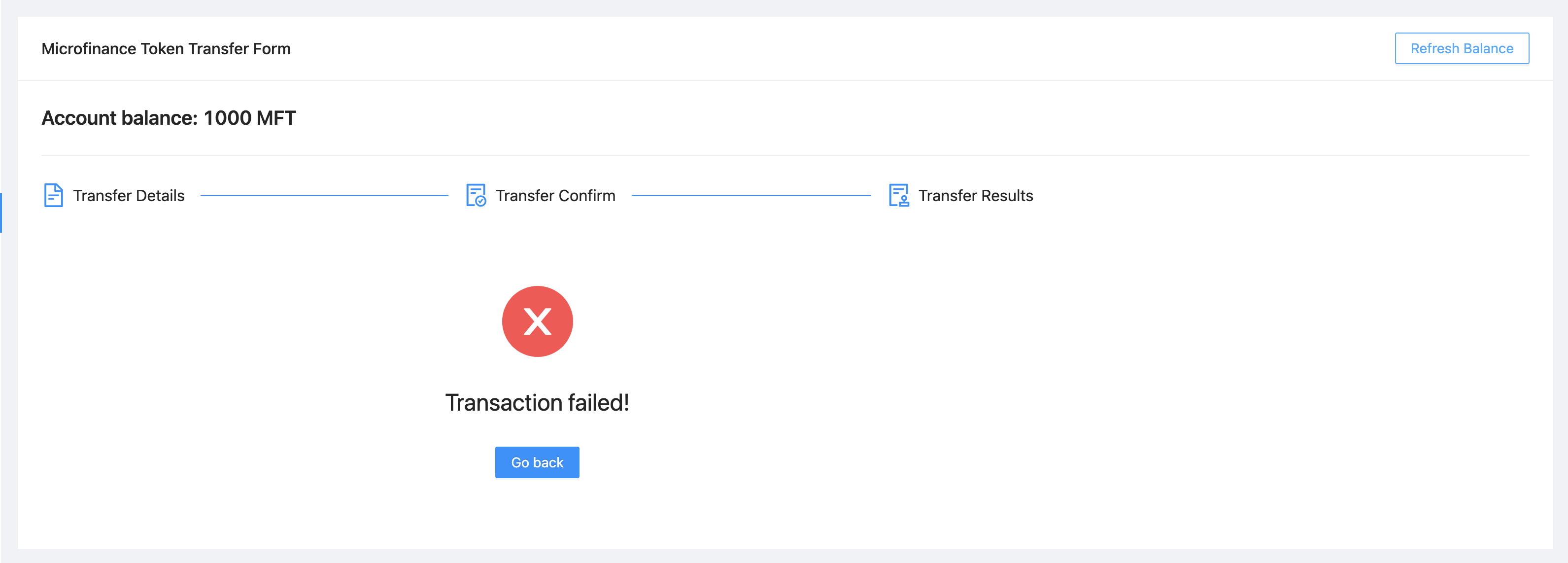
When current state is 2 and isTransactionSuccessful is false, TransferController displays the
TransactionFail component.
{
  current === 2 && !isTransactionSuccessful &&
  <Row>
    <Col lg={24} xl={18} xxl={16}>
      <TransactionFail
        backToHome={backToHome}
      />
    </Col>
  </Row>
}
TransferController passes backToHome function to the TransactionFail component as a prop.
TransactionSuccess component is defined in the bank-web-app/components/transfer/TransactionFail.js file.
In this file first it imports its dependecies and then destructure the props as follows.
import React from 'react';
import { Button, Result } from 'antd';

function TransactionFail({ backToHome }) {
  ....
}
In the return section of the TransactionFail component it displays the error message using
Ant Design Result component.
<Result
  status="error"
  title="Transaction failed!"
  extra={[
    <Button type="primary" key="home" onClick={(e) => backToHome(e)}>
      Go Back
    </Button>,
  ]}
/>
When user clicks the Go Back button it triggers the backToHome function defined in the TransferController component.
const backToHome = () => {
  setInitialStates();
};
backToHome triggers setInitialStates function and it sets all states to their initial values.
Complete Transaction Fail Component
Complete TransactionFail component script:
import React from 'react';
import { Button, Result } from 'antd';

function TransactionFail({ backToHome }) {
  return (
    <Result
      status="error"
      title="Transaction failed!"
      extra={[
        <Button type="primary" key="home" onClick={(e) => backToHome(e)}>
          Go Back
        </Button>,
      ]}
    />

  );
}

export default TransactionFail;