Checking Out the GitLab Project
You may now clone the “Microfinance” project from GitLab to look at the source code using the following command. Open a terminal in any directory in your computer where you wish to clone the project:
git clone https://gitlab.com/gmc123/microfinance.git
There are three projects in the microfinance root directory.
We should change the current directory to the microfinance directory using following command in the current terminal,
cd microfinance/
This will change your directory to the microfinance directory. There are three levels of the “Microfinance” project, as explained in Functionalities.
Check the current git branch using the following command.
git branch
It should show you that you are at the master branch.
We first focus on the level1 branch, the easiest level. Change git branch to level1 branch as follows:
git branch level1
git branch
Project Structure
Here is the folder structure of the Microfinance system. It consists of three main projects and one project for documentation as shown below:
Microfinance
|--bank-server
|--bank-web-app
|--blockchain
|--docs
bank-server/: Node Server project for Bank.bank-web-app/: React web application for Bank.blockchain/: Truffle project blockchain smart contracts.docs/: Documentation for readthedocs.org.
Deployment Diagram
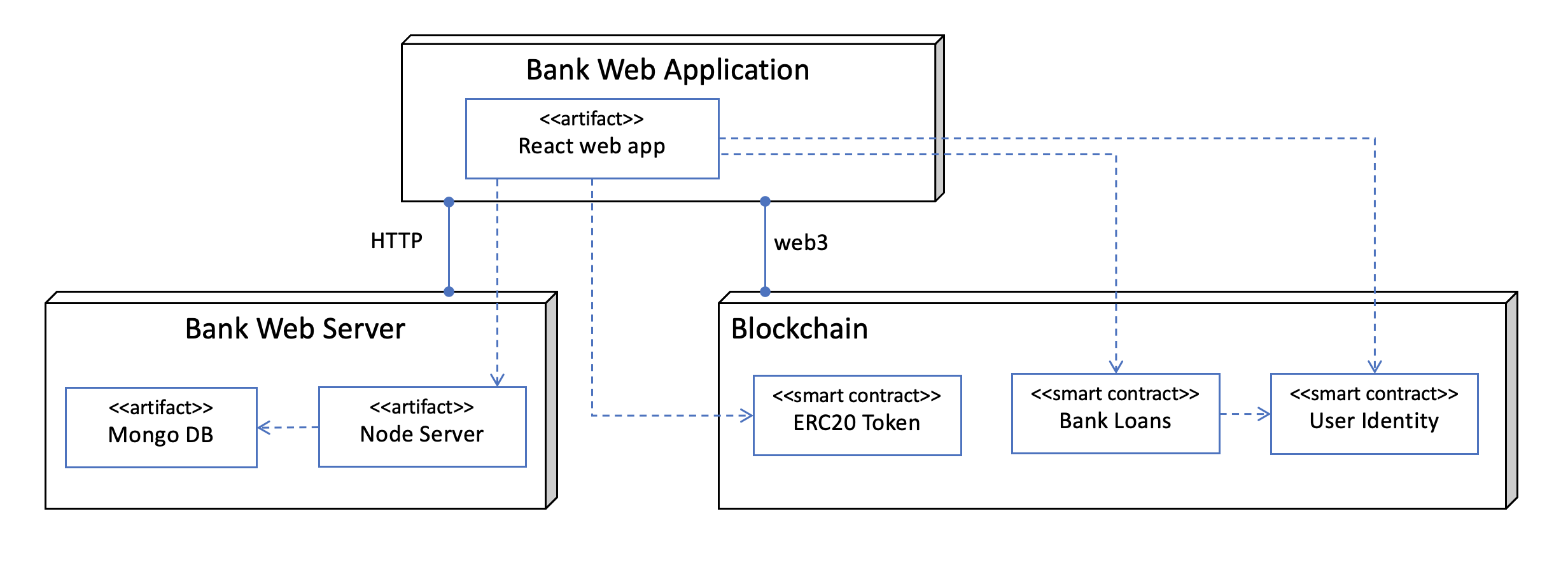
As shown in the diagram, the Bank has a web application developed using React. This web app connects using HTTP to the Bank web server, which consists of a Node.js HTTP server component and a Mongo DB database component. The Bank web application connects to a blockchain using Web3.