Loans Table Event Flows
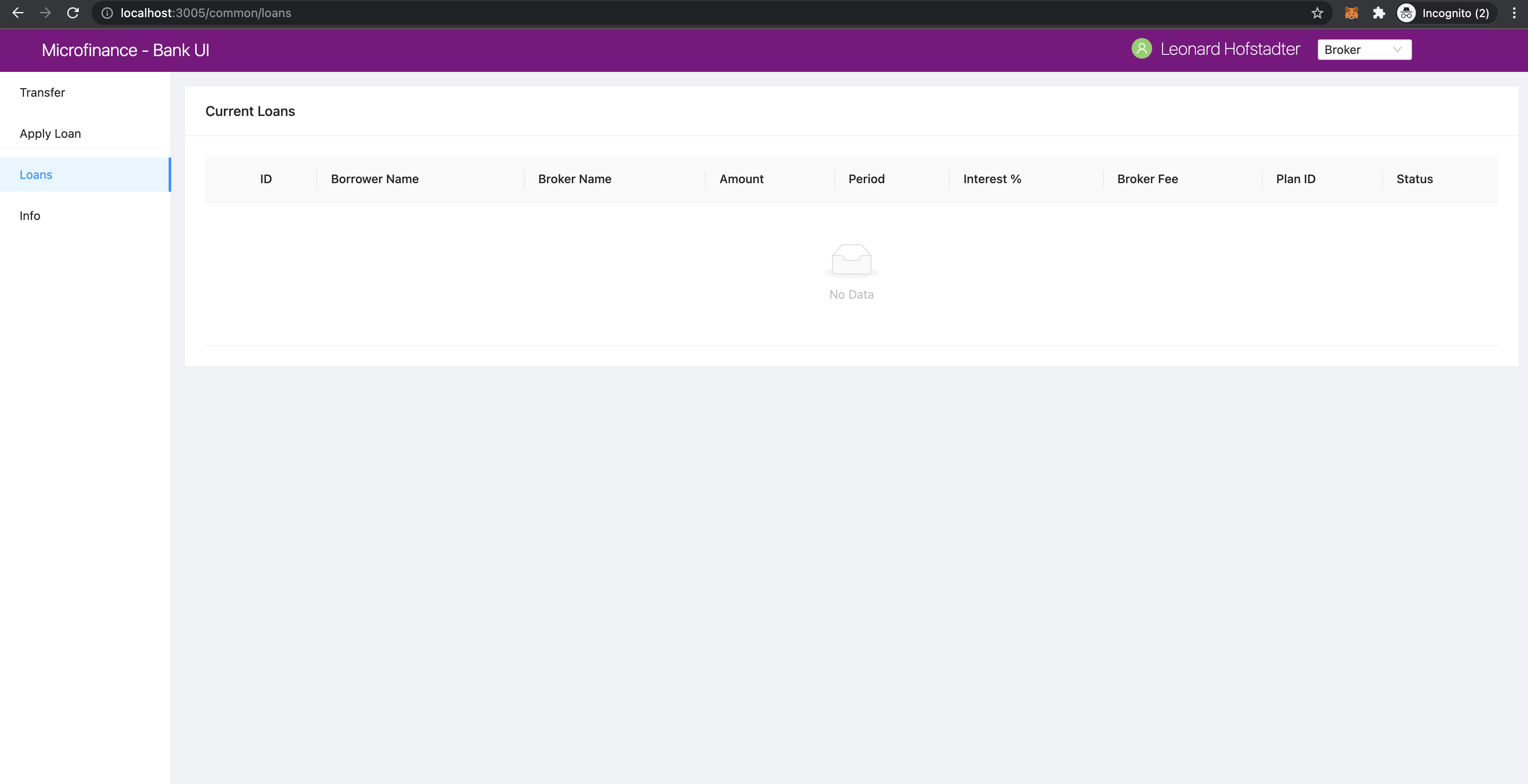
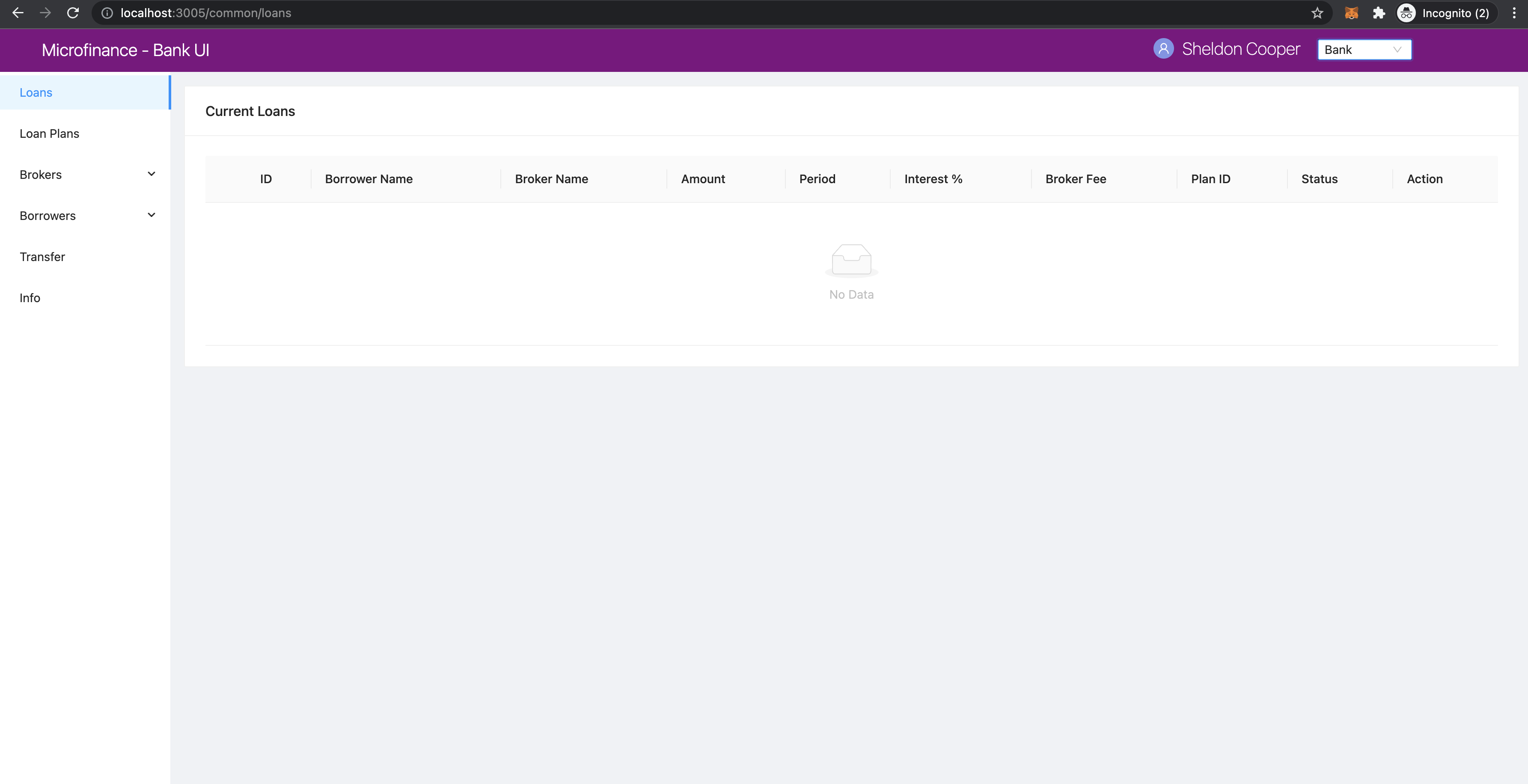
Loans table is displayed for Broker, Borrower, Bank users.
Broker view.
Bank view.
Borrower view.
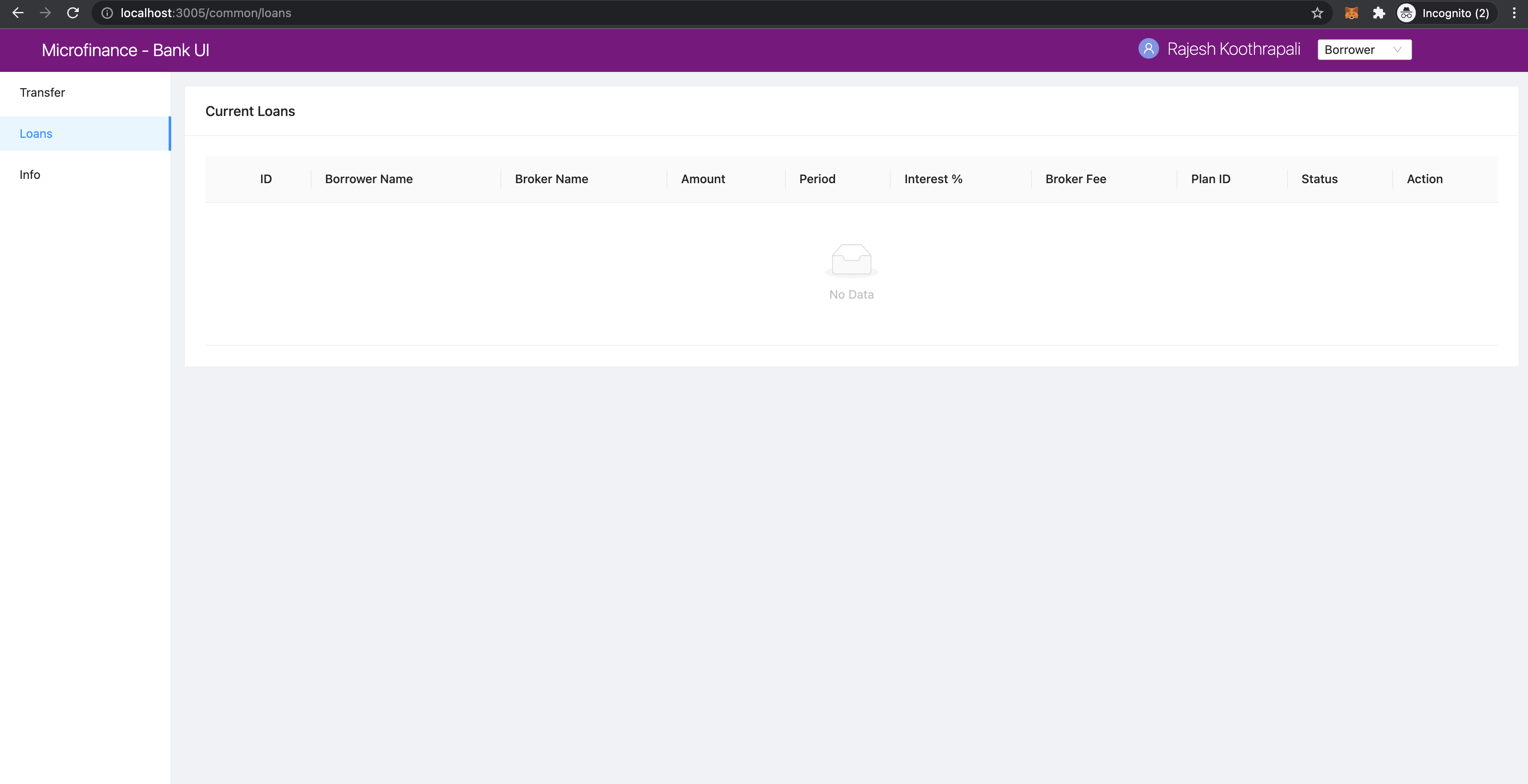
Loans menu item is common for all 3 user roles.
These Menus are defined in the /component/menu/ directory.
All BrokerMenu, BankMenu, and BorrowerMenu components defined the Loans menu item as follows.
<Menu.Item key="/loans" onClick={() => router.push('/common/loans')}>
  Loans
</Menu.Item>
As you can see on the address bars of the above 3 screenshots it contains the address value localhost:3005/common/loans
These 3 distinct menu items will load bank-web-app/pages/common/loans.js page.
We illustrate the flow of events from React web app (UI) to
bank-web-app/pages/common/loans.js to bank-web-app/components/loan/LoansTable.js.
loans.js
script of the loans.js.
import React from 'react';
import { Row, Col } from 'antd';
import LoansTable from '../../components/loan/LoansTable';

function Loans() {
  return (
    <Row gutter={[16, 16]}>
      <Col span={24}>
        <LoansTable />
      </Col>
    </Row>
  );
}

export default Loans;
In the above script, first it imports dependencies.
In addition to the React and Ant design dependencies it imports LoansTable component
from the /components/loan/LoansTable.
It specify the relative path to the LoansTable in the import line.
This script defines the Loans component and it displays the LoansTable component and
aligns it using Row and Col Ant design components.
LoansTable.js
Since LoansTable common for all users it contains many functions and conditional rendering compenents.
First, LoansTable component imports dependencies.
import React, { useState, useContext, useEffect } from 'react';
import { Table, Tag, Card, message, Modal, Form, Space, Button } from 'antd';
import { CloseCircleOutlined } from '@ant-design/icons';
import { getApi } from '../../util/fetchApi';
import UserContext from '../../stores/userContext';
import SmartContractContext from '../../stores/smartContractContext';
getApito fetch data from Bank Web ServerUserContextto get the selected user role.SmartContractContextto access smart contract related context objects to interact with them.
It gets the selected user from UserContext.
const { user } = useContext(UserContext);
It uses the MicroTokenContract, BankLoanContract, and UserIdentityContract
smart contract objects and access them from SmartContractContext.
const { MicroTokenContract, BankLoanContract, UserIdentityContract } = useContext(SmartContractContext);
Loan has different states.
These states maintain usin ENUM in BankLoan smart contract.
But these states will return from BankLoan smart contract as integer values.
To add meaning to these integer states we keep same states array by keeping the same order in the LoansTable as
they defined in the BankLoan smart contract.
const state = ['REQUESTED', 'BORROWER_SIGNED', 'BANK_APPROVED', 'BANK_REJECTED',
              'PAID_TO_BROKER', 'ONGOING', 'DEFAULT', 'CLOSE'];
Integer values returning from BankLoan.sol states are equal to the states index values.
LoansTable has following states.
const [isBrokerTransferModalVisible, setIsBrokerTransferModalVisible] = useState(false);
const [isBorrowerTransferModalVisible, setIsBorrowerTransferModalVisible] = useState(false);
const [loanRecord, setLoanRecord] = useState({});
const [tokenTransferStep, setTokenTransferStep] = useState(0);
const [payments, setPayments] = useState([]);
const [data, setData] = useState([]);
isBrokerTransferModalVisible- Visibility state of the Modal which is transfering tokens fromBanktoBroker.isBorrowerTransferModalVisible- Visibility state of the Modal which is transfering loan token amount fromBanktoBroker.loanRecord- Active Loan state.tokenTransferStep- Current step state of transfering tokens and update loan process.payments- Loan Payments data state.data- Loan data state.
Following 2 objects will store the registered Brokers and Borrowers details.
We use plain objects to keep a map of users wallet addresses and their names.
We use Plain JavaScript object instead of using JavaScript Maps because we just store and retrive data from this map objects.
const brokers = {};
const borrowers = {};
Get Brokers Data
LoansTable component contains a getBrokers function to get registered Brokers details from the UserIdentity smart contract.
It gets the Brokers data using UserIdentityContract smart contract object from the SmartContractContext and
getAllBrokers public method defined in the UserIdentity.sol smart contract.
When getBrokers function gets the results from the smart contract call it will map Broker names to their wallet addresses as
follows.
const getBrokers = async () => {
  const response = await UserIdentityContract.methods.getAllBrokers().call();
  for (let i = 0; i < response.length; i++) {
    brokers[response[i].walletAddress] = response[i].name;
  }
};
UserIdentity smart contract’s getAllBrokers method described in
getAllBrokers section.
Get Borrowers Data
getBorrowers function will get the registered Borrowers details from the UserIdentity smart contract
using UserIdentityContract smart contract object and getAllBorrowers method of the UserIdentity.sol` smart contract.
This function will update the borrowers object by mapping the Borrowers names in to their wallet addresses.
const getBorrowers = async () => {
  const response = await UserIdentityContract.methods.getAllBorrowers().call();
  for (let i = 0; i < response.length; i++) {
    borrowers[response[i].walletAddress] = response[i].name;
  }
};
UserIdentity smart contract’s getAllBrokers method described in
getAllBorrowers section.
Get Loan Payments Data
LoansTable defines a getPayments method to fetch Loan Payment data from the Bank Web Server.
getPayments method fech data from loan-payments api end point using GET method.
It uses the getApi function in the /util/fetchApi.js script.
Results will be set to the payments state defined above using setPayments method.
const getPayments = async () => {
  try {
    const response = await getApi({
      url: 'loan-payments',
    });
    const paymentsResult = await response;
    setPayments(paymentsResult);
  } catch (err) {
    console.log(err);
    message.error('Error occured while loading Loan Payments');
  }
};
Get Loans Data
getLoans function will fetch Loans datafrom the BankLoan smart contract using getLoans method defined in the
BankLoan.sol smart contract.
We use BankLoanContract from the SmartContractContext to call the getLoans method.
After fetching data from BankLoan smart contract, then it resets the data state.
Then map each Loan data into a JavaScript object and append it to the data array state.
In addition to returned Loan data values from the BankLoan smart contract this JavaScript object
keeps the brokerName and borrowerName properties.
brokerName and borrowerName value will be updated using broker and borrower objects respectively.
We can pass the Broker's and Borrower's wallet addresses in to these objects and get the names of them.
It uses the spread operator ...prev in the setData method below.
const getLoans = async () => {
  try {
    const response = await BankLoanContract.methods.getLoans().call();

    setData([]);

    for (let i = 0; i < response.length; i++) {
      const row = {
        key: response[i].id,
        id: response[i].id,
        amount: response[i].amount,
        period: response[i].months,
        interest: response[i].interest,
        planId: response[i].planId,
        borrowerName: borrowers[response[i].borrower],
        borrower: response[i].borrower,
        brokerFee: response[i].brokerFee,
        brokerName: brokers[response[i].broker],
        broker: response[i].broker,
        status: response[i].state,
      };

      setData((prev) => {
        return [...prev, row];
      });
    }
  } catch (err) {
    console.log(err);
    message.error('Error occured while loading current Loans');
  }
};
BankLoan smart contract’s getLoans method described in
getLoans() section.
Load Initial Data
Above 4 functions will load the essential data to be displayed in the Loans Table.
LoansTable component has loadData function to trigger those 4 functions.
const loadData = async () => {
  await getBrokers();
  await getBorrowers();
  await getPayments();
  await getLoans();
};
Then later part of the LoansTable component it uses useEffect hook to load those essential data at the
LoansTable component mounting time.
useEffect(() => {
  loadData();
  ...
}, []);
This useEffect hook will triggers the loadData function at the LoansTable mounting time.
Since this useEffect hook dependency array is empty, it will execute one time only.
Registering for loanRequest event of the BankLoan Smart contract
After executing the loadData function, useEffect hook will register an event listner to loanRequest event of the
BankLoan smart contract.
we pass 2 parameters to this loanRequest event funcion.
First parameter object contains the fromBlock property value.
This property specify the events staring block of the blockchain.
This event listner gets the events emit after the latest block of the blockchain.
Second parameter defines the callback function.
This function gets the event results of the loanRequest event.
This loanRequest events returns the newly created Loan data.
These new Loan data will map to a JavaScript object and append to the data state array.
This event helps to update the Loans Table with newly created Loans.
const emitter = BankLoanContract.events.loanRequest({ fromBlock: 'latest' }, (error, response) => {
  const result = response.returnValues;

  const row = {
    key: result.id,
    id: result.id,
    amount: result.amount,
    period: result.months,
    interest: result.interest,
    planId: result.planId,
    borrower: result.borrower,
    brokerFee: result.brokerFee,
    broker: result.broker,
    status: result.state,
  };

  setData((prev) => {
    return [...prev, row];
  });
});

return () => {
  emitter.unsubscribe();
};
To unsubscribe to this event we call the unsubscribe method in the return section.
This return method will execute when LoansTable dismount from the UI.
BankLoan smart contract’s loanRequest event described in
loanRequest section.
Complete useEffect hook script.
useEffect(() => {
  loadData();
  const emitter = BankLoanContract.events.loanRequest({ fromBlock: 'latest' }, (error, response) => {
    const result = response.returnValues;

    const row = {
      key: result.id,
      id: result.id,
      amount: result.amount,
      period: result.months,
      interest: result.interest,
      planId: result.planId,
      borrower: result.borrower,
      brokerFee: result.brokerFee,
      broker: result.broker,
      status: result.state,
    };

    setData((prev) => {
      return [...prev, row];
    });
  });

  return () => {
    emitter.unsubscribe();
  };
}, []);
Initial Loan Table Columns
As we mentioned above Loans Table is displayed for all 3 user roles.
LoansTable component defines the columns array which contains the Loans Table columns.
const columns = [
  {
    title: 'ID',
    dataIndex: 'id',
    key: 'id',
  },
  {
    title: 'Borrower Name',
    dataIndex: 'borrowerName',
    key: 'borrowerName',
  },
  {
    title: 'Broker Name',
    dataIndex: 'brokerName',
    key: 'brokerName',
  },
  {
    title: 'Amount',
    dataIndex: 'amount',
    key: 'amount',
  },
  {
    title: 'Period',
    dataIndex: 'period',
    key: 'period',
  },
  {
    title: 'Interest %',
    key: 'interest',
    dataIndex: 'interest',
  },
  {
    title: 'Broker Fee',
    key: 'brokerFee',
    dataIndex: 'brokerFee',
  },
  {
    title: 'Plan ID',
    key: 'planId',
    dataIndex: 'planId',
  },
  {
    title: 'Status',
    key: 'status',
    dataIndex: 'status',
    render: tag => {
      let color = 'geekblue';
      if (tag === '3' || tag === '6') {
        color = 'red';
      } else if (tag === '2' || tag === '5') {
        color = 'green';
      }
      return (
        <Tag color={color} key={tag}>
          {state[tag]}
        </Tag>
      );
    },
  },
];
All columns objects have following properties.
title- Column name.dataIndex- Loan object property to disply in the column.key- Unique identifier for the column.
Status column has render property to do a conditional rendering.
render: tag => {
  let color = 'geekblue';
  if (tag === '3' || tag === '6') {
    color = 'red';
  } else if (tag === '2' || tag === '5') {
    color = 'green';
  }
  return (
    <Tag color={color} key={tag}>
      {state[tag]}
    </Tag>
  );
},
This Status column displays the Loan state using Tag Ant design component and change the color of the Tag according to
the loanState value.
Initial Loan Table view for Borrower.
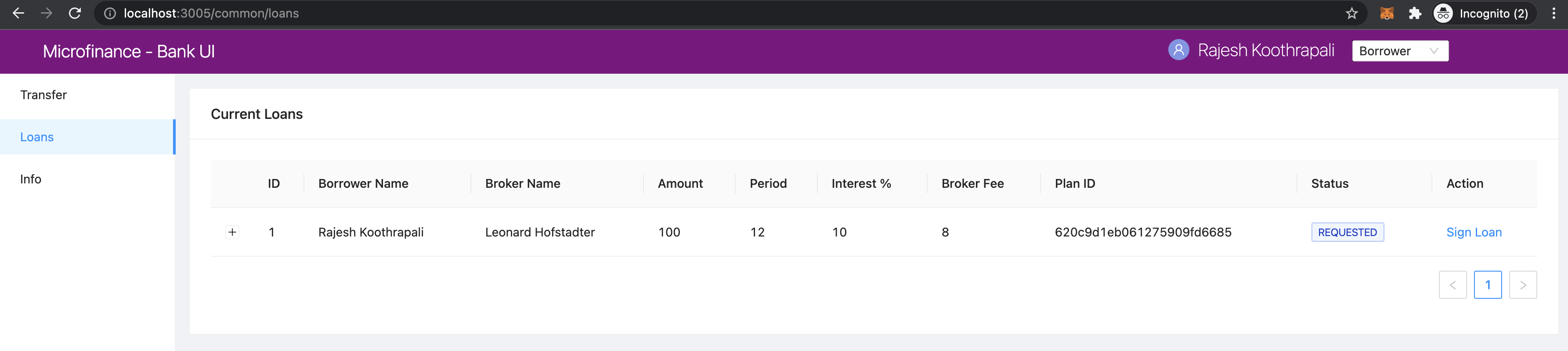
Initial Loan Table view for Bank.
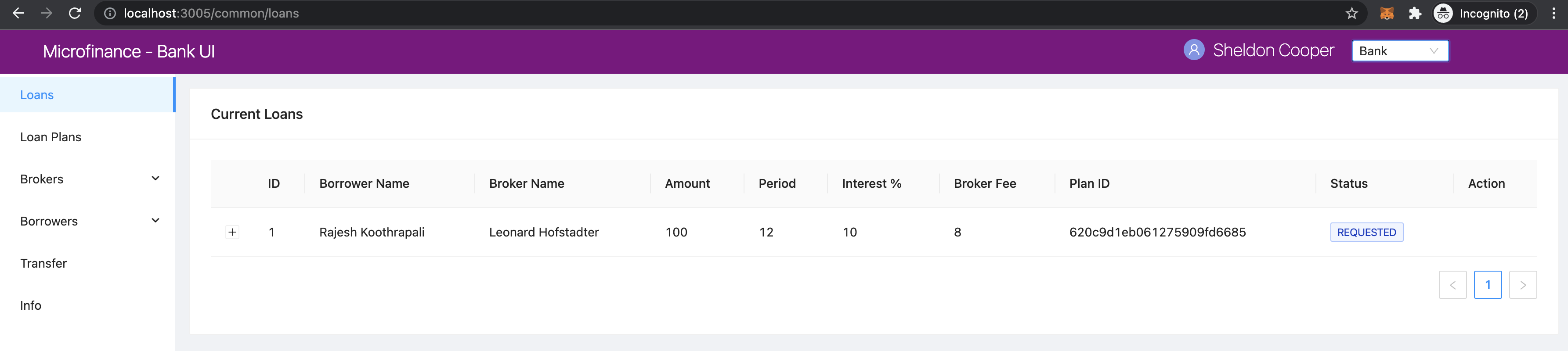
Initial Loan Table view for Broker.
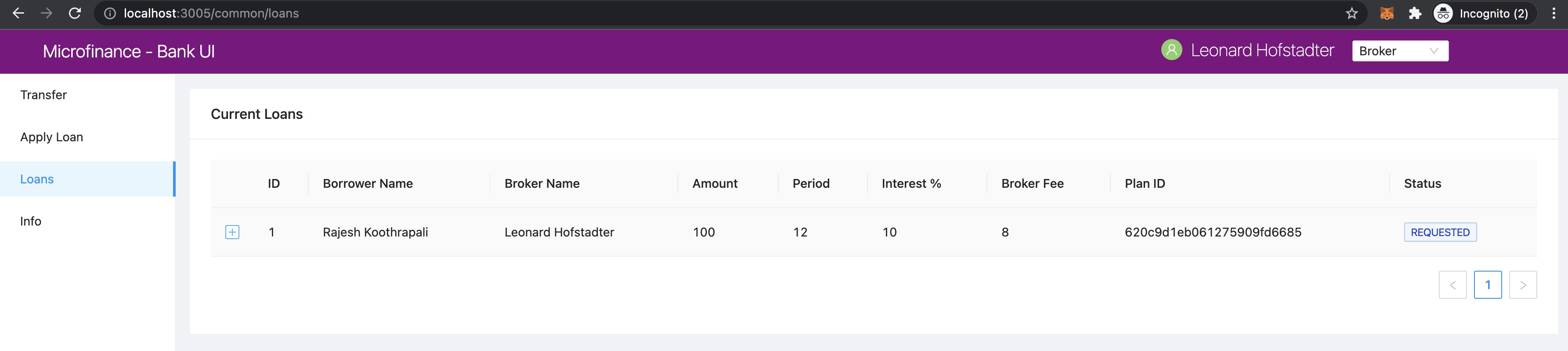
In the above screenshots you may see Action column only enbled for Bank and Borrower users only.
No actions enabled for Bank user for the current Loan listed in the Loan Table.
Sign Loan action enbled for the current Loan in the Loans Table for Broker.
These conditional redering is done using following 2 if conditions.
if (user.role === 'borrower') {
  columns.push({
    title: 'Action',
    dataIndex: '',
    key: 'x',
    render: (record) => {
      if (record.status === '0') {
        return (
          <span>
            <a href onClick={() => signLoan(record.id)}>Sign Loan</a>
          </span>
        );
      }
    },
  });
}

if (user.role === 'bank') {
  columns.push({
    title: 'Action',
    dataIndex: '',
    key: 'x',
    render: (record) => {
      let actionBlock = '';
      if (record.status === '1') {
        actionBlock =
          <span>
            <a href onClick={() => showModal(record.id)}>Approve</a>
            <Divider type="vertical" />
            <a href onClick={() => showRejectModal(record.id)} style={{ color: 'red' }}>Reject</a>
          </span>;
      } else if (record.status === '2') {
        actionBlock =
          <span>
            <a href onClick={() => showBrokerTransferModal(record)}>
              Transfer Tokens to Broker
            </a>
          </span>;
      } else if (record.status === '4') {
        actionBlock =
          <span>
            <a href onClick={() => showBorrowerTransferModal(record)}>
              Transfer Tokens to Borrower
            </a>
          </span>;
      } else if (record.status === '5') {
        actionBlock =
          <span>
            <a href onClick={() => closeLoan(record.id)}>Close</a>
            <Divider type="vertical" />
            <a href onClick={() => markAsDefaulted(record.id)} style={{ color: 'red' }}>Defaulted</a>
          </span>;
      }
      return actionBlock;
    },
  });
}
These 2 if condition statements add Action column to the Loan Table depending on user roles Bank and Borrower.
Before adding the action to the Action colunm they check the Loan status.
Below table describes Actions enabled for User Roles depending on the current Loan State.
Next Loan State column contains the Loan State values which is held by Loan after user taking the action.
Current Loan State |
ENUM |
Action |
User Role |
Next Loan State |
|---|---|---|---|---|
REQUESTED |
0 |
Sign Loan |
Borrower |
BORROWER_SIGNED |
BORROWER_SIGNED |
1 |
Approve / Reject |
Bank |
BANK_APPROVED / BANK_REJECTED |
BANK_APPROVED |
2 |
Transfer Tokens to Broker |
Bank |
PAID_TO_BROKER |
PAID_TO_BROKER |
4 |
Transfer Tokens to Borrower |
Bank |
ONGOING |
ONGOING |
5 |
Cloase / Defaulted |
Bank |
CLOSE / DEFAULT |
For more information you can refer State Transition Diagram of The Bank Loan
LoansTable component displays the Loan Table in a Card Ant design component.
Following code snippet resides inside the return section of LoansTable component.
<Card title="Current Loans">
  <Table
    pagination="true"
    columns={columns}
    dataSource={data}
    expandable={{
      expandedRowRender,
    }}
  />
</Card>
It passes the columns array and data state to a Ant desing Table component.
This component will display table including the columns and Loan data we passed as props.
Expand Loan Table Rows.
In addition above mentioned props there is another prop expandable.
Using this prop we can expand the rows and display more information related to the data row.
You can learn more about this in Ant Design Table Component page
We can set object to this expandable including expandedRowRender key.
Following code snnipet is equal to the expandable prop code snippet.
expandable={{
  expandedRowRender: expandedRowRender,
}}
We used property shorthand mechanism in our project code.
We can set any method to this object key which will be executed when user clicks on the + button
at the begining of the table row.
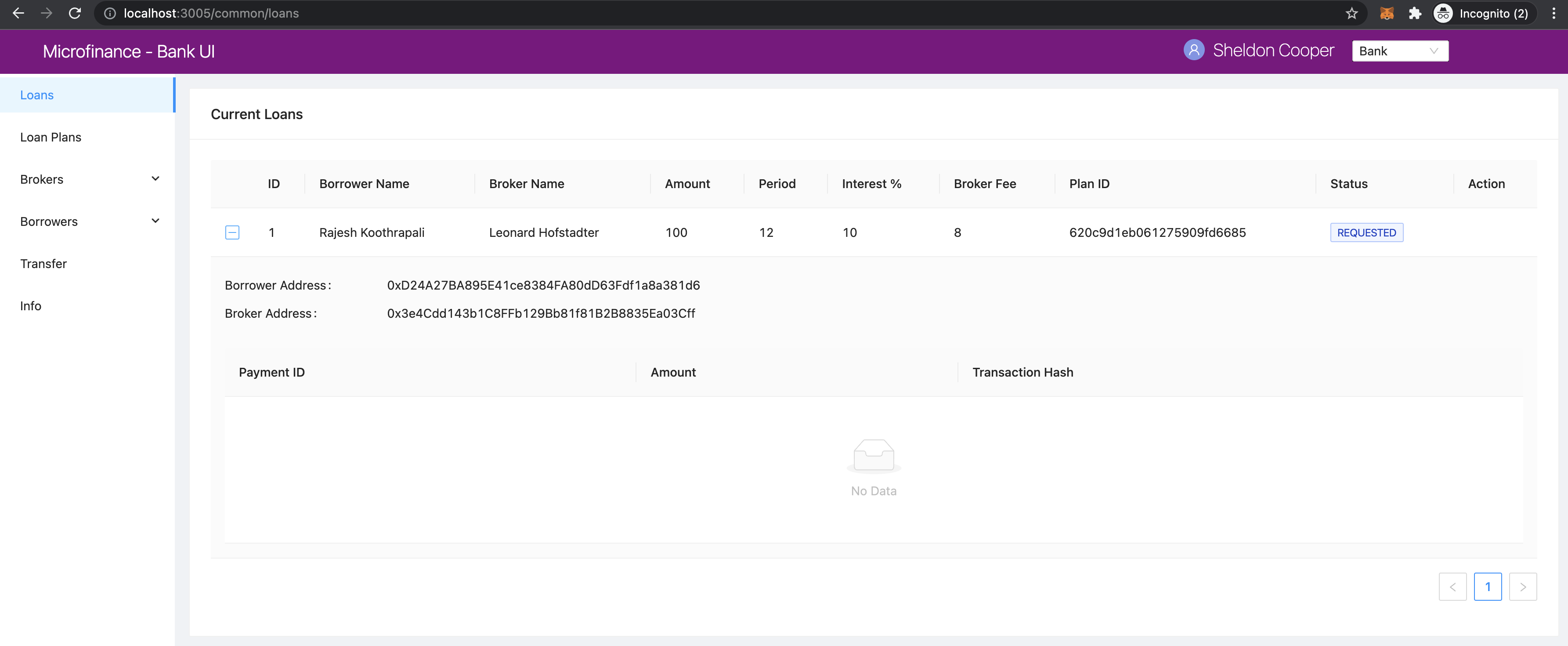
expandedRowRender funcion gets selected row record as a parameter.
const expandedRowRender = (record) => {
  const expandedPayments = payments.filter(item => item.loanId == record.id);

  const expandedPaymentColumns = [
    { title: 'Payment ID', dataIndex: '_id', key: 'id' },
    { title: 'Amount', dataIndex: 'amount', key: 'amount' },
    { title: 'Loan ID', dataIndex: 'loanId', key: 'loanId' },
    { title: 'Transaction Hash', dataIndex: 'transactionHash', key: 'transactionHash' },
  ];

  return (
    <>
      <Form ... >
        <Form.Item label="Borrower address" style={{ marginBottom: '0px' }}>
          <span>{record.borrower}</span>
        </Form.Item>
        <Form.Item label="Broker address">
          <span>{record.broker}</span>
        </Form.Item>
      </Form>
      <Table
        columns={expandedPaymentColumns}
        dataSource={expandedPayments}
        pagination={false}
      />
    </>
  );
};
In expandedRowRender, first it filter out the Loan Payment data from the payment state.
The defines columns of the Loan Payments Table.
expandedRowRender function returns the html to be displayed in the expanded area.
In return section it defines a Form component to display Borrower Address and Broker Address.
The adds the Loan Payment Table.
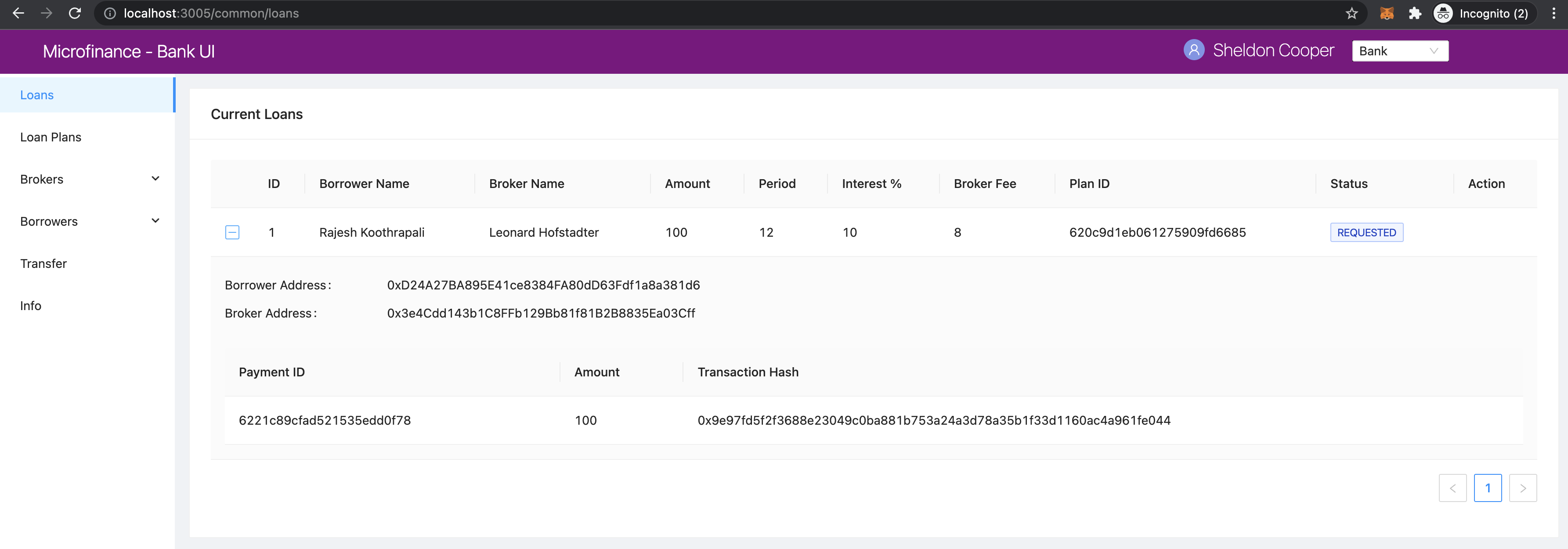
If there is no Payment data related to this Loan, Loan Payments Table displays No Data message in the table.
When Borrower pays loan amount back, He/She may submit the Loan Payment details including blockchain transaction hash value
using Update Loan Payment in the Transfer page. Those payment data will list down in the Payment Table in the expanded view.
Note
Following event flows refer to the actions defined in the Action column.
status integer values refer to the ENUM values returened from the BankLoan smart contract.
await window.ethereum.request({ method: 'eth_requestAccounts' }); line in the functions describe in the following sections
returns the selected account address from the MetaMask.
This selected account address is returned as an array and it contains only the selected account address.
accounts[0] returns the account address.
send methos is used to call smart contract methods which are adding or changing existing data in the blockchain.
This send method contains object parameter. It passes the function caller address as from property.
BankLoanContract is the smart contract object defined in the SmartContractContext.
We use this smart contract object to send Loan updates to the BankLoan smart contract.
BankLoan smart contract’s methods can be accessed through BankLoanContract.methods.
loadData() method is used to load data from the smart contracts as mentioned in Load Initial Data
Borrower Sign Loan Event Flow
If Loan is in 0 (REQUESTED) state, Action column displays Sing Loan action to the Borrower.
if (user.role === 'borrower') {
  columns.push({
    title: 'Action',
    dataIndex: '',
    key: 'x',
    render: (record) => {
      if (record.status === '0') {
        return (
          <Button type="primary" ghost onClick={() => signLoan(record.id)}> Sign Loan </Button>
        );
      }
    },
  });
}
When Borrower clicks the Sign Loan action it triggers the signLoan function and passes
Loan Id record,id as a parameter.
const signLoan = async (loanId) => {
  try {
    const accounts = await window.ethereum.request({ method: 'eth_requestAccounts' });
    await BankLoanContract.methods.signByBorrower(loanId).send({ from: accounts[0] });
    message.success(`Loan ${loanId} signed`);
    loadData();
  } catch (err) {
    console.log(err);
    message.error('Error occured while signing Loan');
  }
};
In signLoan function it calls the signByBorrower smart contract method and passes the loanId.
If this transaction successful it display the success message and load data.
If not it displays the error message.
BankLoan smart contract’s signByBorrower method described in
signByBorrower section.
Bank Approve Loan Event Flow
If Loan is in 1 (BORROWER_SIGNED) state Action column enables Approve and Reject actions to the Bank user.
if (record.status === '1') {
  actionBlock =
    <Space>
      <Button type="primary" ghost onClick={() => confirmLoanApprove(record.id)}> Approve </Button>
      <Button type="primary" danger ghost onClick={() => confirmLoanReject(record.id)}> Reject </Button>
    </Space>;
}
When Bank user clicks the Approve button it triggers the confirmLoanApprove function and passes the
Loan Id record.id value as a parameter.
const confirmLoanApprove = (loanId) => {
  confirm({
    content: `Approve Loan ${loanId} ?`,
    okText: 'Approve Loan',
    onOk: () => approveLoan(loanId),
  });
};
This function displays a confirm Ant Design Modal and displays a confirmation message
When user clicks the Approve Loan button of this modal it triggers the approveLoan function and passes the loanId
as a paramater.
const approveLoan = async (loanId) => {
  try {
    const accounts = await window.ethereum.request({ method: 'eth_requestAccounts' });
    await BankLoanContract.methods.approveLoan(loanId).send({ from: accounts[0] });
    message.success(`Loan ${loanId} approved`);
    loadData();
  } catch (err) {
    message.error('Error occured while approving the Loan');
  }
};
In approveLoan function it calls the approveLoan method of the BankLoan smart contract
using selected wallet address in the MetaMask.
BankLoan smart contract’s approveLoan method described in
approveLoan section.
Bank Reject Loan Event Flow
Second action enabled for the loan state 1 (BORROWER_SIGNED) is Reject action for the Bank users.
if (record.status === '1') {
  actionBlock =
    <Space>
      <Button type="primary" ghost onClick={() => confirmLoanApprove(record.id)}> Approve </Button>
      <Button type="primary" danger ghost onClick={() => confirmLoanReject(record.id)}> Reject </Button>
    </Space>;
}
When Bank user clicks the Reject button it triggers the confirmLoanReject function and passes the
Loan Id record.id value as a parameter.
const confirmLoanReject = (loanId) => {
  confirm({
    icon: <CloseCircleOutlined style={{ color: 'red' }} />,
    content: `Reject Loan ${loanId} ?`,
    okText: 'Reject Loan',
    okType: 'danger',
    onOk: () => rejectLoan(loanId),
  });
};
This function displays a confirm Ant Design Modal and displays a confirmation message.
okType: danger property helps to add submit button in red color in the confirm Modal.
When user clicks the Reject Loan button of this modal it triggers the rejectLoan function and passes the loanId
as a paramater.
const rejectLoan = async (loanId) => {
  try {
    const accounts = await window.ethereum.request({ method: 'eth_requestAccounts' });
    await BankLoanContract.methods.rejectLoan(loanId).send({ from: accounts[0] });
    message.success(`Loan ${loanId} rejected`);
    loadData();
  } catch (err) {
    message.error('Error occured while rejecting the Loan');
  }
};
In rejectLoan function it calls the rejectLoan method of the BankLoan smart contract
using selected wallet address in the MetaMask.
BankLoan smart contract’s rejectLoan method described in
rejectLoan section.
Transfer Tokens to Broker Event Flow
After Bank approves the loan its state is changed to 2 (BANK_APPROVED).
When loan is in state 2, Action column enables Transfer Tokens to Broker
action to the Bank user.
else if (record.status === '2') {
  actionBlock =
    <Button type="primary" ghost onClick={() => showBrokerTransferModal(record)}>
      Transfer Tokens to Broker
    </Button>
}
When Bank user clicks the Transfer Tokens to Broker button it triggers the showBrokerTransferModal function and passes the
Loan record (record) as a parameter.
const showBrokerTransferModal = (row) => {
  setLoanRecord(row);
  setIsBrokerTransferModalVisible(true);
};
showBrokerTransferModal function sets the Loan record row details as the loanRecord state and
sets isBrokerTransferModalVisible state to true.
This displays the Modal defined in the return section of the LoansTable component.
<Modal
  title={`Transfer Tokens to Broker - Loan Id ${loanRecord.id}`}
  visible={isBrokerTransferModalVisible}
  width={700}
  onCancel={handleCancel}
  footer={null}
>
  ...
</Modal>
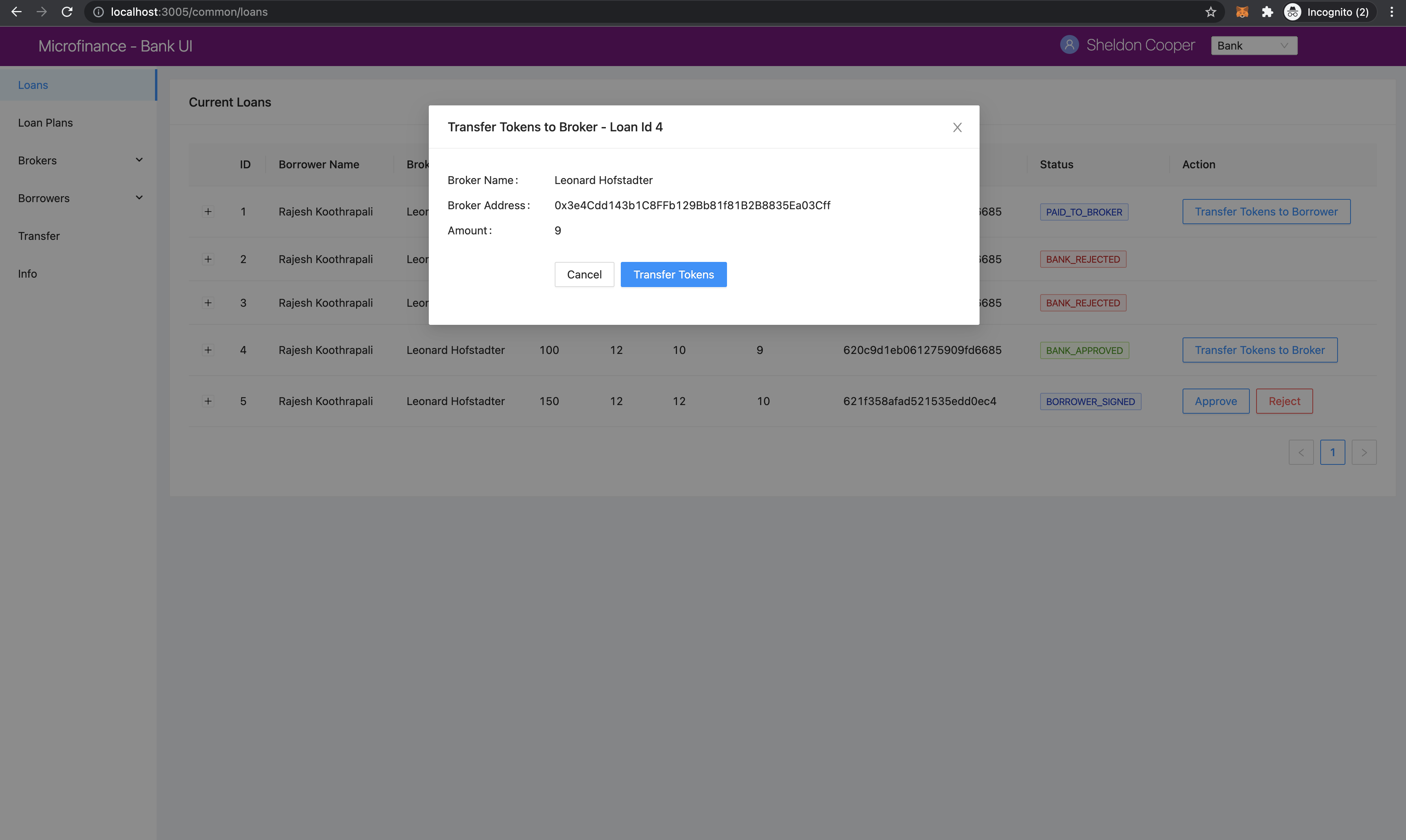
This modal displays the details of loanRecord state.
It displays the Transfer Tokens to Broker and the Loan Id in the Modal title.
Modal visibility is controlled by isBrokerTransferModalVisible state.
Modal body part is rendered using tokenTransferStep as follows.
{
  tokenTransferStep === 0 &&
  <Form ... >
    ...
  </Form>
}
{
  tokenTransferStep === 1 &&
  <span>Updating the Loan State</span>
}
tokenTransferStep state controls the current step of this Bank to Broker token transaction process.
When modal pop-ups tokenTransferStep state has the value 0 and it displays the
Token Transfer details in the Modal body. When tokenTransferStep is 1 it displays the
Updating the Loan State message.
Token transaction details are displayed using Form component as follows.
<Form
  ...
  onFinish={transferTokensToBroker}
>
  <Form.Item label="Broker Name" style={{ marginBottom: '0px' }} >
    <span> { loanRecord.brokerName } </span>
  </Form.Item>
  <Form.Item label="Broker Address" style={{ marginBottom: '0px' }}>
    <span> { loanRecord.broker } </span>
  </Form.Item>
  <Form.Item label="Amount">
    <span> { loanRecord.brokerFee } </span>
  </Form.Item>
  <Form.Item wrapperCol={{
    lg: { span: 14, offset: 6 },
    xl: { span: 14, offset: 5 },
    xxl: { span: 14, offset: 5 } }}
  >
    <Space direction="horizontal">
      <Button onClick={() => handleCancel()}>Cancel</Button>
      <Button type="primary" htmlType="submit">Transfer Tokens</Button>
    </Space>
  </Form.Item>
</Form>
This Form component displays the Broker Name, Broker Wallet Address and Token Amount using
loanRecord state as shown in the above screenshot.
When Bank user clicks the Transfer Tokens button it triggers the transferTokensToBroker function.
Complete Modal component:
<Modal
  title={`Transfer Tokens to Broker - Loan Id ${loanRecord.id}`}
  visible={isBrokerTransferModalVisible}
  width={700}
  onCancel={handleCancel}
  footer={null}
>
  {
    tokenTransferStep === 0 &&
    <Form
      labelCol={{
        lg: 6,
        xl: 5,
        xxl: 5,
      }}
      wrapperCol={{
        lg: 20,
        xl: 20,
        xxl: 20,
      }}
      layout="horizontal"
      size="default"
      labelAlign="left"
      onFinish={transferTokensToBroker}
    >
      <Form.Item label="Broker Name" style={{ marginBottom: '0px' }} >
        <span> { loanRecord.brokerName } </span>
      </Form.Item>
      <Form.Item label="Broker Address" style={{ marginBottom: '0px' }}>
        <span> { loanRecord.broker } </span>
      </Form.Item>
      <Form.Item label="Amount">
        <span> { loanRecord.brokerFee } </span>
      </Form.Item>
      <Form.Item wrapperCol={{
        lg: { span: 14, offset: 6 },
        xl: { span: 14, offset: 5 },
        xxl: { span: 14, offset: 5 } }}
      >
        <Space direction="horizontal">
          <Button onClick={() => handleCancel()}>Cancel</Button>
          <Button type="primary" htmlType="submit">Transfer Tokens</Button>
        </Space>
      </Form.Item>
    </Form>
  }
  {
    tokenTransferStep === 1 &&
    <span>Updating the Loan State</span>
  }
</Modal>
transferTokensToBroker function:
const transferTokensToBroker = async () => {
  try {
    const accounts = await window.ethereum.request({ method: 'eth_requestAccounts' });
    await MicroTokenContract.methods.transfer(loanRecord.broker, loanRecord.brokerFee).send({
      from: accounts[0] });
    message.success('Token transferred successfully');
    await setTokenTransferStep(1);
    await confirmTokenTrasferToBroker(loanRecord.id);
    await setTokenTransferStep(0);
    await setIsBrokerTransferModalVisible(false);
  } catch (err) {
    console.log(err);
    await setTokenTransferStep(0);
    message.error('Error occured while transferring tokens');
  }
};
transferTokensToBroker calls the transfer method of the MicroToken smart contract method using
MicroTokenContract contract object.
It passes the selected wallet account address as the from value in the send method.
When token transaction successfully executed this function updates the tokenTransferStep to 1.
It updates the current Modal body content.
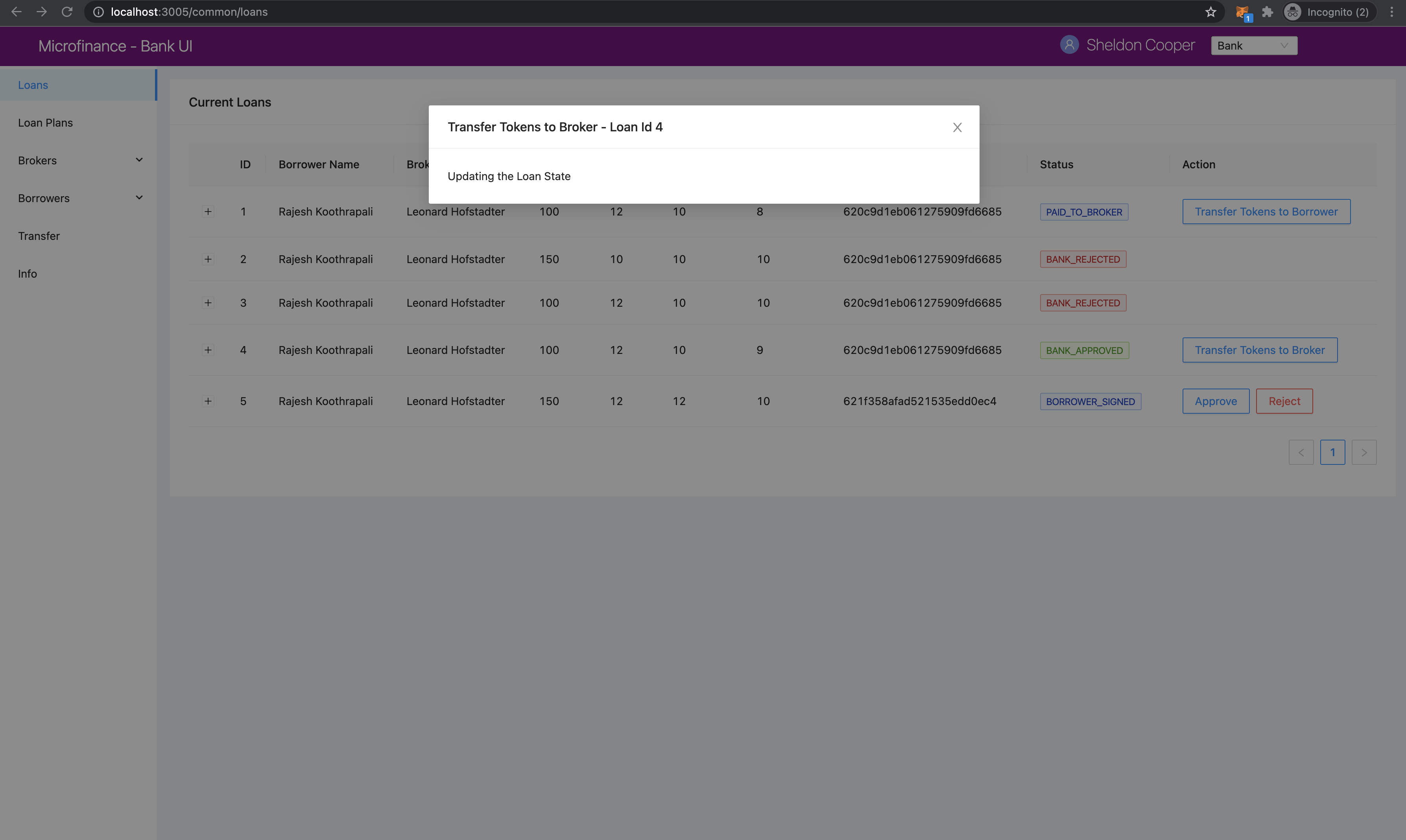
Then transferTokensToBroker triggers the confirmTokenTrasferToBroker function and passes Loan Id; loanRecord.id as a parameter.
By clicking Confirm in MetaMask pop-up message Bank user can update the Loan state in BankLoan smart contract.
When user successfully updates the BankLoan smart contract it resets the tokenTransferStep and
sets isBrokerTransferModalVisible state to false. It removes the Modal from the UI.
confirmTokenTrasferToBroker calls the confirmTokenTrasferToBroker method of the BankLoan smart contract and
passes the loanId and `` MetaMask selected wallet account address.
const confirmTokenTrasferToBroker = async (loanId) => {
  try {
    const accounts = await window.ethereum.request({ method: 'eth_requestAccounts' });
    await BankLoanContract.methods.confirmTokenTrasferToBroker(loanId).send({ from: accounts[0] });
    message.success(`Loan ${loanId} updated`);
    loadData();
  } catch (err) {
    console.log(err);
    message.error('Error occured while updating Loan');
  }
};
BankLoan smart contract’s confirmTokenTrasferToBorrower method described in
confirmTokenTrasferToBroker section.
Transfer Tokens to Borrower Event Flow
After Bank user transfer tokens to the Broker and updates the Loan state in
BankLoan smart contract Loan state is changed to 4 (PAID_TO_BROKER).
When loan is in state 4, Action column enables Transfer Tokens to Borrower
action to the Bank user.
else if (record.status === '4') {
  actionBlock =
    <Button type="primary" ghost onClick={() => showBorrowerTransferModal(record)}>
      Transfer Tokens to Borrower
    </Button>
}
When Bank user clicks the Transfer Tokens to Borrower button it triggers the showBorrowerTransferModal
function and passes the Loan record (record) as a parameter.
const showBorrowerTransferModal = (row) => {
  setLoanRecord(row);
  setIsBorrowerTransferModalVisible(true);
};
showBorrowerTransferModal function sets the Loan record row details as the loanRecord state and
sets isBorrowerTransferModalVisible state to true.
This displays the Modal defined in the return section of the LoansTable component.
<Modal
  title={`Transfer Tokens to Borrower - Loan Id ${loanRecord.id}`}
  visible={isBorrowerTransferModalVisible}
  width={700}
  onCancel={handleCancel}
  footer={null}
>
  ...
</Modal>
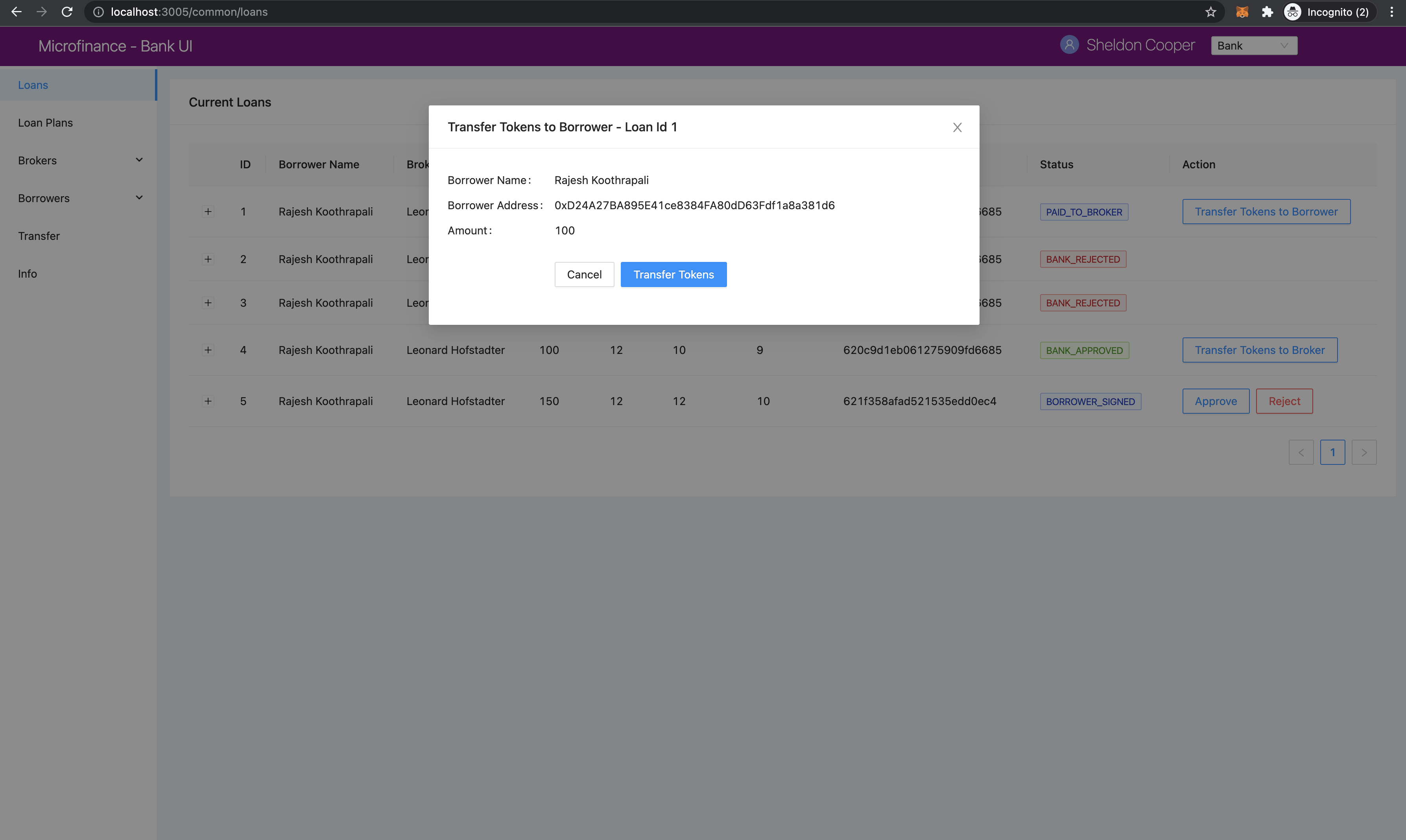
This modal displays the details of loanRecord state.
It displays the Transfer Tokens to Borrower and the Loan Id in the Modal title.
Modal visibility is controlled by isBrokerTransferModalVisible state.
Modal body part is rendered using tokenTransferStep as follows.
{
  tokenTransferStep === 0 &&
  <Form ... >
    ...
  </Form>
}
{
  tokenTransferStep === 1 &&
  <span>Updating the Loan State</span>
}
tokenTransferStep state controls the current step of this Bank to Borrower token transaction process.
When modal pop-ups tokenTransferStep state has the value 0 and it displays the
Token Transfer details in the Modal body. When tokenTransferStep is 1 it displays the
Updating the Loan State message.
Token transaction details are displayed using Form component as follows.
<Form
  ...
  onFinish={transferTokensToBorrower}
>
  <Form.Item label="Borrower Name" style={{ marginBottom: '0px' }}>
    <span> { loanRecord.borrowerName } </span>
  </Form.Item>
  <Form.Item label="Borrower Address" style={{ marginBottom: '0px' }}>
    <span> { loanRecord.borrower } </span>
  </Form.Item>
  <Form.Item label="Amount">
    <span> { loanRecord.amount } </span>
  </Form.Item>
  <Form.Item wrapperCol={{
    lg: { span: 14, offset: 6 },
    xl: { span: 14, offset: 5 },
    xxl: { span: 14, offset: 5 } }}
  >
    <Space direction="horizontal">
      <Button onClick={() => handleCancel()}>Cancel</Button>
      <Button type="primary" htmlType="submit">Transfer Tokens</Button>
    </Space>
  </Form.Item>
</Form>
This Form component displays the Borrower Name, Borrower Wallet Address and Token Amount using
loanRecord state as shown in the above screenshot.
When Bank user clicks the Transfer Tokens button it triggers the transferTokensToBorrower function.
Complete Modal component:
<Modal
  title={`Transfer Tokens to Borrower - Loan Id ${loanRecord.id}`}
  visible={isBorrowerTransferModalVisible}
  width={700}
  onCancel={handleCancel}
  footer={null}
>
  {
    tokenTransferStep === 0 &&
    <Form
      labelCol={{
        lg: 6,
        xl: 5,
        xxl: 5,
      }}
      wrapperCol={{
        lg: 20,
        xl: 20,
        xxl: 20,
      }}
      layout="horizontal"
      size="default"
      labelAlign="left"
      onFinish={transferTokensToBorrower}
    >
      <Form.Item label="Borrower Name" style={{ marginBottom: '0px' }}>
        <span> { loanRecord.borrowerName } </span>
      </Form.Item>
      <Form.Item label="Borrower Address" style={{ marginBottom: '0px' }}>
        <span> { loanRecord.borrower } </span>
      </Form.Item>
      <Form.Item label="Amount">
        <span> { loanRecord.amount } </span>
      </Form.Item>
      <Form.Item wrapperCol={{
        lg: { span: 14, offset: 6 },
        xl: { span: 14, offset: 5 },
        xxl: { span: 14, offset: 5 } }}
      >
        <Space direction="horizontal">
          <Button onClick={() => handleCancel()}>Cancel</Button>
          <Button type="primary" htmlType="submit">Transfer Tokens</Button>
        </Space>
      </Form.Item>
    </Form>
  }
  {
    tokenTransferStep === 1 &&
    <span>Updating the Loan State</span>
  }
</Modal>
transferTokensToBorrower function:
const transferTokensToBorrower = async () => {
  try {
    const accounts = await window.ethereum.request({ method: 'eth_requestAccounts' });
    await MicroTokenContract.methods.transfer(loanRecord.borrower, loanRecord.amount).send({
      from: accounts[0] });
    message.success('Token transferred successfully');
    await setTokenTransferStep(1);
    await confirmTokenTrasferToBorrower(loanRecord.id);
    await setTokenTransferStep(0);
    await setIsBorrowerTransferModalVisible(false);
  } catch (err) {
    console.log(err);
    await setTokenTransferStep(0);
    message.error('Error occured while transferring tokens');
  }
};
transferTokensToBorrower calls the transfer method of the MicroToken smart contract method using
MicroTokenContract contract object.
It passes the selected wallet account address as the from value in the send method.
When token transaction successfully executed this function updates the tokenTransferStep to 1.
It updates the current Modal body content.
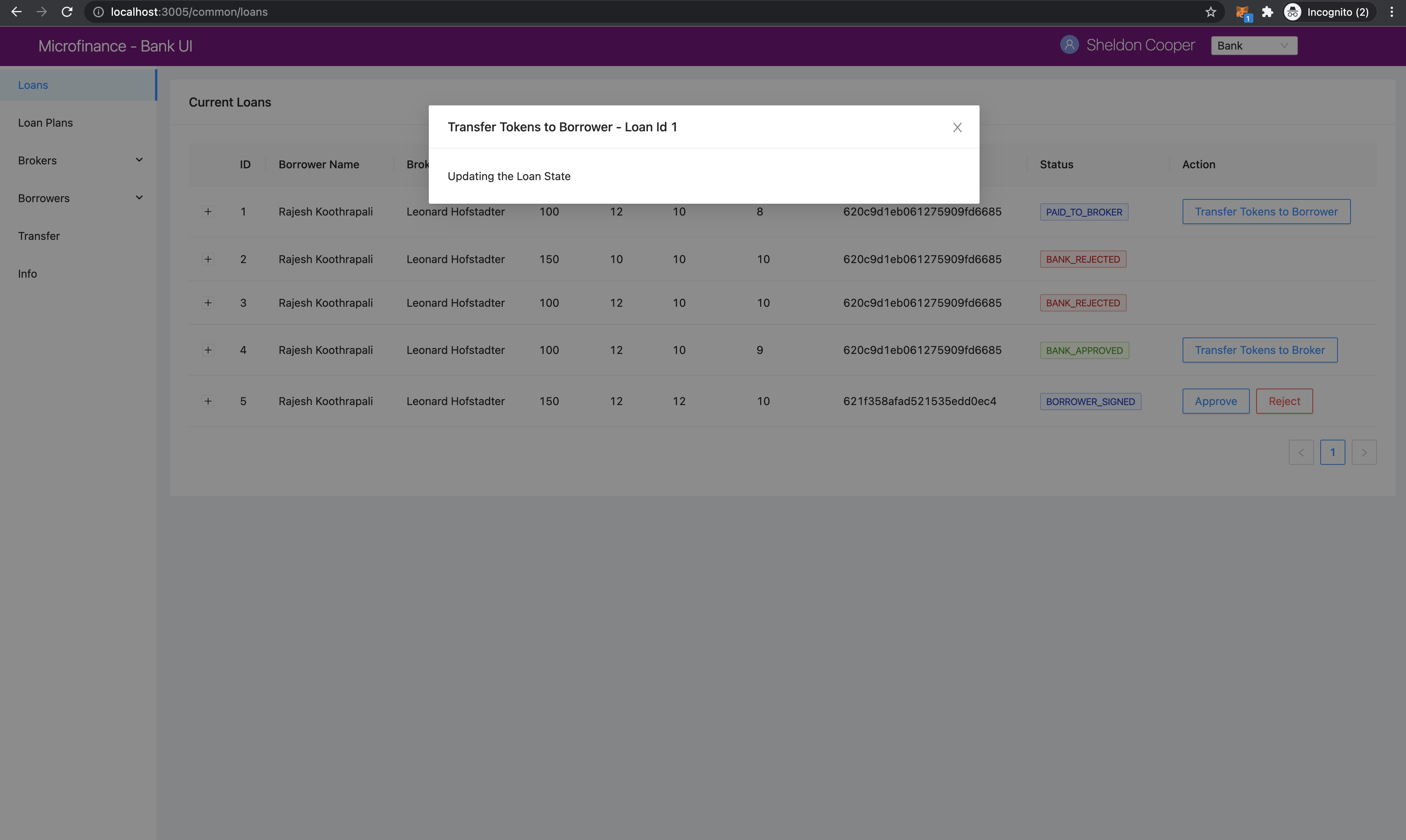
Then transferTokensToBorrower triggers the confirmTokenTrasferToBorrower function and passes Loan Id; loanRecord.id as a parameter.
By clicking Confirm in MetaMask pop-up message Bank user can update the Loan state in BankLoan smart contract.
When user successfully updates the BankLoan smart contract it resets the tokenTransferStep and
sets isBorrowerTransferModalVisible state to false. It removes the Modal from the UI.
confirmTokenTrasferToBorrower calls the confirmTokenTrasferToBorrower method of the BankLoan smart contract and
passes the loanId and `` MetaMask selected wallet account address.
const confirmTokenTrasferToBorrower = async (loanId) => {
  try {
    const accounts = await window.ethereum.request({ method: 'eth_requestAccounts' });
    await BankLoanContract.methods.confirmTokenTrasferToBorrower(loanId).send({ from: accounts[0] });
    message.success(`Loan ${loanId} updated`);
    loadData();
  } catch (err) {
    console.log(err);
    message.error('Error occured while updating Loan');
  }
};
BankLoan smart contract’s confirmTokenTrasferToBorrower method is described in
confirmTokenTrasferToBorrower section.
Close Loan Event Flow
If Loan is in 5 (ONGOING) state, Action column displays Close and Defaulted
actions to the Bank user.
else if (record.status === '5') {
  actionBlock =
    <Space>
      <Button type="primary" ghost onClick={() => closeLoan(record.id)}> Close </Button>
      <Button type="primary" danger ghost onClick={() => markAsDefaulted(record.id)}> Defaulted </Button>
    </Space>;
}
When Bank user clicks the Close action it triggers the closeLoan function and passes
Loan Id record,id as a parameter.
const closeLoan = async (loanId) => {
  try {
    const accounts = await window.ethereum.request({ method: 'eth_requestAccounts' });
    await BankLoanContract.methods.closeLoan(loanId).send({ from: accounts[0] });
    message.success(`Loan ${loanId} updated`);
    loadData();
  } catch (err) {
    console.log(err);
    message.error('Error occured while updating Loan');
  }
};
In closeLoan function, it calls the closeLoan smart contract method and passes the loanId.
If this transaction successful it display the success message and load data.
If not, it displays the error message.
BankLoan smart contract’s closeLoan method described in
closeLoan section.
Loan Mark as Default Event Flow
Second action enabled for the loan state 5 (ONGOING) is Defaulted action for the Bank users.
else if (record.status === '5') {
  actionBlock =
    <Space>
      <Button type="primary" ghost onClick={() => closeLoan(record.id)}> Close </Button>
      <Button type="primary" danger ghost onClick={() => markAsDefaulted(record.id)}> Defaulted </Button>
    </Space>;
}
When Bank user clicks the Defaulted action it triggers the markAsDefaulted function and passes
Loan Id record,id as a parameter.
const markAsDefaulted = async (loanId) => {
              try {
                      const accounts = await window.ethereum.request({ method: 'eth_requestAccounts' });
                      await BankLoanContract.methods.markAsDefaulted(loanId).send({ from: accounts[0] });
                      message.success(`Loan ${loanId} updated`);
                      loadData();
              } catch (err) {
                      console.log(err);
                      message.error('Error occured while updating Loan');
              }
      };
In markAsDefaulted function, it calls the markAsDefaulted smart contract method and passes the loanId.
If this transaction successful it display the success message and load data.
If not, it displays the error message.
BankLoan smart contract’s closeLoan method described in
markAsDefaulted section.