Fetch Loan Plans from Bank Web Server
In this section we discuss about ho to fetch Loan Plans from Bank Web Server
As we disccuss in the Create Loan Plan Event Flow, Microfinance -Bank UI displays a Loan Plans table
at the bottom of the Loan Plans page.
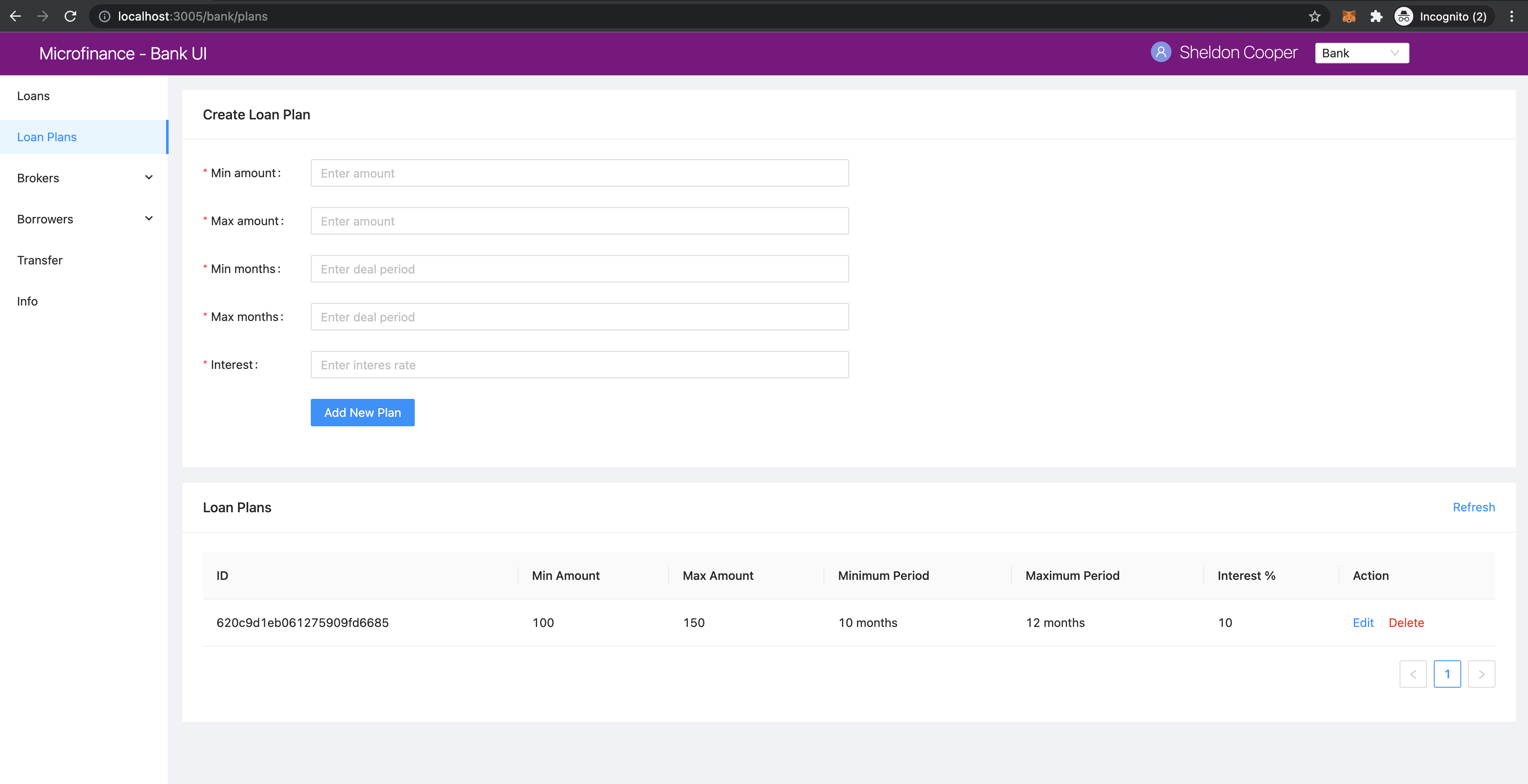
We illustrate the flow of events from React web app (UI) to
bank-web-app/pages/bank/plans.js to bank-web-app/components/plan/PlansTable.js.
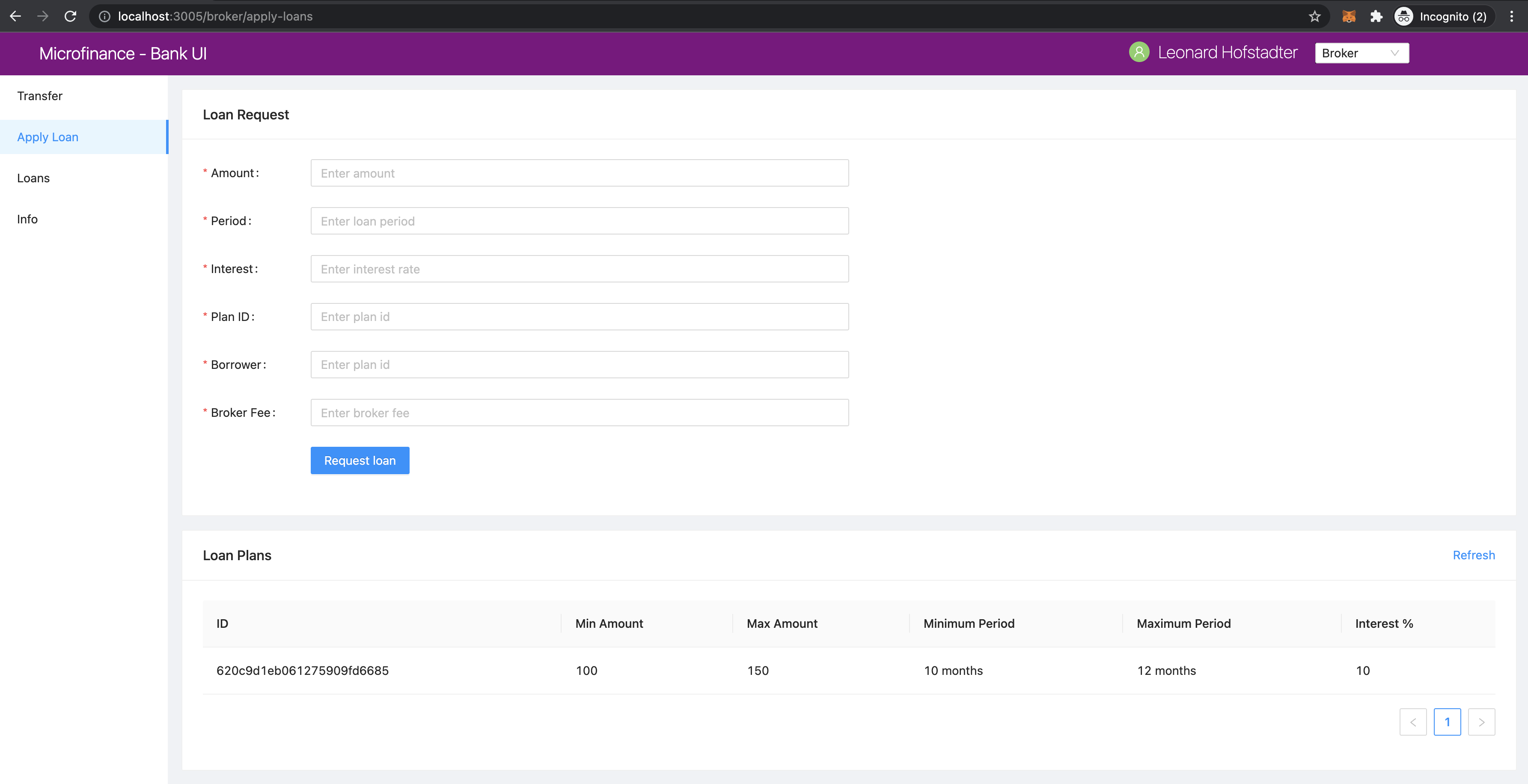
This plan table will be rendered according to the user role.
for Bank user role it displays Action column with Edit and Delete options for each Loan Plan.
It will display for Broker``s at the bottom of the ``Apply Loan page in BrokerMenu.
plans.js
The script of the plans.js.
import React, { useState } from 'react';
import { Row, Col } from 'antd';
import PlansTable from '../../components/plan/PlansTable';
import CreatePlanForm from '../../components/plan/CreatePlanForm';

function BankPlans() {
    const [togglePlan, setTogglePlan] = useState(true);
    return (
        <Row gutter={[16, 16]}>
            <Col span={24}>
                <CreatePlanForm setTogglePlan={setTogglePlan} togglePlan={togglePlan} />
            </Col>
            <Col span={24}>
                <PlansTable togglePlan={togglePlan} />
            </Col>
        </Row>
    );
}

export default BankPlans;
In this plan.js script uses PlanTable component and pass props togglePlan.
It will render the PlansTable component in bank-web-app/components/plan/PlansTable.js.
PlansTable.js
in PlansTable.js script, first it imports following dependencies.
import React, { useState, useContext, useEffect } from 'react';
import { Table, Form, InputNumber, Card, Divider, Modal, Button, message } from 'antd';
import { CloseCircleOutlined } from '@ant-design/icons';
import { getApi, patchApi, deleteApi } from '../../util/fetchApi';
import PropTypes from 'prop-types';
import UserContext from '../../stores/userContext';
It imports
getApi,patchApi,deleteApifromfetchApito get, edit and delete Loan Plans.PropTypesto check prop types in the component.UserContextfor access the user.
Then it defines the PlansTable component as follows.
function PlansTable({ togglePlan })
It gets togglePlan prop when create the component.
PlansTable has following states.
const { user } = useContext(UserContext);
const [isModalVisible, setIsModalVisible] = useState(false);
const [data, setData] = useState([]);
userstate has the selected user role.isModalVisiblestores the Loan Plan Edit Modal visibility state.datastate contains the Loan Plans details.
following states use when Edit and Delete the Loan Plans.
const [id, setId] = useState(''); // Loan id state.
const [minAmount, setMinAmount] = useState(''); // Minimum amount of the loan
const [maxAmount, setMaxAmount] = useState(''); // Maximum amount of the loan
const [minMonths, setMinMonths] = useState(''); // Minimum duration of the loan in months.
const [maxMonths, setMaxMonths] = useState(''); // Maximum duration of the loan in months.
const [interest, setInterest] = useState(''); // Loan interest.
It uses cofirm Modal component from Ant design to display confirmation messages.
const { confirm } = Modal;
fetchPlan function will load the Loan Plans from Bank Web Server using getApi method from fetchApi script.
const fetchPlans = async () => {
  try {
    const plans = await getApi({
      url: 'loan-plans',
    });

    setData([]);
    // Add all Loan Plans to the data array.
    for (let i = 0; i < plans.length; i++) {
      const row = {
        key: plans[i]._id,
        id: plans[i]._id,
        minAmount: plans[i].minAmount,
        maxAmount: plans[i].maxAmount,
        minMonths: plans[i].minMonths,
        maxMonths: plans[i].maxMonths,
        interest: plans[i].interest,
      };

      setData((prev) => {
        // Spread operator(...) helps to update the states.
        // Append each Loan Plan to the data array.
        return [...prev, row];
      });
    }
  } catch (err) {
    console.log(err);
    message.error('Error occured while loading Loan Plans');
  }
};
In the above method first it loads the Loan Plans from loan-plans api end point.
const plans = await getApi({
    url: 'loan-plans',
});
After reset the data state it will map the resulting Loan Plans in to a objects and appent in the data state.
setData([]);
for (let i = 0; i < plans.length; i++) {
    const row = {
        key: plans[i]._id,
        id: plans[i]._id,
        minAmount: plans[i].minAmount,
        maxAmount: plans[i].maxAmount,
        minMonths: plans[i].minMonths,
        maxMonths: plans[i].maxMonths,
        interest: plans[i].interest,
    };

    setData((prev) => {
        return [...prev, row];
    });
}
The spread operator ...prev will return the exisiting data in the data state and then append the next Loan Plan
object to the data state.
We use useEffect hook to trigger fetchPlans function when first time PlansTable component mount to the UI and
then when togglePlan state change. As we discuss above togglePlan is a state value passed from BankPlans
component defined in the plans.js.
When user add new Loan Plan and change the togglePlan state, this hook helps to reload the Loan Plans table
in PlansTable component.
useEffect(() => {
              fetchPlans();
      }, [togglePlan]);
In the middle of this PlansTable component it defines the columns object.
const columns = [
  {
    title: 'ID',
    dataIndex: 'id',
    key: 'id',
  },
  {
    title: 'Min Amount',
    dataIndex: 'minAmount',
    key: 'minAmount',
  },
  {
    title: 'Max Amount',
    dataIndex: 'maxAmount',
    key: 'maxAmount',
  },
  {
    title: 'Minimum Period',
    dataIndex: 'minMonths',
    key: 'minMonths',
    render: text => text + ' months',
  },
  {
    title: 'Maximum Period',
    dataIndex: 'maxMonths',
    key: 'maxMonths',
    render: text => text + ' months',
  },
  {
    title: 'Interest %',
    key: 'interest',
    dataIndex: 'interest',
  },
];
This column object has all coomon columns details of the Loan Plans table.
columns is an object array.
Each object of this array represent on column and all obejcts have title, dataIndex and key keys.
title- Column namedataIndex- Key name of the data object which will display on this column.key- Unique id for each element in the data array.
In addition to these key values some of the objects has render value.
This helps to add additional information or make changes to the data which will display in column.
As an example Minimum Period column has a render method.
{
  title: 'Minimum Period',
  dataIndex: 'minMonths',
  key: 'minMonths',
  render: text => text + ' months',
},
Minimum Period contains a integer value in data object.
render method helps to add `` months`` key word to every data onject in the Minimum Period column.
This columns object array doesn’t contain any Action column.
This Action column displays only for Bank users.
We can add Action column to the columns object array as follows.
if (user.role === 'bank') {
    columns.push({
        title: 'Action',
        dataIndex: '', // Not specify the Data property. Data object will use in render method.
        key: 'id',
        render: (record) =>
            <span>
                <a href onClick={() => showModal(record.id)}>Edit</a>
                <Divider type="vertical" />
                <a href onClick={() => deletePlan(record.id)} style={{ color: 'red' }}>Delete</a>
            </span>
        ),
    });
}
Using if condition first we check the selected user role.
Then we push Action column to the columns object array.
This Action column object has title value but no dataIndex value.
Since we don’t have any specific data value to display in this column we do not specify the dataIndex
In render method it will get the Loan Plan object as record parameter.
This column displays Edit and Delete links.
When user click on the Edit link it will open a Ant design Modal with the selected Loan Plan details.
It facilitates to edit the each Loan Plan values but Loan Plan Id.
Delete link will open a confirm Ant design Modal to delete the Loan Plan.
In the return section of the PlansTable component first it defines the Loan Plans Table in a Ant design Card component.
<Card
    title="Loan Plans"
    extra={<a href onClick={() => fetchPlans()}>Refresh</a>}
>
  <Table columns={columns} dataSource={data} />
</Card>
This card displays Loan Plans as the card title.
extra prop will display Refresh link at the right top corner of the Card coponent.
By clicking this Refresh link user can update the Loan Plans Table.
Refresh link will trigger the fetchPlans function.
Later in the Table Ant design component we pass the columns and dataSource prop.
columns prop value set to columns object array and data object array set as the dataIndex prop.
If there are any changes in the data state may reflect in the Loan Plans Table.
getApi Method of fetchApi.js
We define the getApi method in fetchApi.js as follows.
const getApi = async ({ url, options, params } = mandatory(), cb = f => f)
getApi is a asynchronous function.
It takes 2 parameters.
As we discussed in the postApi function, First parameter of the getApi function
is a object and it contains the keys {url, options, params}.
mandatory is the default value for this object.
If any component call this method without this object it will execute the mandatory() function.
const mandatory = () => {
  return Promise.reject(new Error('Fetch API Missing parameter!'));
};
The mandatory function will return a Promise that rejecting the server call.
This will display an Error message Fetch API Missing parameter! in the UI.
The second parameter is cb stands for callback function.
When any component submits a callback function to this getApi function it will trigger this callback function
at the end of the getApi function.
The default value for the cb is f => f is a simple arrow funcion which is equal to (f) => { return f }.
in getApi function, first it defines the defaultOptions object.
const defaultOptions = {
  method: 'GET',
  headers: {
    'Accept': 'application/json',
    'Content-Type': 'application/json',
  },
};
This object defines the HTTP Request method GET and the request headers for the HTTP Request.
Then it will merge the defaultOptions object and the options object.
We can override these HTTP Request parameters by passing the options object.
const opts = merge(defaultOptions, options);
Then it creates the api url using the url value passed in to the getApi function.
let uri = API_URL + url;
Unlike POST HTTP requests GET requests do not contain body objects in the HTTP request.
Insted we can pass parameters in url.
The following code defines the request url using the params object passed to the getApi function.
if (params && Object.keys(params).length > 0) {
  if (opts && opts.method === 'GET') {
    uri += '?' + new URLSearchParams(params);
    console.log(uri);
  }
}
Then it calls the api using JavaScript fetch api and wait for the response from the Bank Web Server.
const response = await fetch(uri, opts);
const data = await response.json();
To return results to the caller component it will use the callback function.
Then return the results as follows.
Any component in the app can get results through the getApi function
by passing a callback function or using await method.
cb(null, data);
return data;
If error occured while this transaction it will call the callback function with error and
returns a Promise.reject with the error.
cb(err);
return Promise.reject(err);
Edit Loan Plans Event Flow
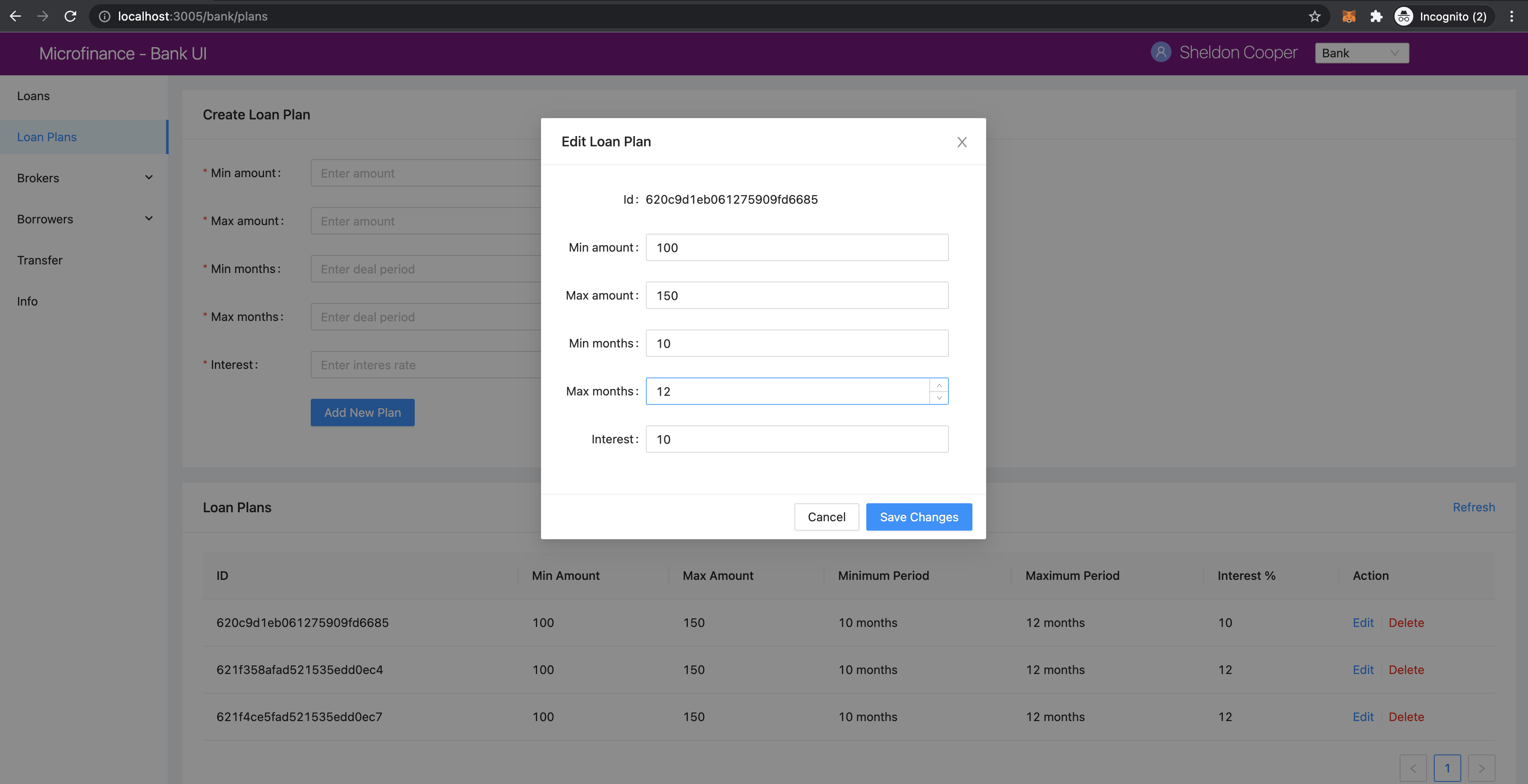
As we discuss above in Action column in PlansTable is enabled for Bank users.
When Bank user click the Edit then PlansTable component displays a Ant design Modal
with the selected Loan Plan. details.
PlansTable.js
The render method of the Action column was defined as follows.
render: (record) =>
    <span>
        <a href onClick={() => showModal(record.id)}>Edit</a>
        <Divider type="vertical" />
        <a href onClick={() => deletePlan(record.id)} style={{ color: 'red' }}>Delete</a>
    </span>
),
When user clicks Edit will trigger the showModal function and Loan Plan Id passed as a parameter.
const showModal = (planId) => {
  fetchPlanById(planId);
  setIsModalVisible(true);
};
In the showModal function, first it will fetch Loan Plan data using fetchPlanById function.
Then it will change the modalVisibility state value to true using its setter method setIsModalVisible.
const fetchPlanById = async (planId) => {
  try {
    const response = await getApi({
      url: 'loan-plans/' + planId,
    });

    const plan = await response;
    setId(plan._id);
    setMinAmount(plan.minAmount);
    setMaxAmount(plan.maxAmount);
    setMinMonths(plan.minMonths);
    setMaxMonths(plan.maxMonths);
    setInterest(plan.interest);
  } catch (err) {
    console.log(err);
    message.error('Error occured while loading Loan Plan');
  }
};
fetchPlanById function got the planId, Loan Plan Id as a parameter.
Then it will fetch data from Bank Web Server using getApi of fetchApi script.
The url of the api end point consists with /loan-plans and planId.
Bank Web Server will return Loan Plan saved under this planId.
We fetch Loan Plan data from the Bank Web Server because the data in the Loan Plans Table could be outdated.
id, minAmount, maxAmount, minMonths, maxMonths, and interest states are updated using the response from
Bank Web Server.
When isModalVisible state value is true the above Modal displays in the Microfinance - Bank UI.
This Modal is defined in the return section in the PlansTable component as follows.
<Modal
  title="Edit Loan Plan"
  visible={isModalVisible} //Change the visibility according to isModalVisibility state.
  onCancel={handleCancel} // Function to be executed when user clicks the Cancel button of the modal.
  // Defines the footer of the modal.
  footer={[
    <Button key="back" onClick={handleCancel}>
      Cancel
    </Button>,
    <Button key="submit" type="primary" onClick={handleOk}>
      Save Changes
    </Button>,
  ]}
>
  <Form ... >
    ...
  </Form>
<Modal>
Modal gets some props to define its appearance and behaviour.
title- Displays the given titleEdit Loan Planat the top of the Modal.visibility- Changes the Modal visibility according toisModalVisiblestate.onCancel- Triggers the given functionhandleCancelwhen user clicks on thecrossicon in the top right corner of the Modal.footer- Defines the footer components.
There are 2 buttons defined in the footer section of the Modal.
Cancel button will trigger the handleCancel function and Save Changes button triggers the handleOk function.
In the Modal component there is a Form component.
<Form ... >
  <Form.Item label="Id">
    <span className="ant-form-text">{id}</span>
  </Form.Item>
  <Form.Item label="Min amount">
    <InputNumber
      min="0"
      style={{ width: '100%' }}
      placeholder="Enter minimum loan amount"
      value={minAmount}
      onChange={(e) => setMinAmount(e)}
    />
  </Form.Item>
  <Form.Item label="Max amount">
    <InputNumber
      min="0"
      style={{ width: '100%' }}
      placeholder="Enter maximum loan amount"
      value={maxAmount}
      onChange={(e) => setMaxAmount(e)}
    />
  </Form.Item>
  <Form.Item label="Min months">
    <InputNumber
      min="0"
      style={{ width: '100%' }}
      placeholder="Enter minimum loan period"
      value={minMonths}
      onChange={(e) => setMinMonths(e)}
    />
  </Form.Item>
  <Form.Item label="Max months">
    <InputNumber
      min="0"
      style={{ width: '100%' }}
      placeholder="Enter maximum loan period"
      value={maxMonths}
      onChange={(e) => setMaxMonths(e)}
    />
  </Form.Item>
  <Form.Item label="Interest">
    <InputNumber
      min="0"
      style={{ width: '100%' }}
      placeholder="Enter interes rate of loan"
      value={interest}
      onChange={(e) => setInterest(e)}
    />
  </Form.Item>
</Form>
In this Form all Form.Item components display their values using states defined in PlansTable component.
Any changes in these states will reflect in the Form.
When user edit data, These Form.Item s will update states as well.
The first Form.Item component displays Loan Plan Id using id state in a span tag.
This id state will update when user clicks Edit and gets the Loan Plan data from the Bank Web Server.
This value is not editable.
User cannot edit the Loan Plan Id value.
Second Form.Item displays the minAmount state value in InputNumber component using value={minAmount}.
onChange={(e) => setMinAmount(e)} will update the minAmount state from the user input when user edit the Min Amount field.
This mechanism is repeated for remaining 4 Form.Item components.
After updating the form fields user can click the Save Changes button at the bottom of the Modal.
As we mentioned before it will trigger the handleOk function.
const handleOk = async () => {
  try {
    const body = {
      minAmount,
      maxAmount,
      minMonths,
      maxMonths,
      interest,
    };

    const response = await patchApi({
      url: 'loan-plans/' + id,
      params: body,
    });

    message.success('Loan Plan updated successfully');
    setIsModalVisible(false);
    fetchPlans();
  } catch (err) {
    message.error('Error while updating the Loan Plan');
    console.log(err);
  }
};
In handleOk function, first it defines Loan Plan object.
const body = {
  minAmount,
  maxAmount,
  minMonths,
  maxMonths,
  interest,
};
This is a shorthand mechanism to define object in JavaScript. This method can use for each key and the value of the object has same name. This is equal to define a obejct as follows.
const body = {
  minAmount: minAmount,
  maxAmount: maxAmount,
  minMonths: minMonths,
  maxMonths: maxMonths,
  interest: interest,
};
Then it will send the updated Loan PLan object to the Bank Web Server using patchApi function.
const response = await patchApi({
  url: 'loan-plans/' + id,
  params: body,
});
HTTP PATCH Request contains the editing Loan Plan Id in the url and updated field values in the request body.
After successfully update data in the MongoDB it will
- show Loan Plan updated successfully message at the top of the Microfinance - Bank UI
- change the visibilty of the Loan Plan Edit Modal and remove it from the UI.
- fetch Loan Plans from the Bank Web Server to update the Loan Plans Table.
patchApi Method of fetchApi.js
We define the patchApi method in fetchApi.js as follows.
const patchApi = async ({ url, options, params } = mandatory(), cb = f => f)
patchApi is a asynchronous function.
It takes 2 parameters.
As we discussed in the postApi function, First parameter of the patchApi function
is a object and it contains the keys {url, options, params}.
mandatory is the default value for this object.
If any component call this method without this object it will execute the mandatory() function.
const mandatory = () => {
  return Promise.reject(new Error('Fetch API Missing parameter!'));
};
The mandatory function will return a Promise that rejecting the server call.
This will display an Error message Fetch API Missing parameter! in the UI.
The second parameter is cb stands for callback function.
When any component submits a callback function to this getApi function it will trigger this callback function
at the end of the getApi function.
The default value for the cb is f => f is a simple arrow funcion which is equal to (f) => { return f }.
in patchApi function, first it defines the defaultOptions object.
const defaultOptions = {
  method: 'PATCH',
  headers: {
    'Accept': 'application/json',
    'Content-Type': 'application/json',
  },
};
We can use HTTP PATCH method to send updates to a API.
This object defines the HTTP Request method PATCH and the request headers for the HTTP Request.
Then it will merge the defaultOptions object and the options object.
We can override these HTTP Request parameters by passing the options object.
const opts = merge(defaultOptions, options);
Then it creates the api url using the url value passed in to the getApi function.
let uri = API_URL + url;
Then adds the body to the HTTP Request from the params object.
Before that params object will convert in to a json object as follows.
if (params && Object.keys(params).length > 0) {
  opts.body = JSON.stringify(params);
}
Then it calls the api using JavaScript fetch api and wait for the response from the Bank Web Server.
const response = await fetch(uri, opts);
const data = await response.json();
To return results to the caller component it will use the callback function.
Then return the results as follows.
cb(null, data);
return data;
If error occured while this transaction it will call the callback function with error and
returns a Promise.reject with the error.
cb(err);
return Promise.reject(err);
Delete Loan Plan Event Flow
The second action displaying in the Action column is Delete.
This action is enabled in the Loan Plans table in Loan Plan page in the Bank user view.
PlansTable.js
In PlansTable component Action column is defined as foloows.
columns.push({
  title: 'Action',
  dataIndex: '', // Not specify the Data property. Data object will use in render method.
  key: 'id',
  render: (record) => (
    // Data object passed as record parameter.
    <span>
      {/* Pass loan plan id to the showModal and deletePlan methods. */}
      <a href onClick={() => showModal(record.id)}>Edit</a>
      <Divider type="vertical" />
      <a href onClick={() => deletePlan(record.id)} style={{ color: 'red' }}>Delete</a>
    </span>
  ),
});
It displays Delete button in red color.
When user click the Delete tag it will trigger the deletePlan function.
Loan Plan Id is passed as a parameter to this deletePlan function.
In deletePlan function it creates a confirm type Modal from Ant design Modal compenent.
As shown in the above screenshot we define the icon of this confirm Modal and it content.
This cofirm modal displays the Delete Loan Plan ${planId} message including the selected Loan Plan Id.
const deletePlan = (planId) => {
  confirm({
    icon: <CloseCircleOutlined style={{ color: 'red' }} />,
    content: `Delete Loan Plan ${planId}`,
    okText: 'Delete',
    onOk: async () => {
      try {
        const response = await deleteApi({
          url: 'loan-plans/' + planId,
        });
        if (response.status === 200) {
          await message.success('Sucsessfully delete the Loan Plan');
          fetchPlans();
        } else {
          message.error('Error occured while deleting loan plan');
        }
      } catch (err) {
        console.log(err);
        message.error('Error occured while deleting loan plan');
      }
    },
  });
};
onOk function will be triggered when user clicks the Delete button in the confirm Modal.
In this onOk function it defines the api url value including the Loan Plan Id.
Then submits the DELETE HTTP Request to the Bank Web Server using deleteApi function in the fetchApi.
If it gets a success response,
it will display the Sucsessfully delete the loan plan message on the top of the Microfinance - Bank UI and trigger
fetchPlans function to update the Loan Plans table.
If there is any error occured while trying to delete the Loan Plan it will display the Error meesage on the top of the Microfinance - Bank UI.
deleteApi Method of fetchApi.js
We define the patchApi method in fetchApi.js as follows.
const deleteApi = async ({ url, options, params } = mandatory(), cb = f => f)
deleteApi is a asynchronous function.
It takes 2 parameters.
As we discussed in the postApi function, First parameter of the deleteApi function
is a object and it contains the keys {url, options, params}.
mandatory is the default value for this object.
If any component call this method without this object it will execute the mandatory() function.
const mandatory = () => {
  return Promise.reject(new Error('Fetch API Missing parameter!'));
};
The mandatory function will return a Promise that rejecting the server call.
This will display an Error message Fetch API Missing parameter! in the UI.
The second parameter is cb stands for callback function.
When any component submits a callback function to this getApi function it will trigger this callback function
at the end of the getApi function.
The default value for the cb is f => f is a simple arrow funcion which is equal to (f) => { return f }.
in deleteApi function, first it defines the defaultOptions object.
const defaultOptions = {
  method: 'DELETE',
  headers: {
    'Accept': 'application/json',
    'Content-Type': 'application/json',
  },
};
We can use HTTP DELETE method to delete operations in through API.
This object defines the HTTP Request method DELETE and the request headers for the HTTP Request.
Then it will merge the defaultOptions object and the options object.
We can override these HTTP Request parameters by passing the options object.
const opts = merge(defaultOptions, options);
Then it creates the api url using the url value passed in to the getApi function.
let uri = API_URL + url;
Then adds the body to the HTTP Request from the params object.
Before that params object will convert in to a json object as follows.
if (params && Object.keys(params).length > 0) {
  if (opts && opts.method === 'GET') {
    uri += '?' + new URLSearchParams(params);
    console.log(uri);
  }
}
Then it calls the api using JavaScript fetch api and wait for the response from the Bank Web Server.
const response = await fetch(uri, opts);
const data = await response.json();
To return results to the caller component it will use the callback function.
Then return the results as follows.
cb(null, data);
return data;
If error occured while this transaction it will call the callback function with error and
returns a Promise.reject with the error.
cb(err);
return Promise.reject(err);
At the end of the PlansTable.js script it checks the PropTypes of the PlansTable component.
PlansTable.propTypes = {
  togglePlan: PropTypes.bool,
};
PropTypes checks the type of the togglePlan prop.
If parent component passes any prop value not a boolean type it will give warning in the console.
But this togglePlan prop is not required prop.
Complete PlansTable.js script including all above details.
import React, { useState, useContext, useEffect } from 'react';
import { Table, Form, InputNumber, Card, Divider, Modal, Button, message } from 'antd';
import { CloseCircleOutlined } from '@ant-design/icons';
import { getApi, patchApi, deleteApi } from '../../util/fetchApi';
import PropTypes from 'prop-types';
import UserContext from '../../stores/userContext';`

function PlansTable({ togglePlan }) {
  const { user } = useContext(UserContext); // Access the use role selected from userContext.
  const [isModalVisible, setIsModalVisible] = useState(false); // Edit Loan Plan Modal visibility state.
  const [data, setData] = useState([]); // Stores Loan Plan data.

  const [id, setId] = useState(''); // Loan id state.
  const [minAmount, setMinAmount] = useState(''); // Minimum amount of the loan
  const [maxAmount, setMaxAmount] = useState(''); // Maximum amount of the loan
  const [minMonths, setMinMonths] = useState(''); // Minimum duration of the loan in months.
  const [maxMonths, setMaxMonths] = useState(''); // Maximum duration of the loan in months.
  const [interest, setInterest] = useState(''); // Loan interest.

  const { confirm } = Modal;

  // Get all loan plans from the bank server.
  const fetchPlans = async () => {
    try {

      // Calls http get method to fetch all loan plans from the bank server.
      const plans = await getApi({
        url: 'loan-plans', // Calls <Bank Server URL>/loan-plans api.
      });

      setData([]); // Initialize data array to zero elements to add all Loan Plans from the bank server response.
      // Add all Loan Plans to the data array.
      for (let i = 0; i < plans.length; i++) {
        const row = {
          key: plans[i]._id,
          id: plans[i]._id,
          minAmount: plans[i].minAmount,
          maxAmount: plans[i].maxAmount,
          minMonths: plans[i].minMonths,
          maxMonths: plans[i].maxMonths,
          interest: plans[i].interest,
        };

        setData((prev) => {
          // Spread operator(...) helps to update the states.
          // Append each Loan Plan to the data array.
          return [...prev, row];
        });
      }
    } catch (err) {
      console.log(err);
      message.error('Error occured while loading Loan Plans');
    }
  };

  // Get Loan Plan by id from bank server.
  const fetchPlanById = async (planId) => {
    try {
      const response = await getApi({
        // Calls the <Bank Serrver URL>/loan-plans api with planId.
        // Complete URL => <Bank Server URL>/loan-plans/planId
        url: 'loan-plans/' + planId,
      });

      // Get the Loan Plan from bank server http response and update react component states.
      const plan = await response;
      setId(plan._id);
      setMinAmount(plan.minAmount);
      setMaxAmount(plan.maxAmount);
      setMinMonths(plan.minMonths);
      setMaxMonths(plan.maxMonths);
      setInterest(plan.interest);
    } catch (err) {
      console.log(err);
      message.error('Error occured while loading Loan Plan');
    }
  };

  // Display Loan Plan edit modal.
  // Parameter - planId = Loan Plan Id
  const showModal = (planId) => {
    fetchPlanById(planId); // First fetch the Loan Plan details by its id from the bank server.
    setIsModalVisible(true); // Change Loan Plan edit modal visibility to true.
  };

  // Delete Loan Plan.
  // Parameter - planId = Loan Plan Id
  const deletePlan = (planId) => {
    confirm({
      icon: <CloseCircleOutlined style={{ color: 'red' }} />,
      content: `Delete Loan Plan ${planId}`,
      okText: 'Delete',
      onOk: async () => {
        try {
          // Calls <Bank Server URL>/loan-plans DELETE HTTP method.
          // Complete URL => <Bank Server URL>/loan-plans/planId
          const response = await deleteApi({
            url: 'loan-plans/' + planId,
          });
          if (response.status === 200) {
            await message.success('Sucsessfully delete the Loan Plan');
            fetchPlans(); // Fetch all plans after successfully delete a Loan Plan.
          } else {
            message.error('Error occured while deleting Loan Plan');
          }
        } catch (err) {
          console.log(err);
          message.error('Error occured while deleting Loan Plan');
        }
      },
    });
  };

  // Loan Plan table columns. Each object in the columns array contains:
  // title : Title of the column.
  // dataIndex : Property name of the data object that should display in the column.
  // key : Key of the data object. This should be unique.
  // render : Defined how data should be displayed in the table cell.
  const columns = [
    {
      title: 'ID',
      dataIndex: 'id',
      key: 'id',
    },
    {
      title: 'Min Amount',
      dataIndex: 'minAmount',
      key: 'minAmount',
    },
    {
      title: 'Max Amount',
      dataIndex: 'maxAmount',
      key: 'maxAmount',
    },
    {
      title: 'Minimum Period',
      dataIndex: 'minMonths',
      key: 'minMonths',
      render: text => text + ' months',
    },
    {
      title: 'Maximum Period',
      dataIndex: 'maxMonths',
      key: 'maxMonths',
      render: text => text + ' months',
    },
    {
      title: 'Interest %',
      key: 'interest',
      dataIndex: 'interest',
    },
  ];

  // if Bank user it will append Action column to the table.
  if (user.role === 'bank') {
    columns.push({
      title: 'Action',
      dataIndex: '', // Not specify the Data property. Data object will use in render method.
      key: 'id',
      render: (record) => (
        // Data object passed as record parameter.
        <span>
          {/* Pass loan plan id to the showModal and deletePlan methods. */}
          <a href onClick={() => showModal(record.id)}>Edit</a>
          <Divider type="vertical" />
          <a href onClick={() => deletePlan(record.id)} style={{ color: 'red' }}>Delete</a>
        </span>
      ),
    });
  }

  // Edit Loan Plan modal ok button handler.
  const handleOk = async () => {
    try {
      // Define HTTP request body object
      const body = {
        minAmount,
        maxAmount,
        minMonths,
        maxMonths,
        interest,
      };

      // Use HTTP PATCH method to update the Loan Plan.
      const response = await patchApi({
        // Send HTTP Patch request to <Bank Server URL>/loan-plans/planId api.
        url: 'loan-plans/' + id,
        params: body,
      });

      message.success('Loan Plan updated successfully');
      setIsModalVisible(false); // Chnange modal visibility state.
      fetchPlans(); // Fetch all Loan Plans from the bank server when successfully update a Loan Plan.
    } catch (err) {
      message.error('Error while updating the Loan Plan');
      console.log(err);
    }
  };

  const handleCancel = () => {
    setIsModalVisible(false); // Dismiss the Loan Plan edit Modal.
  };

  useEffect(() => {
    fetchPlans();
  }, [togglePlan]); // Execute fetchPlans function when togglePlan state changes.

  return (
    <>
      <Card
        title="Loan Plans"
        extra={<a href onClick={() => fetchPlans()}>Refresh</a>}
      >
        {/* Ant design table component. */}
        <Table columns={columns} dataSource={data} />
      </Card>

      {/* Loan Plan edit modal */}
      <Modal
        title="Edit Loan Plan"
        visible={isModalVisible} //Change the visibility according to isModalVisibility state.
        onCancel={handleCancel} // Function to be executed when user clicks the Cancel button of the modal.
        // Defines the footer of the modal.
        footer={[
          <Button key="back" onClick={handleCancel}>
            Cancel
          </Button>,
          <Button key="submit" type="primary" onClick={handleOk}>
            Save Changes
          </Button>,
        ]}
      >
        {/* Form input fields values set using states defined in the value property
        Update states when user changes the input field values */}
        <Form
          labelCol={{
            span: 5,
          }}
          wrapperCol={{
            span: 18,
          }}
          layout="horizontal"
          size="default"
        >
          <Form.Item label="Id">
            <span className="ant-form-text">{id}</span>
          </Form.Item>
          <Form.Item label="Min amount">
            <InputNumber
              min="0"
              style={{ width: '100%' }}
              placeholder="Enter minimum loan amount"
              value={minAmount} // Field value set from the minAmount state.
              onChange={(e) => setMinAmount(e)} // When user chnage the field value it will update the minAmount state.
            />
          </Form.Item>
          <Form.Item label="Max amount">
            <InputNumber
              min="0"
              style={{ width: '100%' }}
              placeholder="Enter maximum loan amount"
              value={maxAmount}
              onChange={(e) => setMaxAmount(e)}
            />
          </Form.Item>
          <Form.Item label="Min months">
            <InputNumber
              min="0"
              style={{ width: '100%' }}
              placeholder="Enter minimum loan period"
              value={minMonths}
              onChange={(e) => setMinMonths(e)}
            />
          </Form.Item>
          <Form.Item label="Max months">
            <InputNumber
              min="0"
              style={{ width: '100%' }}
              placeholder="Enter maximum loan period"
              value={maxMonths}
              onChange={(e) => setMaxMonths(e)}
            />
          </Form.Item>
          <Form.Item label="Interest">
            <InputNumber
              min="0"
              style={{ width: '100%' }}
              placeholder="Enter interes rate of loan"
              value={interest}
              onChange={(e) => setInterest(e)}
            />
          </Form.Item>
        </Form>
      </Modal>
    </>
  );
}

PlansTable.propTypes = {
  togglePlan: PropTypes.bool,
};

export default PlansTable;