Read Values from Smart Contract
We discuss about how to read values from the blockchain via a smart contract.
We illustrate the flow of events from bank web app (UI) to bank-web-app/pages/common/transfer.js to bank-web-app/components/transfer/TransferController.
We’re gonna to see how to read account balance from the MicroToken smart contract as an example.
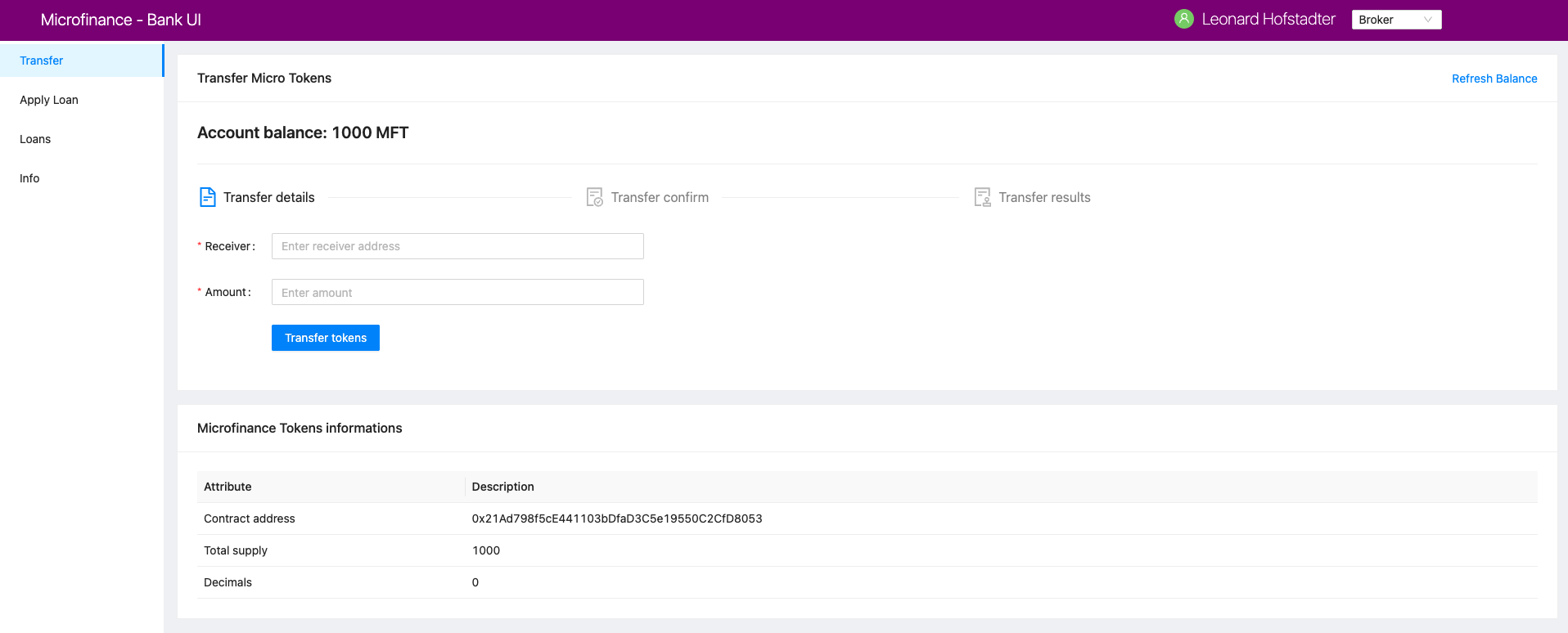
As shown in the screenshot above, the Transfer item in the left menu is common to all users (Bank, Broker, Borrower).
It updates the browser address as localhost:3005/common/transfer.
In Next.js, this means directing to the pages/common/transfer.js file.
transfer.js loads the TransferController from the components/transfer/ directory. It is shown here:
import React from 'react';
import { Row, Col } from 'antd';
import TransferController from '../../components/transfer/TransferController';
import TokenInfo from '../../components/TokenInfo';

function Transfer() {
    return (
        <>
            <Row gutter={[16, 16]}>
                <Col span={24}>
                    <TransferController />
                </Col>
                <Col span={24}>
                    <TokenInfo />
                </Col>
            </Row>
        </>
    );
}

export default Transfer;
TransferController is the controller function for token transactions, as shown here:
import React, { useEffect, useState, useContext } from 'react';
import { Typography, Card, Divider, message, Steps, Col, Row } from 'antd';
import { FileTextOutlined, FileDoneOutlined, AuditOutlined } from '@ant-design/icons';
import TransferForm from './TransferForm';
import TransactionSuccess from './TransactionSuccess';
import TransactionConfirm from './TransactionConfirm';
import TransactionFail from './TransactionFail';
import SmartContractContext from '../../stores/smartContractContext';

const { Title } = Typography;
const { Step } = Steps;
function TransferController() {
    const [balance, setBalance] = useState('0');
    const [symbol, setSymbol] = useState('');
    const [address, setAddress] = useState('');
    const [amount, setAmount] = useState('');
    const [transactionHash, setTransactionHash] = useState('');
    const [isTransactionSuccessful, setIsTransactionSuccessful] = useState(false);
    const { MicroTokenContract } = useContext(SmartContractContext);

    // Stages of token transferring process
    // 0. Fill token transfering formatCountdown
    // 1. Confirm receiver address and amount
    // 2. Transaction result (successful or not)
    const [current, setCurrent] = useState(0); // Current stage of token transferring process

    // Read the user token balance from the Micro Token Contract
    const getBalance = async () => {
            try {
                    const accounts = await window.ethereum.request({ method: 'eth_requestAccounts' }); // Get selected wallet account from the metamask plugin.
                    // Read token balance from the Micro Token Smart Contract for the selected wallet address.
                    const response = await MicroTokenContract.methods.balanceOf(accounts[0]).call();

                    setBalance(response); // Update the balance state
            } catch (err) {
                    console.log(err);
                    message.error('Error occured while reading balance'); // Show error message if any error occured while reading the token balance
            }
    };

    ...

    const transferTokens = () => {
            setCurrent(current + 1); // Increase the token transfering process stage.
    };

        // Transfer tokens from selected wallet account to receiver account
    const confirmTokenTransfer = async () => {
    try {
            const accounts = await window.ethereum.request({ method: 'eth_requestAccounts' });
            const response = await MicroTokenContract.methods.transfer(address, amount).send({from: accounts[0] });

            setTransactionHash(response.transactionHash); // Update the transaction hash state from the response
            setIsTransactionSuccessful(true); // Update transaction result state as successful.
            setCurrent(current + 1); // Update the transfer stage.
            message.success('Token transferred successfully');
    } catch (err) {
            console.log(err);
            message.error('Error occured while transferring tokens');
            setCurrent(current + 1); // Update the transfer statge.
            setIsTransactionSuccessful(false); // Update transaction result state as unsuccessful.
    }
    };

    useEffect(() => {
            getBalance(); // Load the wallet token balance when load the web page.
            getSymbol(); // Load ERC20 token symbol when load the web page.
    }, []);

    useEffect(() => {
            if (amount !== '') {
                    transferTokens(); // If amount state value is not empty transferTokens function will execute.
            }
    }, [amount]); // This useEffect function will execute when amount state value change.

    // Three steps of token transferring process
    const steps = [
    {
            title: 'Transfer details',
            icon: <FileTextOutlined />,
    },
    {
            title: 'Transfer confirm',
            icon: <FileDoneOutlined />,
    },
    {
            title: 'Transfer results',
            icon: <AuditOutlined />,
    },
    ];
    return (
            <Card title="Transfer Micro Tokens" extra={<a href onClick={getBalance}>Refresh Balance</a>}>
                    <Title level={4}>Account balance: {balance} {symbol}</Title>
                    <Divider />
                    <Row><Col lg={24} xl={18} xxl={16} style={{ marginBottom: 25 }}><Steps current={current}>{steps.map(item => (<Step key={item.title} title={item.title} icon={item.icon} /> ))} </Steps></Col></Row>
                    {
                            current === 0 &&
                            <Row><Col lg={24} xl={18} xxl={16}><TransferForm setAddress={setAddress} setAmount={setAmount} /></Col></Row>
                    }
                    {
                            current === 1 &&
                            <Row><Col lg={24} xl={18} xxl={16}><TransactionConfirm address={address} amount={amount} transactionHash={transactionHash} confirmTokenTransfer={confirmTokenTransfer} prev={prev} /></Col></Row>
                    }
                    {
                            current === 2 && isTransactionSuccessful &&
                            <Row><Col lg={24} xl={18} xxl={16}><TransactionSuccess amount={amount} address={address} transactionHash={transactionHash} backToHome={backToHome} /></Col></Row>
                    }
                    {
                            current === 2 && !isTransactionSuccessful &&
                            <Row><Col lg={24} xl={18} xxl={16}><TransactionFail backToHome={backToHome} /></Col></Row>
                    }
            </Card>
    );
}

export default TransferController;
In TransferController.js,
it first imports the necessary dependencies and UI components.
Then it defines the balance state and assigns it the initial value of zero:
const [balance, setBalance] = useState('0');
We access the MicroToken smart contract object within TransferController using React Context defined in the Smart Contract Context section as follows.
const { MicroTokenContract } = useContext(SmartContractContext);
Using this MicroToken smart contract, we may call functions in the smart contract. For illustration, we show how to fetch the account balance from the MicroTokenContract account using its balanceOf method.
The sequence diagram to get token balance of a user is:
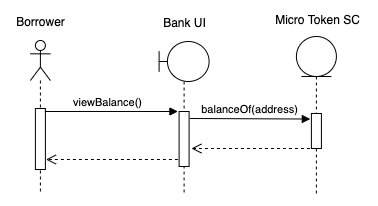
The getBalance function fetches the account balance from the MicroTokenContract smart contract.
const getBalance = async () => {
    try {
           const accounts = await window.ethereum.request({ method: 'eth_requestAccounts' });
           const response = await MicroTokenContract.methods.balanceOf(accounts[0]).call();
           setBalance(response);
     } catch (err) {
           message.error('Error occured while reading balance');
    }
};
This uses the async/await functionality to fetch the account balance from smart contract.
First, the current in-use account in MetaMask is obtained via window.ethereum.enable().
Then it calls the balanceOf function of MicroToken smart contract to obtain the balance of this account.
response is this account’s balance and is passed into setBalance to update the state of the web app.
This is the function we use to fetch data via view functions of smart contracts.
It will return the account balance and we update the balance state in our application.
In React, we use the useEffect hook so that the current component is notified whenever external changes take place, such as when the web page loads.
useEffect(() => {
        getBalance(); // Load the wallet token balance when load the web page.
    ...
    }, []);
The useEffect hook is invoked when the TransferController component is rendered to the browser.
The useEffect hook calls the getBalance method.
Effectively, this means that the account balance is fetched from the smart contraxt whenever a user navigates to the Transfer page.
In the return function of the TransferController, we have the following line:
<Title level={4}>Account balance: {balance}</Title>
It shows the account balance as shown in the above Microfinance screenshot.
Title is a component from Ant design and {balance} is given the balance React state value.
When it changes, React will automatically and visually update the necessary portion in the browser page as well.
This is how we fetch data from smart contracts and render it in a browser using smart contract, the call() method, and React states.