Loan Payment Update Event Flow
Borrower pays back the loan amount and interest at the end of the loan period.
Borrower pays back the loan by Microfinance ERC20 tokens using MicroToken smart contract.
When Borrower pay the loan back, he should update the Bank using Loan Payment Update Form.
Sequence diagram for pay back loans.
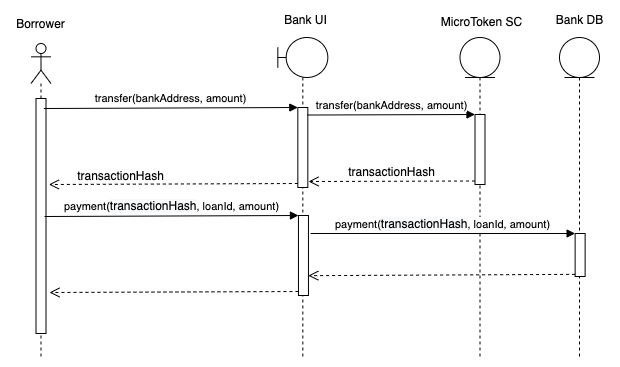
As shown in the above diagram Borrower transfer the pay back token amount to Bank wallet using MicroToken smart contract.
Then Borrower updates the Bank and the loan payment details are saved in the Bank DB.
We illustrate the flow of events from bank web app (UI)
to bank-web-app/pages/borrower/transfer.js
to bank-web-app/components/transfer/TransferController
to bank-web-app/components/payment/LoanPaymentForm.
Borrower’s view of Transfer page.
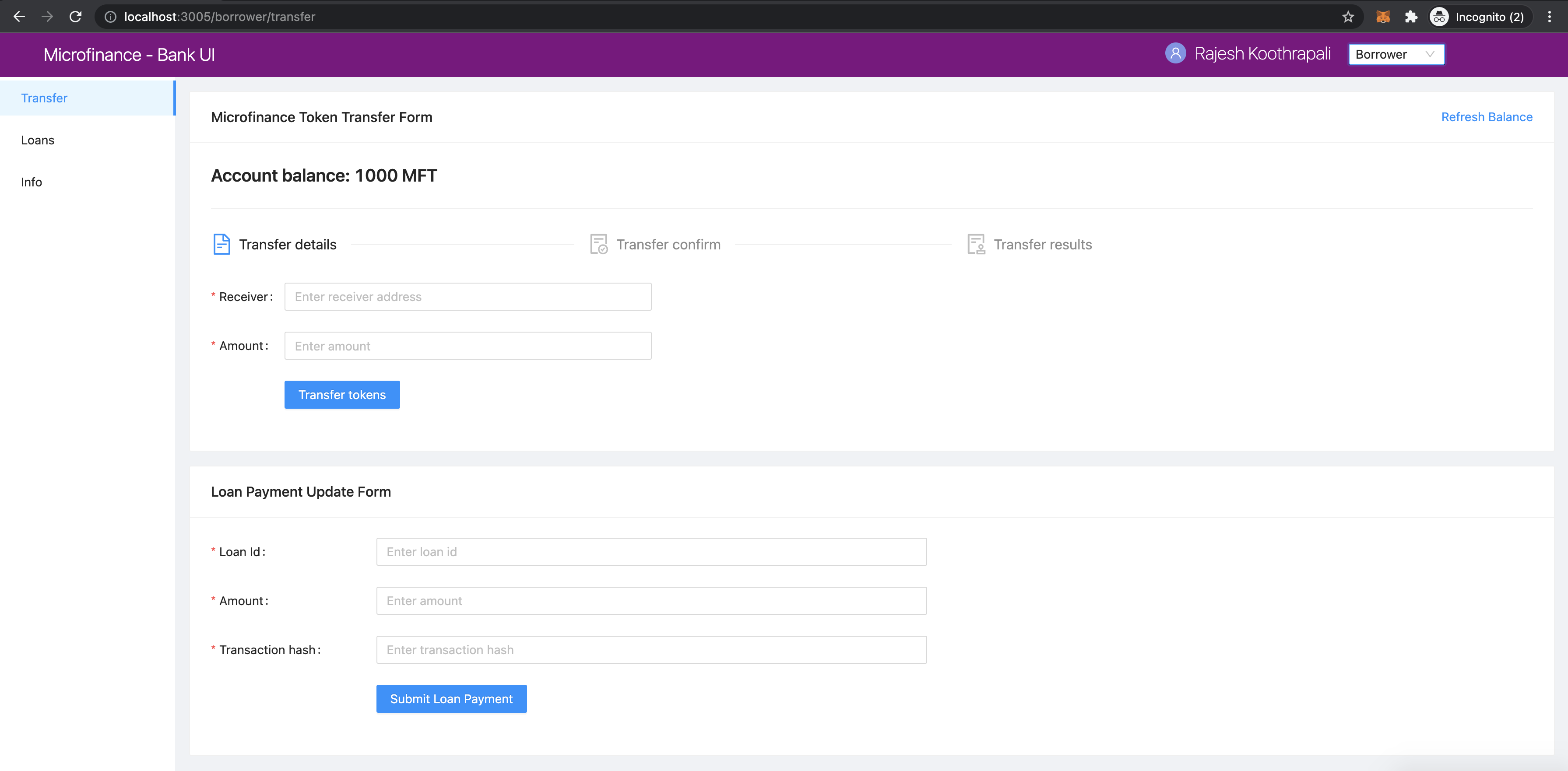
Borrower uses the Microfinance Token Transfer Form to transfer tokens to the Bank and Loan Payment Update Form to update the
Bank about Loan Payments.
The browser address bar contains the localhost:3005/borrower/transfer.
This means UI loads the bank-web-app/pages/borrower/transfer.js component.
import React from 'react';
import { Row, Col } from 'antd';
import TransferController from '../../components/transfer/TransferController';
import LoanPaymentForm from '../../components/payment/LoanPaymentForm';

function Transfer() {
  return (
    <Row gutter={[16, 16]}>
      <Col span={24}>
        <TransferController />
      </Col>
      <Col span={24}>
        <LoanPaymentForm />
      </Col>
    </Row>
  );
}

export default Transfer;
As shown in the above screenshot, Transfer component loads the TransferController at the top and
LoanPaymentForm at the bottom.
First Borrower transfer the pay back token amount to the Bank using TransferController component as
dscribed in Token Transfer Event Flow section.
As described in the Transaction Success Component section, It displays the transactionHash value
in the success message when token transaction success.
Borrower copies the transactionHash and submits it to the Bank using Loan Payment Update Form
Loan Payment Form Component
As shown above Transfer component, it displays the LoanPaymentForm from bank-web-app/components/payment/LoanPaymentForm.js
In LoanPaymentForm.js first it imports the dependencies.
import React from 'react';
import { Card, Form, Input, Button, InputNumber, message } from 'antd';
import { postApi } from '../../util/fetchApi';
postApi method is used to send new Loan Payment Transaction to Bank Web Server.
As shown in the above screenshot LoanPaymentForm displays a form in the UI.
This was defined in the return section of the LoanPaymentForm component.
return (
  <Card title="Loan Payment Update Form">
    <Form
      ....
      onFinish={submitLoanPayment}
    >
      <Form.Item label="Loan Id" name="loanId" rules={[{ required: true, message: 'Please enter loan id!' }]}>
        <InputNumber min="1" style={{ width: '100%' }} placeholder="Enter loan id" />
      </Form.Item>
      <Form.Item label="Amount" name="amount" rules={[{ required: true, message: 'Please enter amount!' }]}>
        <InputNumber min="0" style={{ width: '100%' }} placeholder="Enter amount" />
      </Form.Item>
      <Form.Item label="Transaction hash" name="transactionHash" rules={[{ required: true, message: 'Please enter transaction hash!' }]}>
        <Input style={{ width: '100%' }} placeholder="Enter transaction hash" />
      </Form.Item>
      <Form.Item wrapperCol={{ .... }}
      >
        <Button type="primary" htmlType="submit">Submit Loan Payment</Button>
      </Form.Item>
    </Form>
  </Card>
);
In this Form component it has 3 fields to input Loan Id, Payment Amount and Transaction Hash value.
Borrower inputs the relavent Loan Id and Amount.
Borrower can obtain the Transaction Hash value from the Transaction Success component described in Transaction Success Component
section.
When Borrower clicks the Submit Loan Payment button it triggers the submitLoanPayment function.
const submitLoanPayment = async (values) => {
  try {
    const body = {
      loanId: values.loanId,
      amount: values.amount,
      transactionHash: values.transactionHash,
    };

    await postApi({
      url: 'loan-payments',
      params: body,
    });

    message.success('Loan Payment added successfully');
  } catch (err) {
    message.error('Error while adding the Loan Payment');
    console.log(err);
  }
};
submitLoanPayment defined the HTTP Request body using submitted Form Field values.
It sends the request to loan-payment path in the Bank Web Server api.
When Bank Web Server saves the new Loan Payment entry in the Bank DB, submitLoanPayment displays the
success message. If not it displays the error message.
More about postApi described in the postApi Method of fetchApi.js section.
Complete Loan Payment Form Component
Complete LoanPaymentForm component:
import React from 'react';
import { Card, Form, Input, Button, InputNumber, message } from 'antd';
import { postApi } from '../../util/fetchApi';

function LoanPaymentForm() {
  const submitLoanPayment = async (values) => {
    try {
      const body = {
        loanId: values.loanId,
        amount: values.amount,
        transactionHash: values.transactionHash,
      };

      await postApi({
        url: 'loan-payments',
        params: body,
      });

      message.success('Loan Payment added successfully');
    } catch (err) {
      message.error('Error while adding the Loan Payment');
      console.log(err);
    }
  };

  return (
    <Card title="Loan Payment Update Form">
      <Form
        labelCol={{ lg: 5, xl: 4, xxl: 3 }}
        wrapperCol={{ lg: 16, xl: 14, xxl: 10 }}
        layout="horizontal"
        size="default"
        labelAlign="left"
        onFinish={submitLoanPayment}
      >
        <Form.Item label="Loan Id" name="loanId" rules={[{ required: true, message: 'Please enter loan id!' }]}>
          <InputNumber
            min="1"
            style={{ width: '100%' }}
            placeholder="Enter loan id"
          />
        </Form.Item>
        <Form.Item label="Amount" name="amount" rules={[{ required: true, message: 'Please enter amount!' }]}>
          <InputNumber
            min="0"
            style={{ width: '100%' }}
            placeholder="Enter amount"
          />
        </Form.Item>
        <Form.Item label="Transaction hash" name="transactionHash" rules={[{ required: true, message: 'Please enter transaction hash!' }]}>
          <Input
            style={{ width: '100%' }}
            placeholder="Enter transaction hash"
          />
        </Form.Item>
        <Form.Item wrapperCol={{
          lg: { span: 14, offset: 5 },
          xl: { span: 14, offset: 4 },
          xxl: { span: 14, offset: 3 } }}
        >
          <Button type="primary" htmlType="submit">Submit Loan Payment</Button>
        </Form.Item>
      </Form>
    </Card>

  );
}

export default LoanPaymentForm;